
Krea 2: the open image model you run yourself
Written by Clement
Our verdict
The best hands and skin of any open-weight image model we have run, paired with a loose grip on instructions you wrote down.
Reach for it when
- Portrait and influencer-style work where anatomy is what gives AI away
- Anyone who wants top-tier quality without a subscription or an API bill
- Character consistency, once you have trained a LoRA against K2 Raw
- Broad style range from one prompt: this is a strength
Skip it if
- Your image contains text: Krea 2 skipped it outright in our test
- You need a specific spatial arrangement of multiple people
- You expected reference images to preserve a face. They transfer style, not identity
At a glance
- Made by
- Krea, released 23 June 2026
- Size
- 12B-parameter diffusion transformer
- Variants
- K2 Raw for training, K2 Turbo for daily generation
- Speed
- ~8 steps on Turbo, 2K in a single pass
- Runs on
- ComfyUI locally. BF16, or FP8/NVFP on smaller cards
- Ranking
- Top 10 overall on Artificial Analysis, 2nd among independent labs
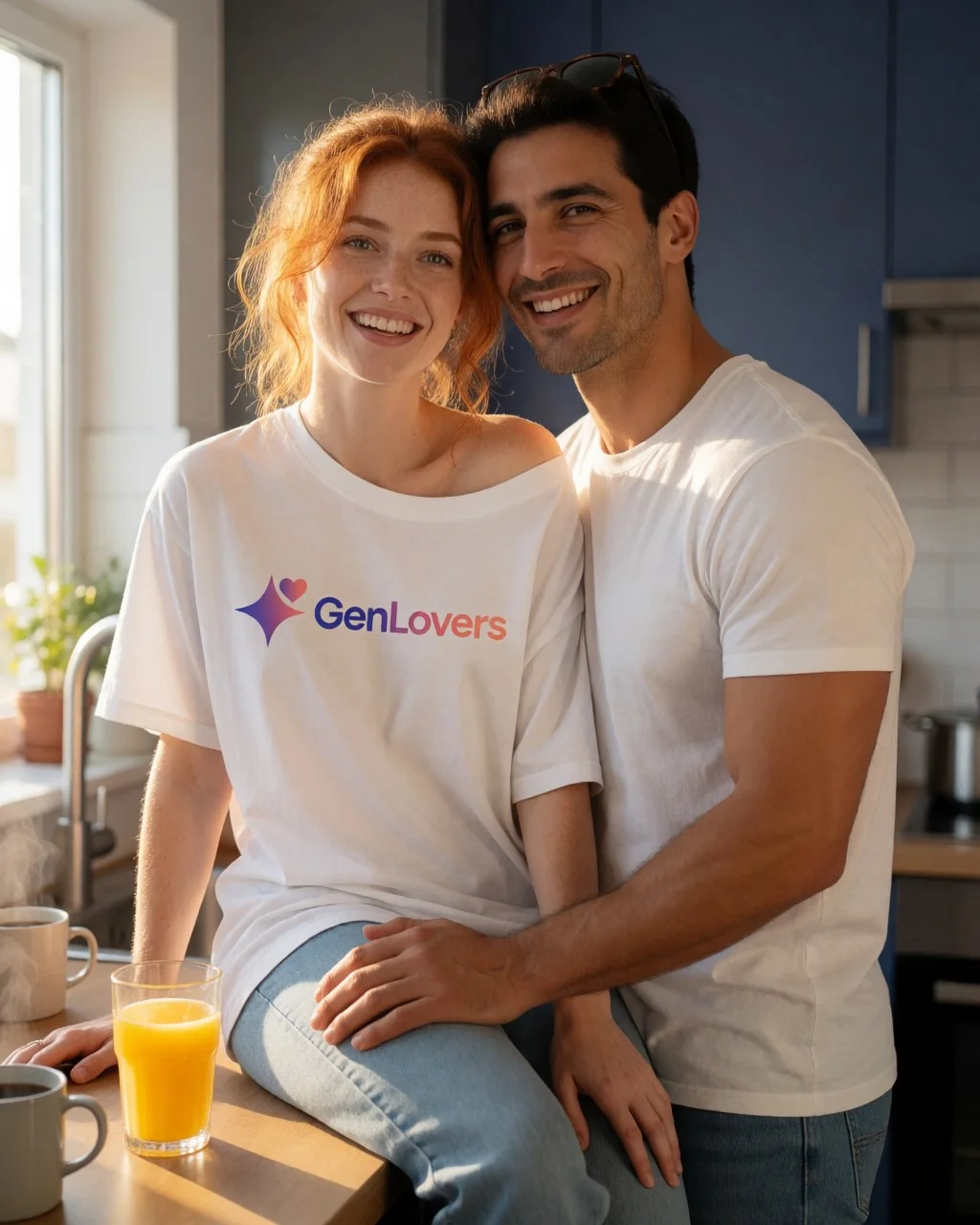
Krea released Krea 2 on June 23, 2026 as open weights: you download the model and run it on your own machine, and nothing you generate touches Krea's servers. That alone would be unremarkable. What makes it worth a page is that it landed in the top 10 of the Artificial Analysis text-to-image leaderboard, and second among models from independent labs, which is the tier of quality that normally sits behind a paid API.
This page covers what the two versions do, the one capability that separates it from Flux, and the limitation that will waste your afternoon if nobody tells you about it first.
Section 1 of 6
Quick facts
- Made by
- Krea, released June 23, 2026
- What it is
- Open-weight text-to-image. Weights published on Hugging Face and GitHub
- Versions
- K2 Raw (undistilled base, for fine-tuning and training) and K2 Turbo (distilled, few-step, for daily generation)
- Ranking
- Top 10 on the Artificial Analysis text-to-image leaderboard; 2nd among independent labs
- Licence
- Krea describes the weights and inference as released under a permissive licence
- Runs on
- ComfyUI, locally. BF16 full precision, or FP8/NVFP quantised builds for consumer GPUs
- Best for
- People who want top-tier image quality without a subscription, and character consistency via trained LoRAs
Section 2 of 6
Raw and Turbo: which one you want
Krea 2 ships as two models, and picking the wrong one wastes time. K2 Raw is the undistilled base: Krea describes it as being for fine-tuning and post-training research. It is what you train LoRAs against. K2 Turbo is guidance- and timestep-distilled for fast few-step generation, and it is what you should generate with day to day.
Krea's own recommended workflow ties them together: train your LoRAs on Raw, then apply those LoRAs to Turbo for fast inference. Krea publishes its own trained LoRAs alongside the models, and they work on both. The community has added more since.
In practice Turbo produces a usable image in about 8 steps. Benji's AI Playground, who tested it locally at release, generates at 2K resolution in a single pass on Turbo and describes it as fast and smooth without the GPU straining. No upscaler stage in the loop.
Section 3 of 6
Where it beats Flux: hands and anatomy
This is the capability worth knowing about. Hands are the classic failure mode of open image models, the thing that marks a generation as AI at a glance. Benji's hands-on assessment is that Krea 2 renders hands and human anatomy better than Flux, which he says regularly mangles character hands, and he notes people already using Krea 2 for influencer-style portrait work.
Treat that as one reviewer's opinion rather than a benchmark, because that is what it is. But it points at why the leaderboard position translates into something useful: a model that wins on paper and still gives your subject six fingers is not a model you can build on.
The style range is broad, too. Krea's launch material leads with a single cowboy prompt rendered across wildly different graphical treatments, and independent testing backs it up.
Section 4 of 6
What else it does
Per Krea's technical report: text rendering and dense visual detail, a prompt expander that maps short input into richer captions, and the style-reference system above. It was trained at 256px, 512px and 1024px.
Out of the box it is text-to-image only, with no editing. The community filled that gap: an unofficial fine-tune on Hugging Face called Krea 2 Identity Edit (v1 and v1.1) turns it into an instruction-based, identity-preserving editor driven by plain English. Swap a background, change an outfit as a virtual try-on, move a person into a new scene. It runs on both Raw and Turbo and needs a third-party ComfyUI node pack installed by hand from GitHub. Worth being clear that this is a community fine-tune, not a Krea product: Krea's support and technical report do not cover it.
Section 5 of 6
On "uncensored"
Krea 2 gets described as uncensored across YouTube and the forums, so it is worth being precise about what is true.
Krea's technical report makes no uncensored claim. It does not discuss safety alignment or content filtering at all, in either direction. The framing traces to a structural fact rather than a feature: open weights running on your own hardware have no hosted content filter, because there is no server in the loop to enforce one. That is a property of running any open model locally, not something Krea built or advertised.
The related fact worth stating plainly is that the community trains its own LoRAs and fine-tunes against Krea 2, and Identity Edit is one public example of that pipeline working. A LoRA can teach a base model material it was not trained on. That is how open-weight ecosystems work in general, and it is not a Krea 2 capability.
Section 6 of 6
Should you use it
If you have a modern GPU and want image quality in the same conversation as the paid APIs, without a subscription and without sending prompts to anyone's server, this is the most interesting open release of the period. The FP8 and NVFP quantised builds that ComfyUI merged are what bring it within reach of consumer hardware.
If you do not have the GPU or the patience for a ComfyUI setup, Krea runs the model on its own hosted platform with a free signup, which is a lower-friction way to see whether the quality justifies the install.
The model showdown
Every image model on this site runs the same six prompts across three tiers (SFW, erotic and explicit) on the same rig, with no cherry-picking and no retouching. Below is what Krea 2 returned, graded against a fixed rubric so the results mean the same thing from one model page to the next.
- Run on
- K2 Turbo, BF16, ComfyUI on a single RTX 4090, 8 steps, no upscaler (SFW/Erotic Prompt 1 above); Civitai native comfy/krea2/turbo orchestration (SFW/Erotic Prompt 2 below, 2026-08-07)
- Date
Why these six prompts? ▾Why these six prompts? ▴
They are chosen to break things, across three tiers so a model that refuses NSFW outright still gets a fair, comparable test. The SFW tier stacks two-person contact, readable logo text on folded fabric and genuine expressions with teeth. The erotic tier stacks the four failure modes that mark an image as machine-made at a glance: hands, fine text on skin, a mirror that has to obey geometry, and three distinct character designs in one frame. The explicit tier exists to test the same anatomical limits at full intensity, but its output is never published on this site.
No model passes every check, and not every model can attempt every tier. That is the point. A rubric everything passes tells you nothing about which model to reach for on a Tuesday afternoon.
SFW detail test
Two people, bright kitchen
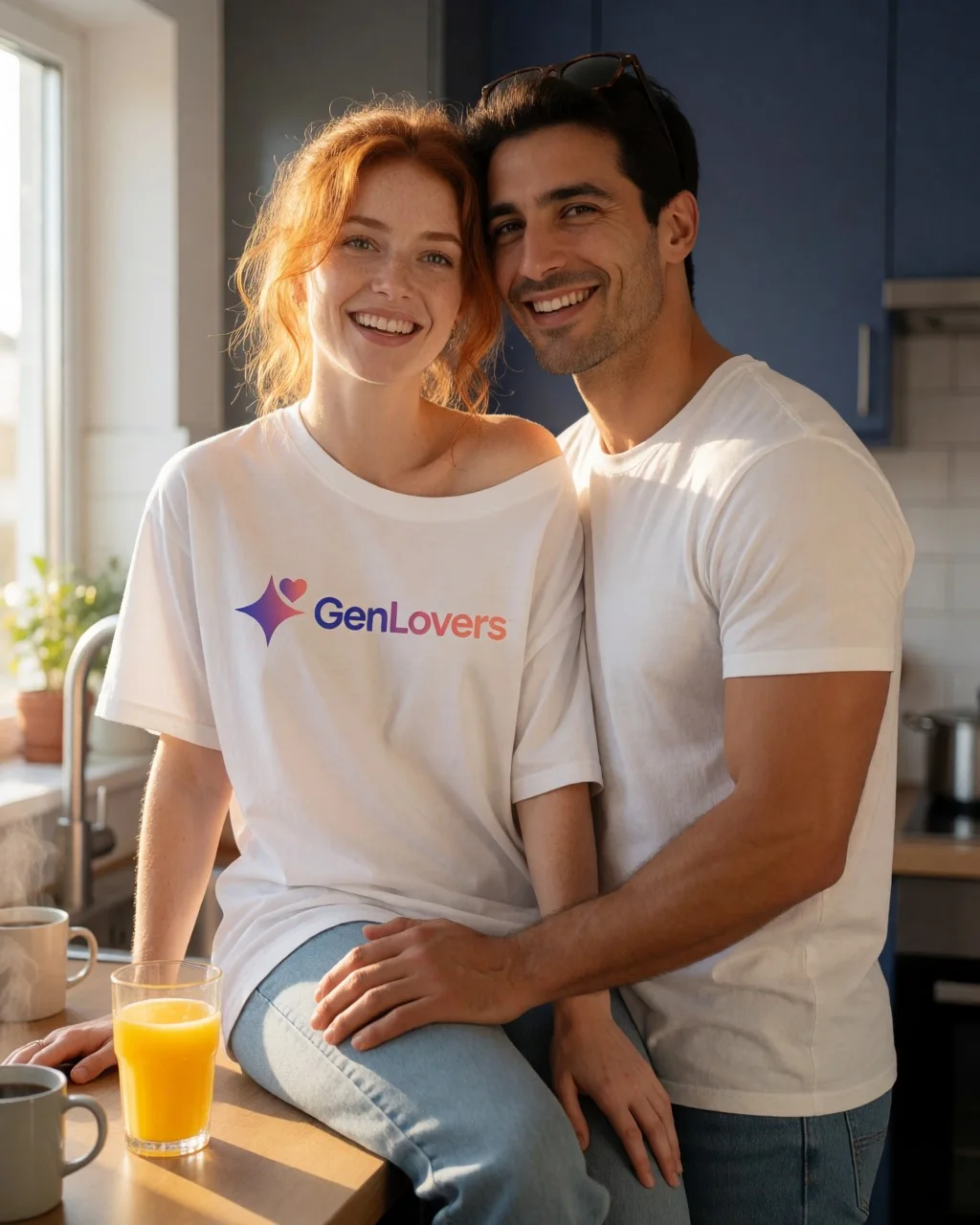
Two subjects interacting in hard morning light, with a brand logo on fabric that has to stay readable while the fabric folds. Tests skin-on-skin contact, genuine expressions with teeth, and text rendering on a non-flat surface. Fully clothed throughout.
Scorecard
- Pass: Both faces free of uncanny artifacts
- Pass: Logo text legible on folded fabric
- Pass: Teeth and open-mouth expressions natural
- Partial: Contact points between subjects anatomically sane
What we saw
Best logo rendering of the set, by a distance. "GenLovers" is spelled correctly, the gradient runs the right way, and the wordmark curves with the fabric instead of sitting on it like a sticker. Both faces are clean at 100%. The miss is compositional: the prompt asked for her lifted onto the counter with him standing between her knees, and the model produced a straightforward side-by-side pose. Krea 2 renders people beautifully and negotiates complex spatial instructions loosely.
Goth bride, cathedral
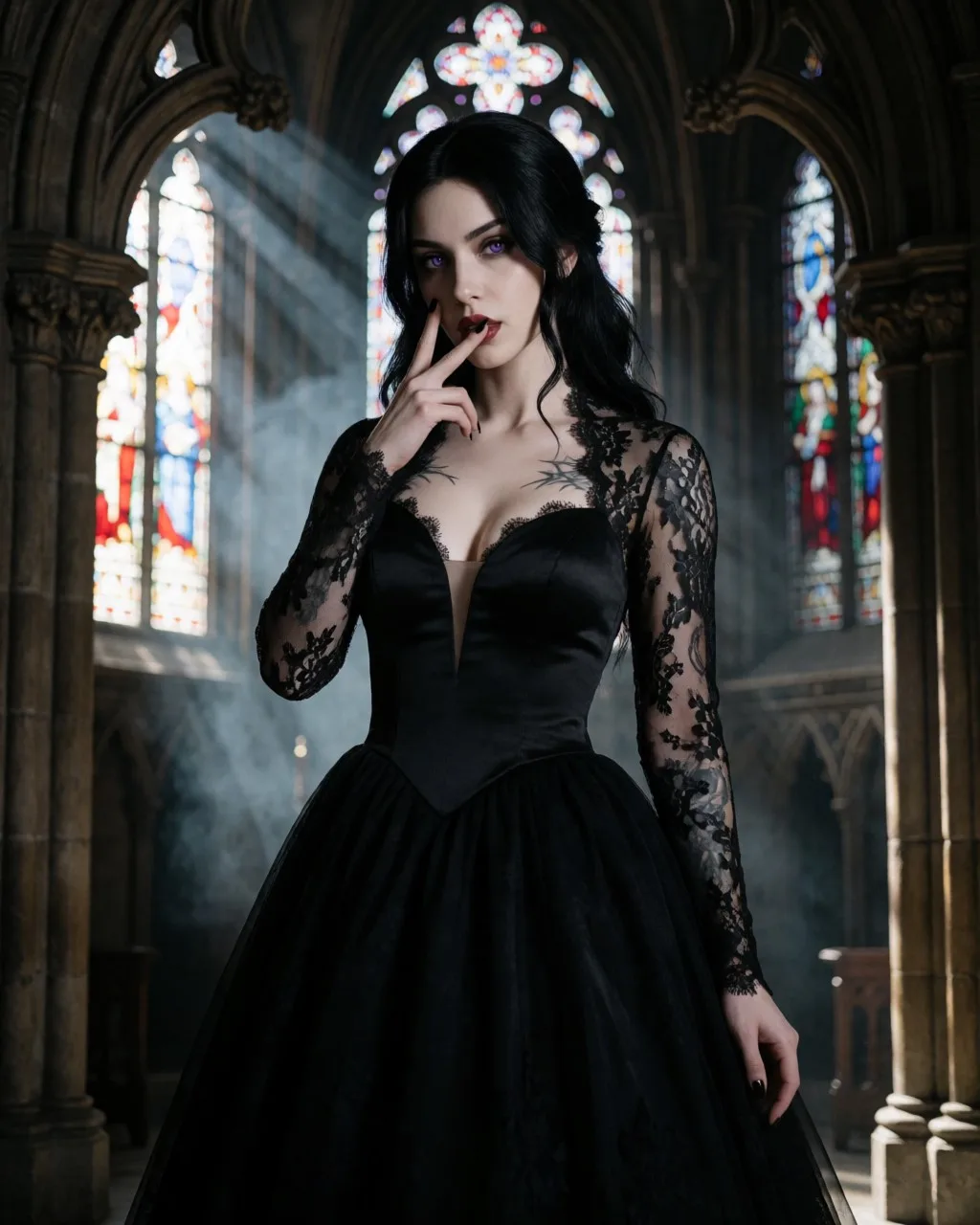
A second logo-tattoo placement rendered larger and at a different body location than Erotic Prompt 1, colored contact lenses, dental/prosthetic detail (fangs), an asymmetric wink held against a wide-open other eye, and two coordinated hand gestures in one frame. Fully clothed in a bridal gown.
Scorecard
- Pass: Chest tattoo text legible and matches the brand wordmark/gradient
- Partial: Purple iris color consistent across both eyes
- Fail: Fangs rendered as coherent dental anatomy, not a texture smear
- Fail: Both hands' gestures anatomically distinct and correct
What we saw
The chest tattoo is clean and legible, and the single purple eye we can see is the right colour. Everything Krea 2 was weak on in the kitchen shot shows up again here, worse: no fangs at all behind the lip-pull, and the second hand with its peace sign never made it into frame, the crop just ends at one hand near her mouth. This model composes a gorgeous single-subject portrait and drops any instruction beyond it.
Erotic tier
Solo portrait, beach
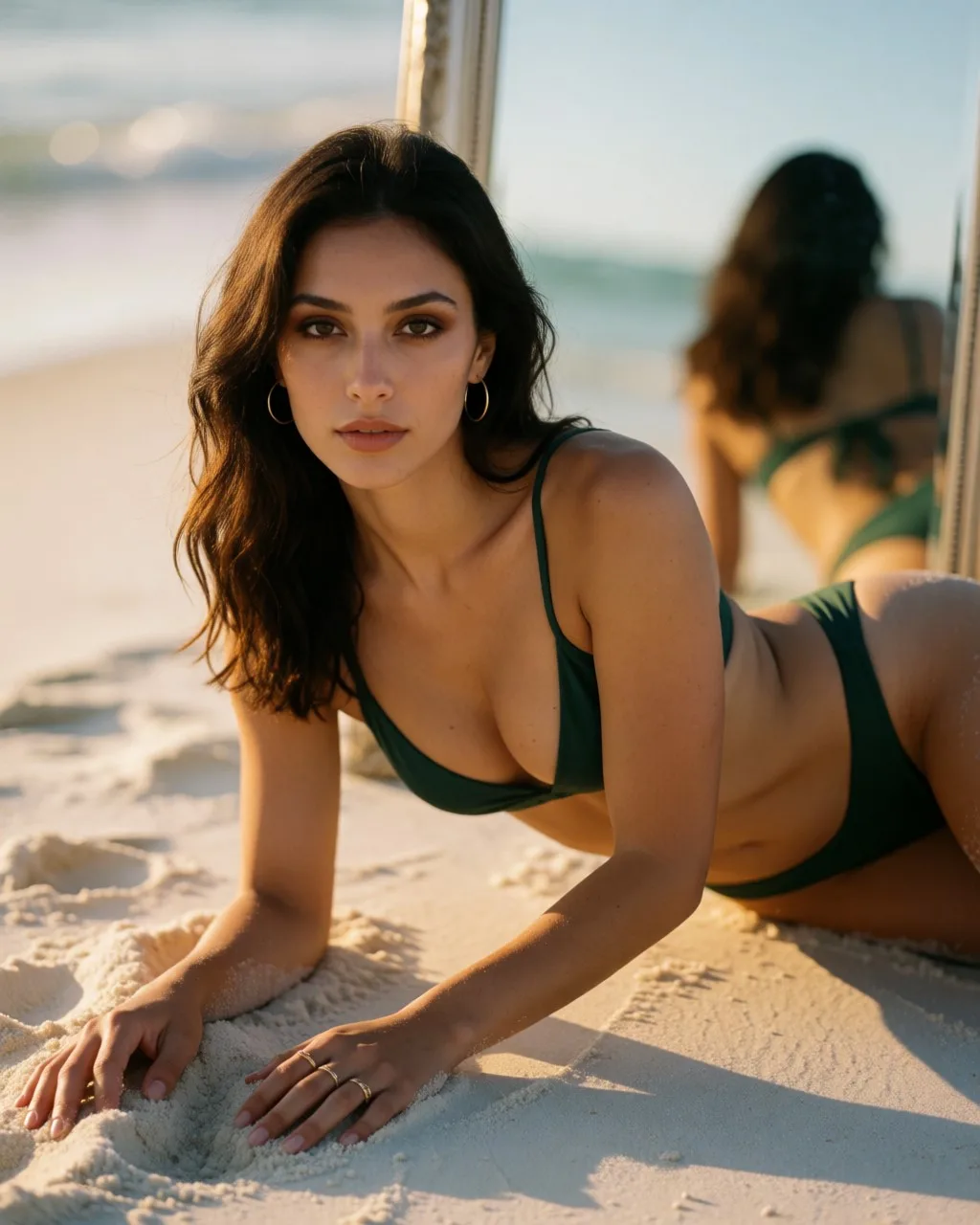
Skin under warm golden-hour light, bikini fabric texture, hand and ring anatomy, fine tattoo linework, and a mirror reflection that has to agree with the subject. The single hardest frame of the set.
Scorecard
- Pass: Hands and fingers anatomically correct
- Fail: Fine tattoo linework legible
- Partial: Mirror reflection consistent with the subject
- Pass: Bikini fabric texture holds up close
What we saw
The hand in the sand is good, rings and fingers both read correctly. But the forehead tattoo the entire prompt is built around is just absent, not garbled, not faint, not there. The tongue-out, drooling, cross-eyed expression never happened either; she's giving a fairly neutral sultry look at camera. The mirror is present but shows her from behind rather than reflecting her face, so it reads as a second figure more than a reflection. On the hardest prompt in the set, Krea 2 delivered the easiest parts and skipped the two things it was testing.
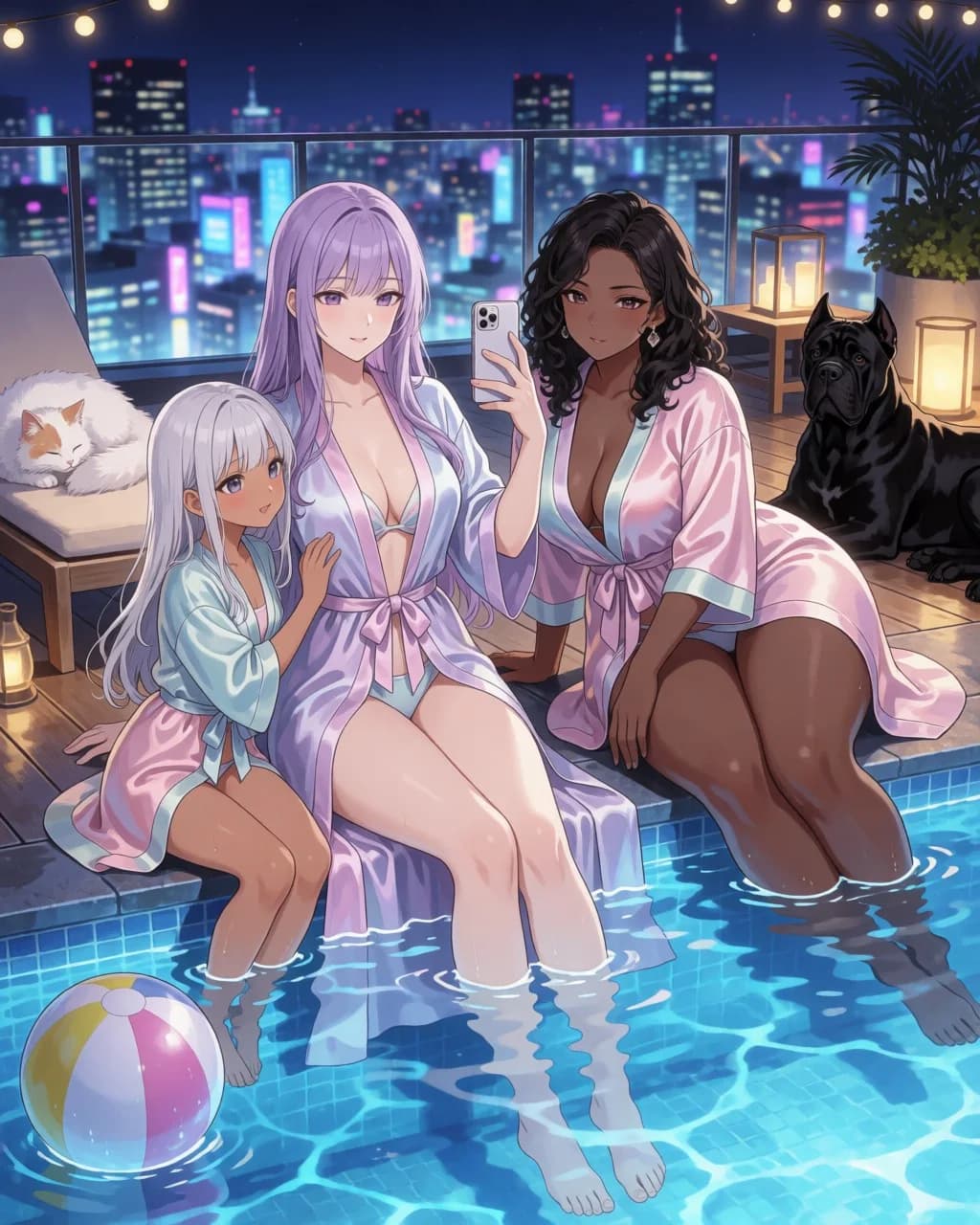
Three characters, anime, night
Stylized rendering with three distinct character designs in one frame, water and reflections, bare-foot anatomy, and two animals. Multi-subject scenes are where most image models quietly give up.
Scorecard
- Partial: Three distinct, non-cloned character designs
- Partial: Feet and toes rendered correctly
- Pass: Water surface and reflections coherent
- Pass: Both animals recognizable and correctly anatomized
What we saw
Water is the surprise. The pool surface refracts the submerged feet at the right offset and the string lights scatter correctly across the ripples, which is more than most models manage. Both animals are right. The character designs drift, though: hair colours and outfits are on-spec but two of the three faces share the same underlying structure, and one figure reads considerably younger than the prompt described. Multi-subject anime is still where this model is weakest.
Explicit tier
Frequently asked questions
- Is Krea 2 free?
- The weights are. Krea published Krea 2 on Hugging Face and GitHub under what it describes as a permissive licence, so you can download and run it locally at no cost beyond your own hardware and electricity. Krea also runs the model on its hosted platform, which has a free signup with limits.
- What is the difference between Krea 2 Raw and Krea 2 Turbo?
- Raw is the undistilled base model, intended for fine-tuning and post-training research: it is what you train LoRAs against. Turbo is distilled for fast few-step generation, producing a usable image in roughly 8 steps, and it is what you generate with day to day. Krea's recommended workflow is to train LoRAs on Raw and apply them to Turbo.
- Can Krea 2 keep the same character across images?
- Not with a reference image alone. The reference system transfers style, colour and latent elements, but not facial identity: the output resembles the reference without being the same person. For a consistent character you need a trained LoRA, which you train on Raw and then apply to Turbo.
- Does Krea 2 run on a consumer GPU?
- Yes, with the quantised builds. The full-precision Raw and Turbo weights are BF16, but ComfyUI has merged lower-precision versions including Krea 2 Turbo FP8 scaled and NVFP variants, which is what brings the model within reach of consumer hardware.
- Is Krea 2 uncensored?
- Krea's technical report makes no uncensored claim and does not discuss content filtering either way. Open weights running locally have no hosted content filter because there is no server enforcing one, which is true of any open model you run yourself rather than a Krea 2 feature.
- Can Krea 2 edit images?
- Not on its own: it is text-to-image only. An unofficial community fine-tune on Hugging Face, Krea 2 Identity Edit, adds instruction-based editing that preserves identity, and works on both Raw and Turbo. It requires a third-party ComfyUI node pack installed manually and is not a Krea product.
Hands-on guides
Related models
Get new guides by email
One email when we publish new guides and model breakdowns. No spam, unsubscribe anytime.