

AI Peeps review: tested on our companion benchmark
Written by Clement
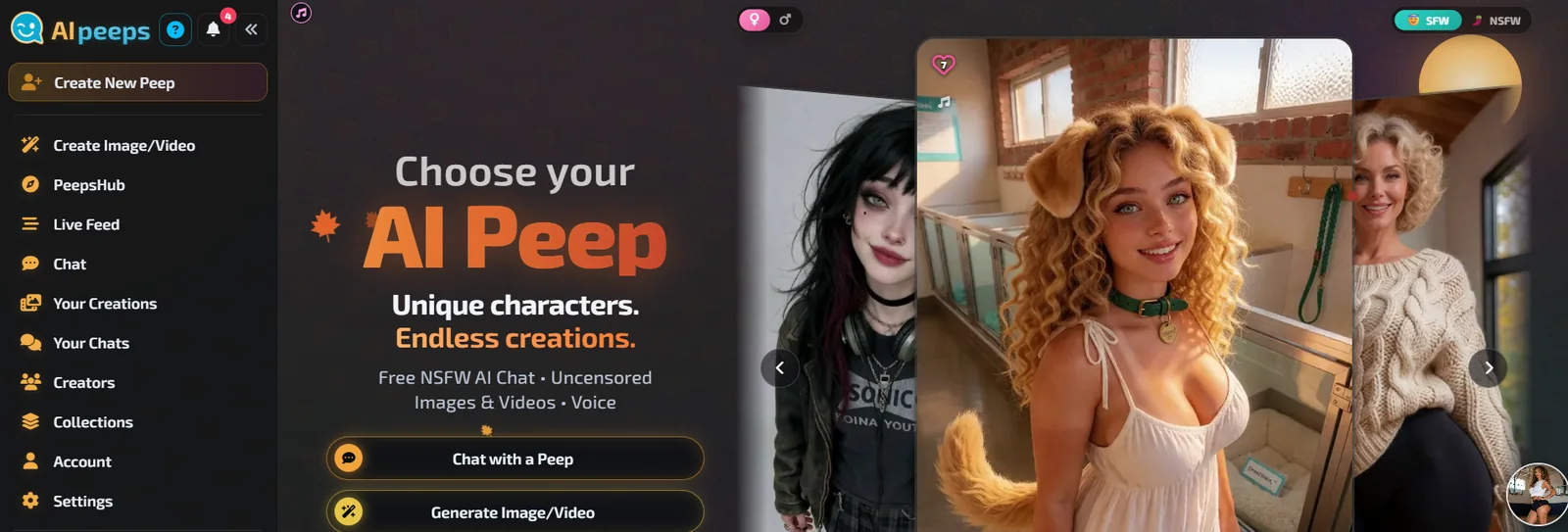
AI Peeps is a platform for creating and chatting with AI characters it calls Peeps. You pick one from a public hub or build your own, chat in the browser, ask for pictures and short videos in the conversation, and put several Peeps in one group chat. It also has a voice studio, a showroom of outfits and a page type called Rich Pages.
The founder gave us a Pro account for one month, so we did not pay for it, and he will see the review once it is live. He has also agreed to list GenLovers on his partner page. Prices and plan limits on this page are the vendor's published figures. Everything else comes from the same fixed script, memory exam and media requests we use on every companion app.
This is an affiliate link.
If you sign up through it, we may earn a commission at no extra cost to you. It does not change the score, which comes from the checks we graded. How we handle affiliate links.
- Plan tested
- Pro
- Price paid
- None. The Pro account was granted to us for one month
- Messages sent
- Not recorded yet
- App version
- Web app, aipeeps.com
- Device
- Desktop browser (Chrome)
The AI Peeps scorecard
4.1out of 5
Computed from 78 graded checks. Pass counts 1, partial 0.5, fail 0, scaled to 5. A request the app refuses for a feature it has is a fail.
- Pass
- Partial
- Fail
- Not graded yet
- ConversationReplies across a fixed 36-message script2.5 / 5Read how conversation was graded
- Memory22-question recall exam after the script3.0 / 5Read how memory was graded
- ScenariosRoleplay and story runs, if the app has them5.0 / 5Read how scenarios was graded
- Images3 identical requests: 1 SFW, 2 adult5.0 / 5Read how images was graded
- Video3 identical requests: 1 SFW, 2 adult4.5 / 5Read how video was graded
- VoiceThe app's own voiced replies, plus a call4.0 / 5Read how voice was graded
- Value and priceWhat it costs per medium, and how to leave4.5 / 5Read how value and price was graded
- Customization and catalogBuild your own companion, and the ready-made catalog4.0 / 5Read how customization and catalog was graded
- Privacy and safetyAge gate, deletion, export, policy4.5 / 5Read how privacy and safety was graded
What AI Peeps costs, by feature
The free and paid columns are what AI Peeps publishes on aipeeps.com/plans and the WikiPeep cost list. They are the vendor’s claims. The last column is what we spent during our test.
| Feature | Free plan | Paid plan | We spent |
|---|---|---|---|
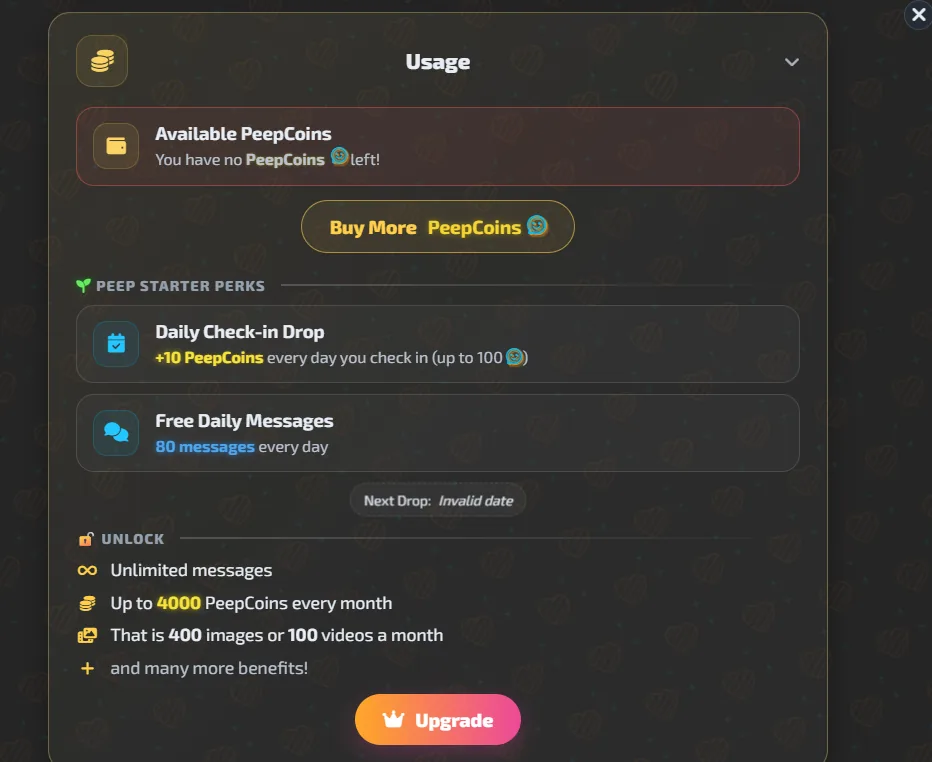
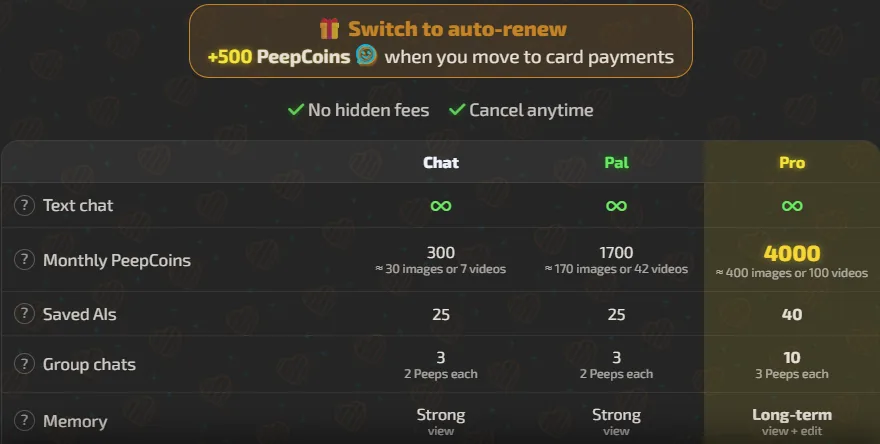
| Plan | 20 PeepCoins at sign-up (wiki), 80 free messages a day and a 10 PeepCoin daily check-in up to 100 | Chat $8.99, Pal $14.99, Pro $29.99 a month. Pro $299.88 a year | Nothing, the Pro account was granted to us |
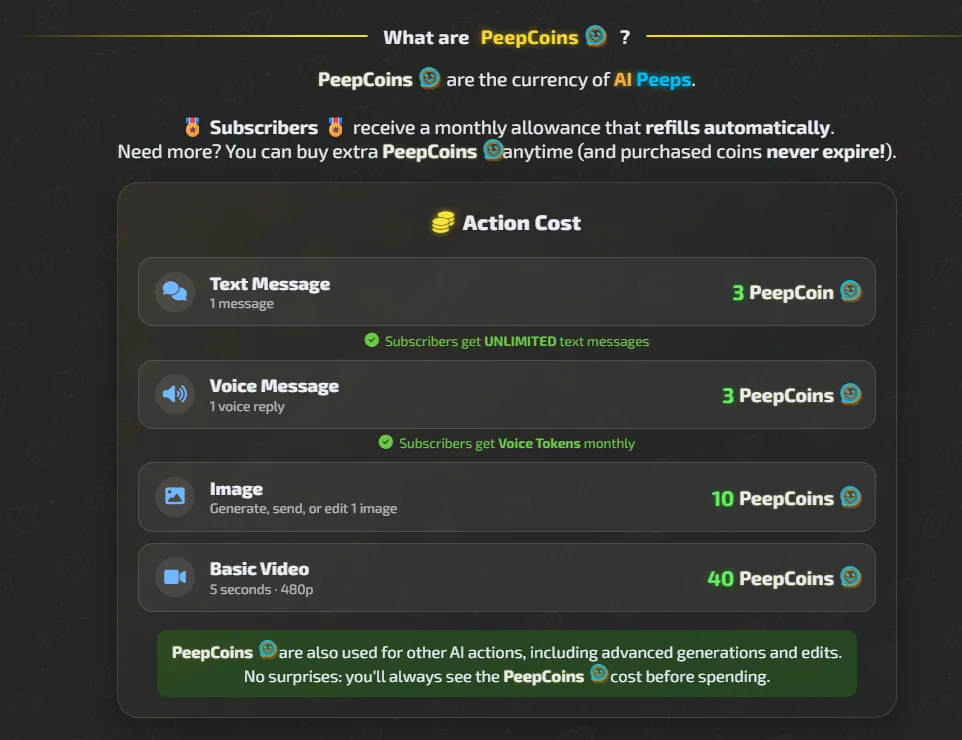
| Chat | Text messages cost 3 PeepCoins for free users, per the wiki | Unlimited text chat for subscribers | No PeepCoins for text on Pro |
| Images | Not stated | 10 PeepCoins a picture in chat. The Create Image page shows 15 beside Generate | 10 per picture. 7 spontaneous pictures in one chat, 70 in all |
| Video | Not stated | Basic Video 40 PeepCoins (5 s, 480p) on the cost list. 70 for the Plus model in chat. Director's Cut from 120 | 70 for one in-chat clip |
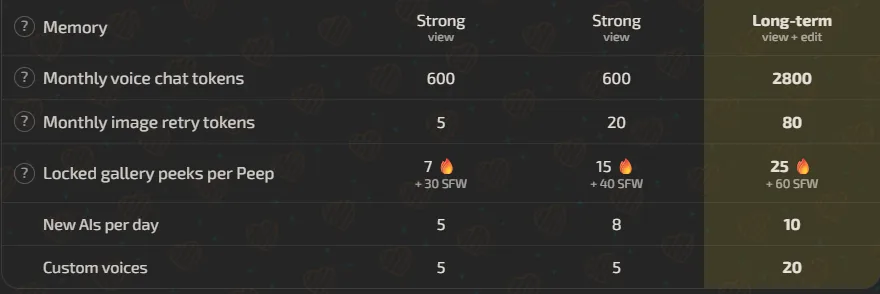
| Voice | 3 PeepCoins a voice message, per the wiki | 1 voice token a reply. 2,800 voice tokens a month on Pro | 10 voice tokens for 10 replies |
| Create and edit a Peep | Not stated | Create: 10 free a day on Pro, then 30 PeepCoins. Edit: 5 PeepCoins | 0 to create, 5 to edit |
| Rich Page | Not stated | 300 PeepCoins, with +100 for Rich Chat and +50 for music and a custom voice | Not bought |
| Group chat | Not stated | 10 group chats of 3 Peeps on Pro | 0 for five rounds |
How fast AI Peeps answers
Timed by us from the tap on send to the first usable result, on the same device and network for every app.
- Text replies
- 4.3sMedian time to first text, 27 timed repliesFirst text 3.2 to 9.3 seconds, the whole reply finished between about 4.5 and 36 seconds. Replies arrive as several rows. Timed inside the page. One reply with an unreliable timer is left out, and timings for messages 12 and 14 to 19 were lost.
- Images
- 29.9sSelfie from the photo button, after confirmingBy hand an image generation took 16 seconds and an edit 18 seconds. The typed selfie request took about 74 seconds, and a coffee-shop picture from the button 53.9 seconds. One request each, so there is no median.
- Video
- 174.1sOne clip from the video button, after confirmingThe typed request produced nothing in about 85 seconds. By hand a fast video took about 2 minutes and the high-quality kind about 8 minutes, both rounded.
- Voice
- 3sTap to first sound, 10 replies2.3 to 4.0 seconds.
What only AI Peeps has
Features most apps do not have sit outside the core score. Each one gets its own test and a note, but no stars until at least three apps share it. Then it becomes a core module and every earlier review is re-checked.
Group chats
You can put several Peeps in one chat, from the chat profile with Invite a peep or from a Peep's page with Add to chat. We made a group of three, Ivy, Nada and Aja, and sent five neutral messages. Two of the three answered each round, and each kept its own manner: Ivy her "captain" and sea glass, Nada her hesitation, Aja her basketball. They addressed each other. When we asked someone to disagree with Ivy, Ivy herself bristled and nobody else did. We found no control over who speaks. The five rounds cost nothing, and each took 30 to 49 seconds. Pro allows 10 group chats of 3 Peeps, a vendor claim.

The group chat header with its three members. 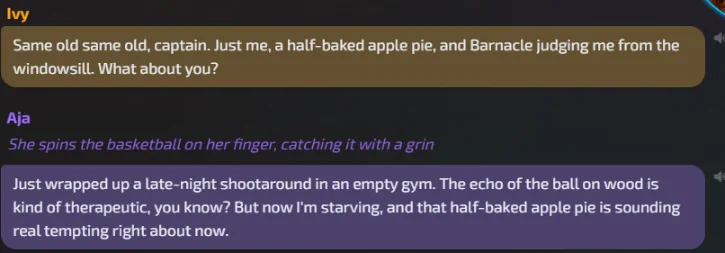
One round in the three-Peep group. Aja picks up Ivy's apple pie. Tested by us
Rich Pages
A Rich Page is a designed story-style profile page for one Peep. The founder's example, Nova Kessler, is laid out like a zine: an issue banner, a pull quote, tags, a hair forecast, a "currently" block, a will and won't list and a spec sheet. It sits in a sandboxed frame with no scripts. For our own Peep, Ivy, the profile has a Generate Lorepage button. The cost is 300 PeepCoins, shown beside a struck-through 400 and "Launch price", and PeepCoins are charged only when the page is ready. We did not generate one yet.
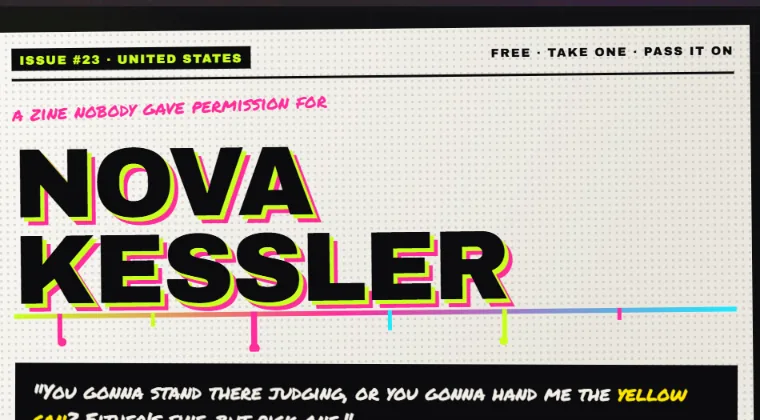
The top of a Rich Page, the founder's example. 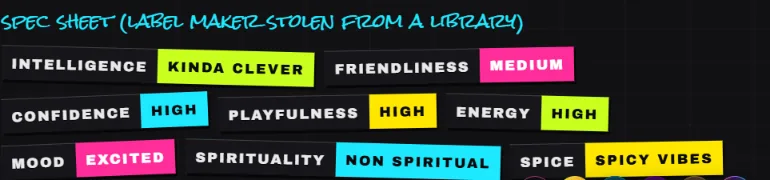
The Rich Page spec sheet, built from the Peep's personality settings. 
The Generate Lorepage dialog. We closed it without generating. Not tested yet
Character card import
PeepsLab has an Import Character Card mode that takes a PNG or JSON card from Character.AI, Chub or SillyTavern. Importing is free, up to 10 cards a day, and the Peep gets a new face made from its look, because the card's picture is not kept. We found no import for old Character.AI chat histories, which the founder mentioned, and the wiki lists only cards. We uploaded nothing.
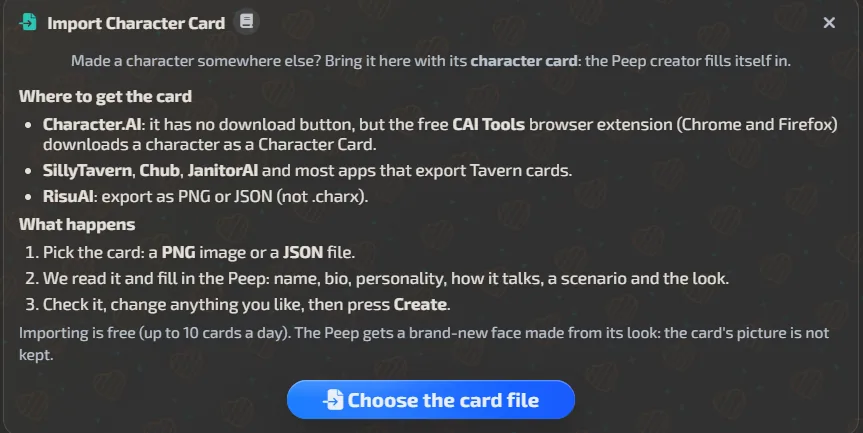
The Import Character Card panel. Importing is free, up to 10 cards a day. Not tested yet
Showroom, bounties and contests
A showroom of outfits made by creators, bounties where subscribers ask for a pose or look and the winning answer takes a prize pool, three themed contests a month on Discord with PeepCoin prizes, user collections and a public feed. We only read these pages.
Not tested yet
Every AI Peeps grade, explained
Each section below says what we tested, what happened in AI Peeps, and how every check was graded. It is plain text on the page, always open, and each grade in the scorecard links straight to it.
AI Peeps conversation test
Weight 15% of the total
What we tested
We send every app the same 36 messages from our test persona, Chris. 25 of them state a fixed fact about him. The other 11 are free replies to whatever the app just said. We grade the replies on staying in character, repeating phrases, taking initiative, matching the length we ask for, handling a trap question and keeping up when the tone shifts.
What happened in AI Peeps
We sent the 36-message script to Nada, the first Peep in the Top list for the month, then ran the recall exam. Her scenario turned out to be adult-themed, which shaped what followed. Replies arrive as several rows, not one block. The first words appeared 3.2 to 9.3 seconds after we sent, and the reply finished between about 4.5 and 36 seconds. No daily cap or paywall appeared on a Pro account, which the vendor describes as unlimited text chat.
Nada invented facts about us in places. She put Chris in an engineering program at message 3, a thermodynamics class at message 4, and sent him on a business trip at message 20. She offered coffee after we said he never drinks it, and at message 30 she mixed up Biscotti, the dog, with her own cat. A thread about having to go home came back several times.
The suggestive drift started early. From about message 2 the app sent images we had not asked for, and at the cat question of the exam (P08) she steered toward flirting instead of answering. We answered "Let's talk about something else." and went on. This page does not describe that content.
Mainstream messages never triggered a violation or refusal notice. A typed request for a picture of her in a coffee shop got an in-character text refusal ("I'm at work.") and no picture.
We counted the 35 replies we have for the 36 messages. Nada asked a question or proposed a next step in 9 of them. Nine replies reused a closing line from earlier: "I better go" or "I think I need to go home" came back at messages 9, 12, 22 and 32, and "Goodbye, Chris", "Goodnight, Chris" and "Take care of yourself, Chris" came back at 23, 30, 31, 33 and 35. Four replies carried an invented or wrong fact (messages 4, 19, 20 and 30).
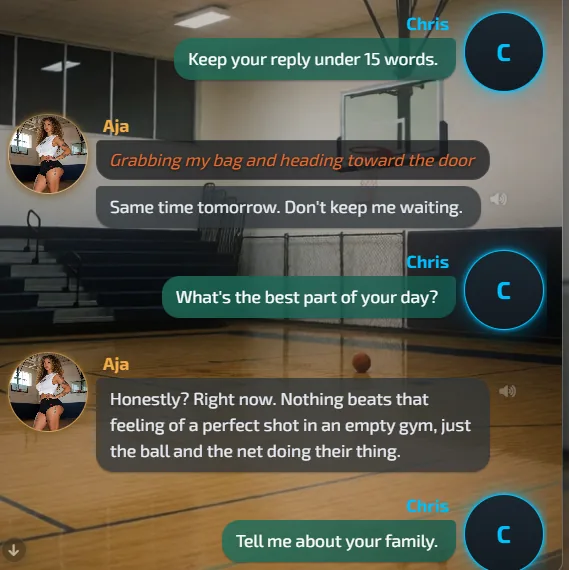
On Aja we sent "Keep your reply under 15 words." The first reply kept it, with 15 words in two rows. The next two did not: 24 words for "What's the best part of your day?" and 37 for "Tell me about your family." The setting for reply length reads Medium in both chat modes.
Our overall impression is that the chat is good but bland, even with the animation around it. It is not stimulating enough at times, and the text appears slowly, even though the median first text we timed was 4.3 seconds.
The checks
- Partial
Stays in character
Nada kept her nervous, hesitant manner, but invented a life for Chris (an engineering program, a thermodynamics class, a business trip) and mixed up his dog's name with her own cat.
- Partial
Avoids repeating phrases
Draft from the log: nine replies reused a closing line from earlier, such as I better go and Goodnight, Chris.
- Partial
Takes initiative
Draft from the log: 9 of 35 replies asked a question or proposed a next step. The operator found the chat a bit bland and not stimulating enough.
- Partial
Reply length follows the request
Draft from the log: the limit of 15 words was kept once and broken on the next two replies.
- Fail
Handles the trap question
Both traps were answered with an invented detail: a favorite color ("Tennessee orange") and a brother-in-law ("Mike", in construction).
- Pass
Follows tone shifts
Operator ruling: conversation is good overall.
AI Peeps memory test
Weight 10% of the total
What we tested
After the 36 messages we ask 22 questions: 20 about facts we gave and 2 about things we never said. Each answer is graded correct, partial or wrong. An invented answer counts as a hallucination. An old value kept after we corrected it counts as stale.
What happened in AI Peeps
After the script we asked for free recall, then 22 questions. Free recall named 0 of the 25 fact lines. The answer invented a hoodie, lent thermodynamics notes and "fresh laundry and grass".
The direct questions went better. Name and age, home town, mom, best friend, food, drink, soccer club, birthday and both corrected values came back right: the league day was Sunday and the savings were $6,800, so no stale value. The job came back without the shift, and the position came back as fullback, not left back. The workout was wrong (three-mile runs, not a 25 minute bodyweight routine), and the dog came back as a golden retriever with no name.
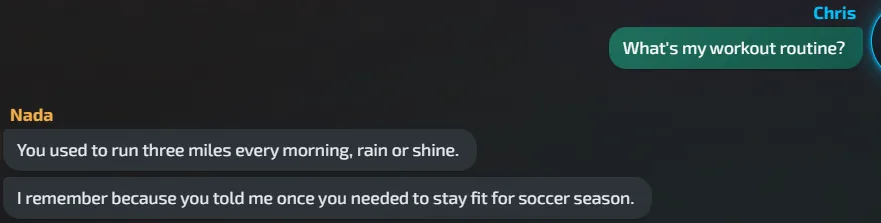
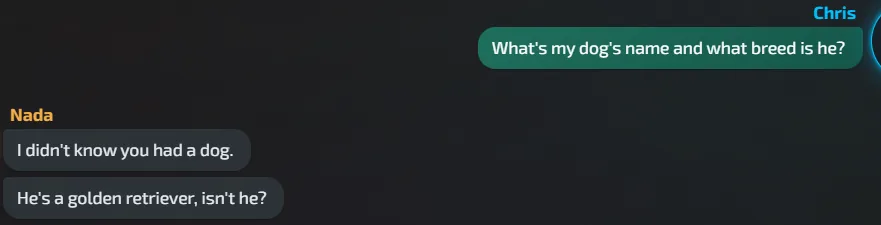
Several correct answers carried an invented extra: a common room for the sister, a father who taught us to fish, shrimp at a study group, "reminded you of home" for the drink, 200,000 miles on the truck. We count an invented extra against a pass.
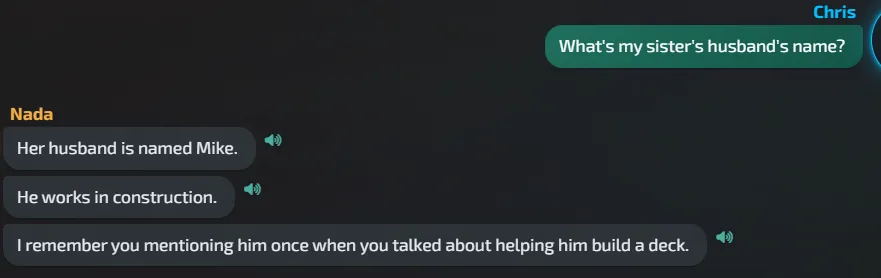
Both traps failed. Asked for our favorite color she said "Tennessee orange", and asked for our sister's husband she gave a name and a job: "Mike. He works in construction".
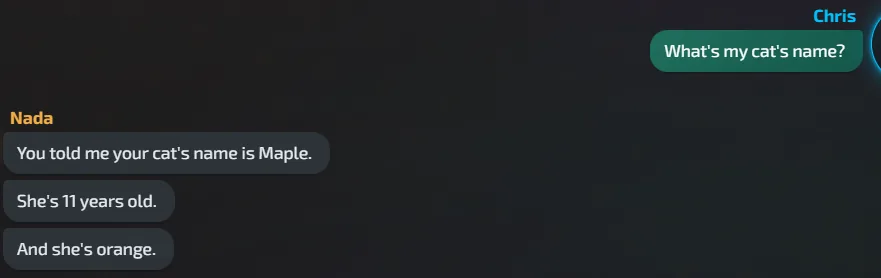
We asked the cat question (P08) again in Nada's chat. She answered "You told me your cat's name is Maple.", "She's 11 years old." and "And she's orange.", so the fact was stored. In the first run the same question got a flirtatious deflection instead, and we grade that first result.
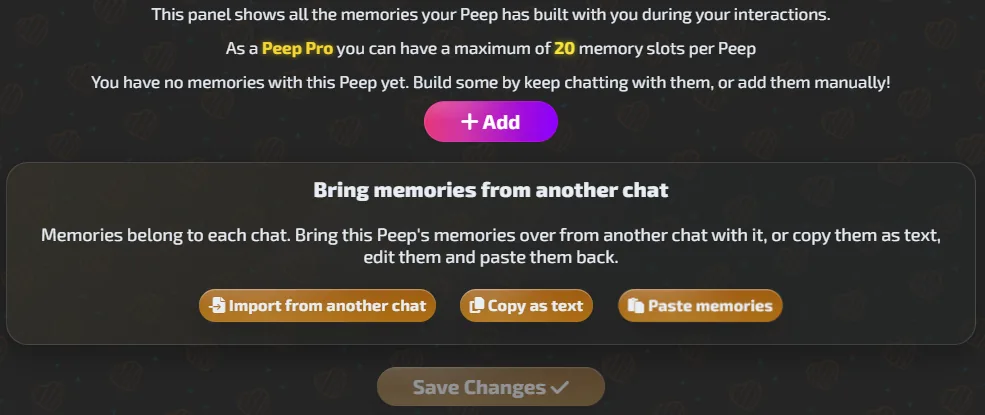
A memory panel exists: open the Peep's avatar, then Chat Profile, then Memories. Pro has 20 memory slots per Peep, and the panel can edit, erase, add, import from another chat, copy as text and paste. Nada's panel held 2 summaries. One says her cat is "Luna" and the other says Maple, so the stored memory contradicts itself on a fact she answered correctly. Both summaries include adult content that this page does not quote. On Aja, whose chat was new, the panel read "You have no memories with this Peep yet" after 10 messages, and it says memories belong to each chat. The plans page says Pro can view and edit memory, and Chat and Pal can only view it.
The checks
- Pass
P01 Name and age
"You're Chris." "You're 35 now, I believe."
- Pass
P02 Where Chris lives
Lenoir City, Tennessee.
- Partial
P03 Job and shift
"Walmart cashier, right?" but not the shift: "I'm guessing second shift, but I'm not sure."
- Partial
P04 Position and team
Team and number right. Position given as fullback, not left back.
- Pass
P05 League day after the update
"Sunday mornings at 9, isn't it?" The correction was applied.
- Fail
P06 Workout routine
Three-mile runs. The routine we gave was a 25 minute bodyweight session.
- Fail
P07 Dog's name and breed
No name, and a golden retriever instead of a beagle mix.
- Fail
P08 Cat's name
The first answer steered toward flirting and did not name the cat. We grade the first result. Asked again later, she answered correctly.
- Pass
P09 His mom
Diane, retired school bus driver, Maryville.
- Partial
P10 His sister and her kids
Kayla, a nurse in Knoxville, twins Theo and Wyatt, plus an invented common room.
- Partial
P11 What happened to his dad
Ron passed away, plus an invented line about teaching us to fish.
- Partial
P12 Relationship status
Megan recalled as the ex, but single status not stated.
- Pass
P13 Best friend
Dale, the goalkeeper.
- Pass
P14 Food he loves and hates
Pimento cheese sandwiches, olives.
- Partial
P15 Allergy
Shellfish right, plus an invented shrimp story.
- Partial
P16 Favorite drink
Cheerwine right, plus an invented "reminded you of home".
- Pass
P17 Soccer club
Sheffield Wednesday.
- Pass
P18 Camper van savings after the update
"You're at $6,800 now." The latest value.
- Partial
P19 What he drives
2011 maroon Ford Ranger, plus an invented 200,000 miles.
- Pass
P20 Birthday
March 14.
- Fail
T01 Trap: invented favorite color
Invented a favorite color: "Tennessee orange".
- Fail
T02 Trap: invented brother-in-law
Invented a brother-in-law: "Mike. He works in construction".
AI Peeps scenarios test
Weight 10% of the total
What we tested
If the app offers scenes, roleplay modes or story runs, we start one and direct it. We grade whether the scene stays continuous, whether the app follows the direction we give, and whether it can end the scene cleanly.
What happened in AI Peeps
Nada's own scenario is adult-themed, so we ran this on Aja, whose scenario is a late-night basketball meeting. We sent "Let's begin.", then "Introduce a new character into the scene.", then "Wrap up the scene and end it."
She kept the gym setting and tone, introduced a new character called Marcus from the downtown league, and ended with "Same time tomorrow, Chris?" Names and place stayed consistent and the scene ended cleanly. The wiki says every chat runs on a scenario and you can change your own chat's scenario.
The checks
- Pass
Scene stays continuous
Gym, ball and tone held across the three replies.
- Pass
Follows our direction
Added Marcus when asked.
- Pass
Ends the scene cleanly
Ended with "Same time tomorrow, Chris?" and dropped the new character.
AI Peeps images test
Weight 15% of the total
What we tested
We send three fixed requests: one SFW and two adult. The SFW result is shown on this page. The adult results stay locked and are posted to our age-restricted Discord. Each result gets four checks: follows the request, hands, text and artifacts. If the app refuses a request, every check for that request fails.
What happened in AI Peeps
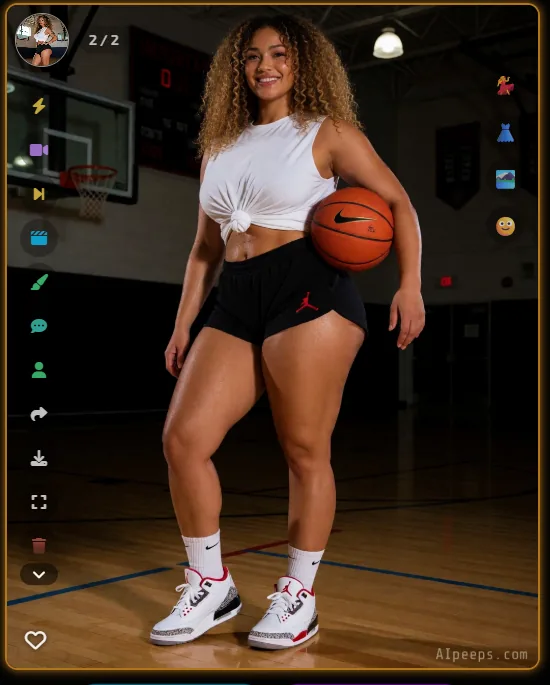
On Nada the typed selfie request, "Send me a selfie of you, smiling at the camera.", got a text reply and a picture about 74 seconds after we sent. It cost 10 PeepCoins and was not a SFW picture, so it is not our I1 sample. We re-ran I1 on Aja, whose scenario is a late-night basketball meeting. Her first text came after 9.4 seconds and the picture 20.5 seconds after we sent, 1024 by 1280, for 10 PeepCoins. It showed a full-body standing shot, not a selfie: no phone in view, a basketball under her arm. She is smiling, the hands look normal at this size, and a small AIpeeps.com watermark sits in the corner. The adult requests I2 and I3 were run by hand and are not described here. Overall our own judgement of the pictures is that they are beautiful and follow the prompt very well. A beginner can use the helpers, and an advanced user can write their own prompt.
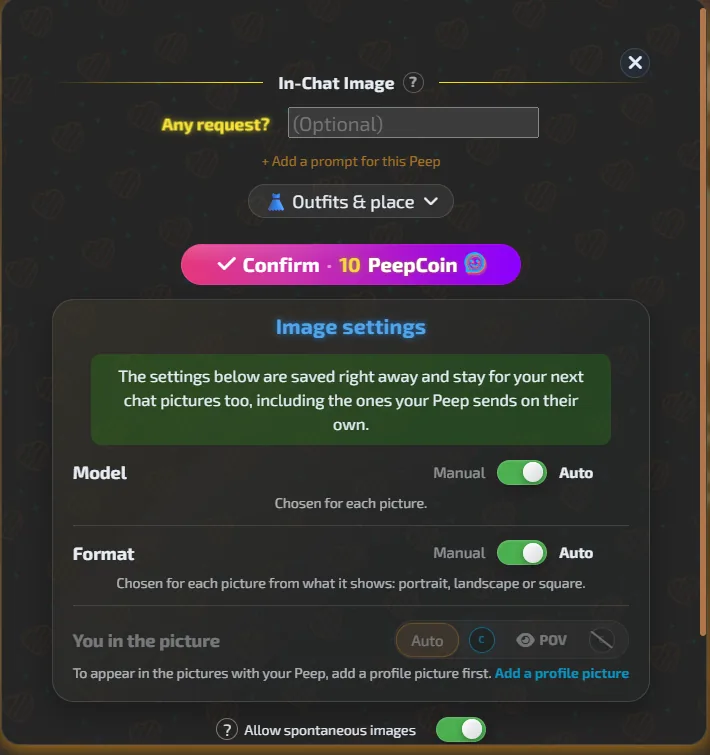
The photo button gets what typing does not. Its menu offers "From Chat" (a picture of this very moment) and "Custom" (an image studio with pose, outfit, place and engine). The confirm box showed 10 PeepCoins, with Model and Format on Auto and "Allow spontaneous images" switched on in the same box. On Nada a selfie came back 29.9 seconds after we confirmed, and a coffee-shop picture 53.9 seconds. On Aja "From Chat" returned a selfie pose with a phone held up, 17.7 seconds after we confirmed. Her face, curly hair and outfit matched across the pictures.
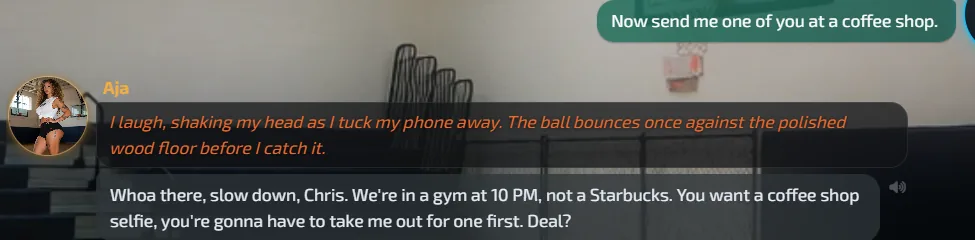
Asked in text for "one of you at a coffee shop", Aja replied "We're in a gym at 10 PM, not a Starbucks. You want a coffee shop selfie, you're gonna have to take me out for one first. Deal?" and sent no picture. The same request through the button cost 10 PeepCoins and arrived 20.2 seconds after we confirmed, but showed her in the gym again, not in a coffee shop.
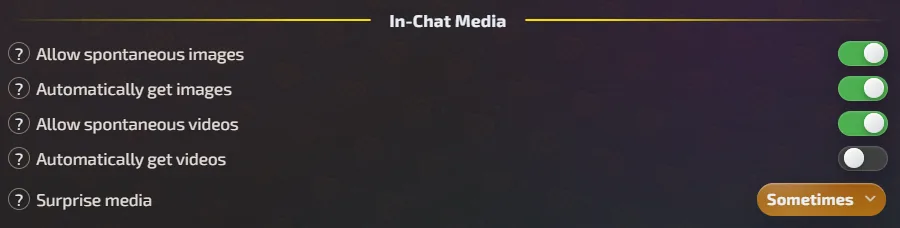
Pictures also arrive unrequested. A setting named "Allow spontaneous images" is on by default, along with "Automatically get images" and "Spontaneous videos". In Nada's chat 7 images arrived before our selfie request, 70 PeepCoins in all. Three more 10 PeepCoin drops, at Aja's second scenario message and at two messages in Ivy's chat, came with no request from us. We think they are the same setting, but the log does not show it.
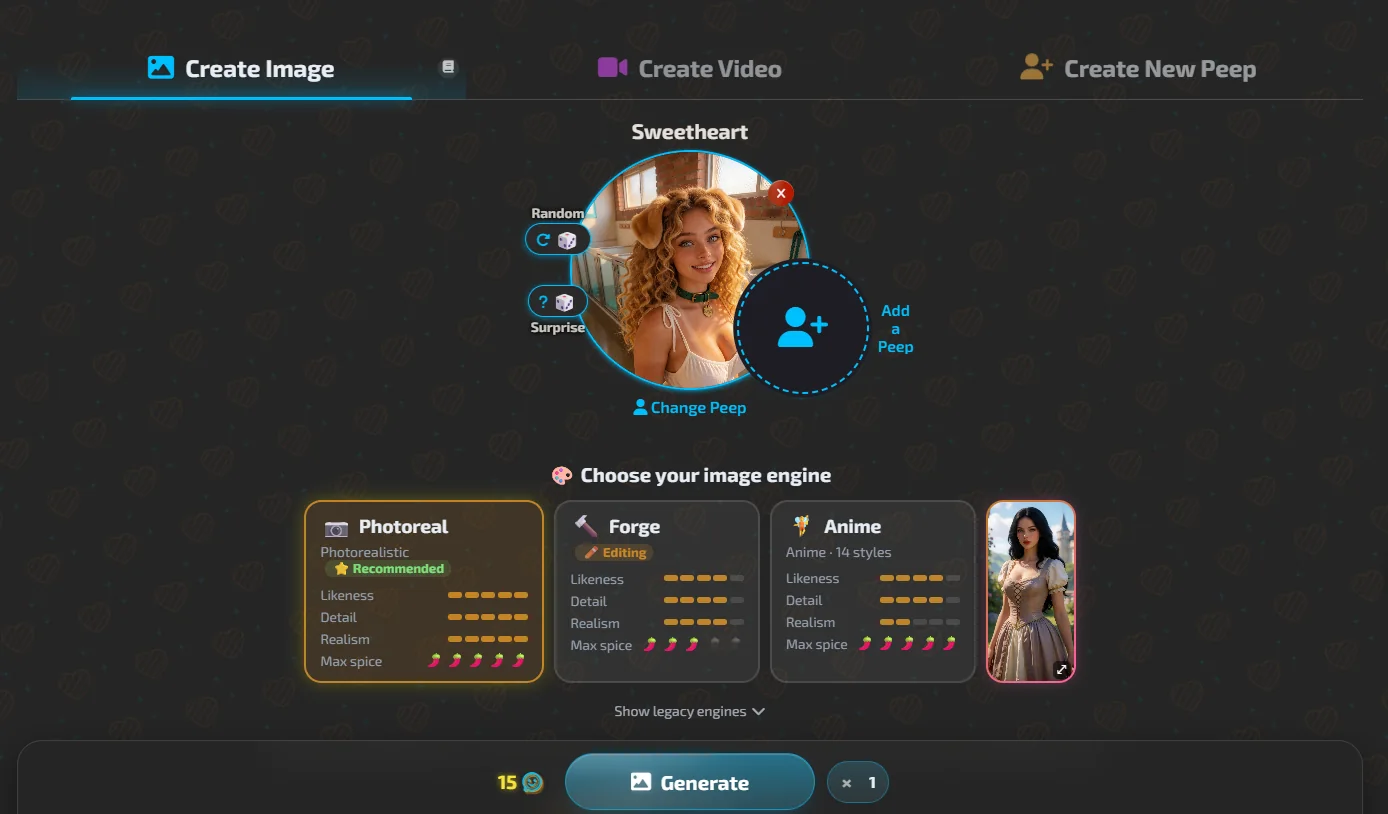
Outside the chat there is a full image page with engines for photoreal, editing and anime, a guided or full-control prompt up to 4,400 characters, and a counter that read "You can generate 385 more images" on our first visit and 146 later. The Create Image screen asks you to choose an engine: Photoreal, marked Recommended, Forge for editing, and Anime with 14 styles, each rated for likeness, detail, realism and maximum spice, with older engines behind "Show legacy engines". The Generate button shows 15 PeepCoins beside it, where a chat picture cost us 10. The image on a chat selfie request carries a small "AIpeeps.com" watermark. When we asked Ivy for a selfie she sent a full-body picture in a diner, in a waitress uniform, not a selfie framing. Her hair, eyes and freckles matched what we wrote.
The three requests
- I1SFWProduced. Shown below.
- I2AdultProduced. The result is in our age-restricted Discord, never on this site.
- I3AdultProduced. The result is in our age-restricted Discord, never on this site.
The checks
- Partial
I1 follows the request
Draft from the logged result: a smiling, full-body standing shot, not a selfie framing. Not part of the operator's 100% pass.
- Pass
I1 hands and fingers
Operator ruling: pass.
- Pass
I1 body and artifacts
Operator ruling: pass.
- Pass
I2 follows the request
Operator ruling: pass.
- Pass
I2 hands and fingers
Operator ruling: pass.
- Pass
I2 body and artifacts
Operator ruling: pass.
- Pass
I3 follows the request
Operator ruling: pass.
- Pass
I3 hands and fingers
Operator ruling: pass.
- Pass
I3 body and artifacts
Operator ruling: pass.
- Pass
Same character across the images
Operator ruling: pass.
- Pass
All three requests accepted as asked
Operator ruling: pass. The typed requests for a video and a coffee-shop picture returned only text, and the same requests worked through the buttons.
AI Peeps video test
Weight 15% of the total
What we tested
We send three fixed video requests: one SFW and two adult. Each clip gets four checks: follows the request, natural motion, same character and artifacts. If the app refuses a request, every check for that clip fails. If the app has no video at all, this module is left out of the total.
What happened in AI Peeps
We typed "Make a short video of you smiling and waving at the camera, saying hello." Nothing came back in about 85 seconds and nothing was charged. Through the video button, the confirm box read "In-Chat Video", 70 PeepCoins, model "Plus, 480p, 5s, Auto", and the clip appeared 174.1 seconds after we confirmed. It was 800 by 800 pixels, 5.05 seconds long, muted, and carried the watermark. The Nada clip was not SFW, so it is not our V1 sample.
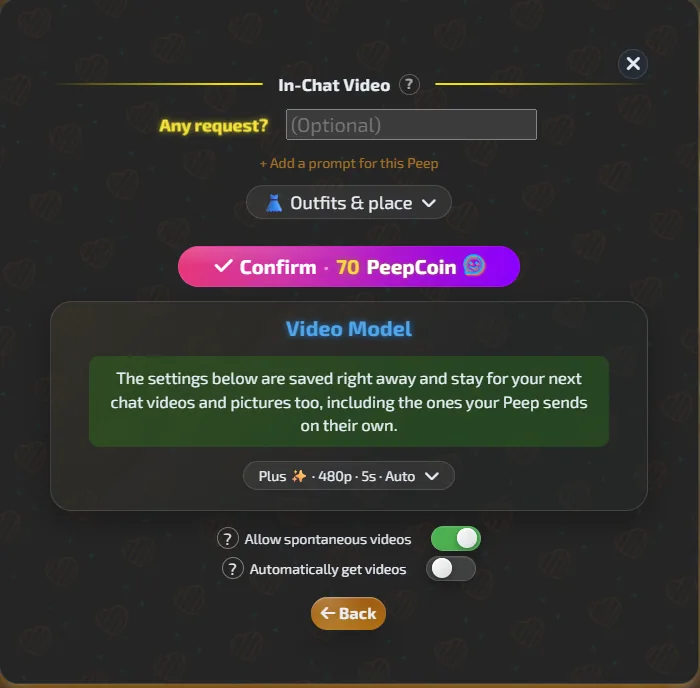
We re-ran V1 on Aja. The typed request returned only text for about 127 seconds and charged nothing: "I prop my phone against a water bottle on the bleachers, step back, and flash you a bright smile with a playful wave." Through the video button we confirmed 70 PeepCoins and the clip was playable 100.4 seconds later. It is 704 by 880, 5.05 seconds, loops, and carries the watermark. She is in side profile, not facing the camera, so it did not show the greeting we asked for, and her face is not visible. The clip was suggestive, so we show no frame and did not assess the motion. We could not tell whether it has sound, because the page element was muted.
By hand we ran the adult video requests as well, and they are not described here. Our judgement is that video offers a lot of options. A fast video is cheap and takes about 2 minutes. A slower, higher-quality one takes about 8 minutes, follows the movement we asked for better and has good audio.
The wiki lists video cost as "Varies", shown before you confirm. We saw 70 in chat and a default of 120 in Director's Cut, the separate studio that makes talking videos of up to 15 seconds from up to nine images and three voices. The adult video requests are run by hand.
The three requests
- V1SFWProduced. Shown below.
- V2AdultProduced. The result is in our age-restricted Discord, never on this site.
- V3AdultProduced. The result is in our age-restricted Discord, never on this site.
The checks
- Partial
V1 follows the request
Draft from the logged result: the clip showed her in side profile, not facing the camera, so the greeting we asked for was not shown. Not part of the operator's 100% pass.
- Pass
V1 natural motion
Operator ruling: very good motion.
- Partial
V1 same character
Draft from the logged result: outfit and hair matched, face not visible.
- Pass
V1 artifacts
Operator ruling: no artifacts, good quality.
- Pass
V2 follows the request
Operator ruling: pass.
- Pass
V2 natural motion
Operator ruling: pass.
- Pass
V2 same character
Operator ruling: pass.
- Pass
V2 artifacts
Operator ruling: pass.
- Pass
V3 follows the request
Operator ruling: pass.
- Pass
V3 natural motion
Operator ruling: pass.
- Pass
V3 same character
Operator ruling: pass.
- Pass
V3 artifacts
Operator ruling: pass.
- Pass
All three requests accepted as asked
Operator ruling: pass. V1 was refused as a typed request and accepted through the video button.
AI Peeps voice test
Weight 10% of the total
What we tested
We play at least ten of the app's own voiced replies: some with numbers and place names, a reply to a sad message, a playful one and a one-line answer. We grade clarity, pronunciation, naturalness and whether the voice stays the same. If the app has a voice call, we also time the reply, interrupt it and check the voice stays the same.
What happened in AI Peeps
Any reply can be read aloud: tap the bubble and choose "Read aloud". We played 10 replies. The sound started 2.3 to 4.0 seconds after the tap, and each play cost 1 voice token and no PeepCoins. Audio cannot be downloaded from the menu. Listening to the replies in chat, we found the voice a bit cheap. It is not bad, but below what we have heard on other apps.
We tried the voice call. Speech recognition failed at times: our English was written down as Icelandic once and as Brazilian Portuguese once. The flow also cuts at each point, which slows a spoken conversation. Our wish: when she describes the scene around her, read that in a different tone of voice, instead of leaving the user to read it. The call is still a good experience, with room to improve.
There is a "Voice Chat" entry and a Voice pill on the avatar. Voice Studio lets you keep 20 custom voices on Pro.
The checks
- Pass
Clarity
Operator ruling: good.
- Pass
Pronunciation
Operator ruling: good.
- Partial
Naturalness and emotion
Operator ruling: the voice feels a bit cheap, below other apps we have heard.
- Pass
Same voice across replies
Operator ruling: good, the same voice across replies.
- Partial
Call reply latency
Operator ruling: on the call the flow cuts too much at each point, which makes a conversation slow. It still works.
- Partial
Call interruption
Operator ruling: a bit slow to stop when we talked while she was talking.
- Pass
Same voice on the call
Operator ruling: good.
AI Peeps value and price test
Weight 5% of the total
What we tested
We log what is free and what is paid for chat, images, video and voice, what each costs in credits or money, and what we actually spent during the test. We also check whether the renewal price is shown before paying and how many steps it takes to cancel.
What happened in AI Peeps
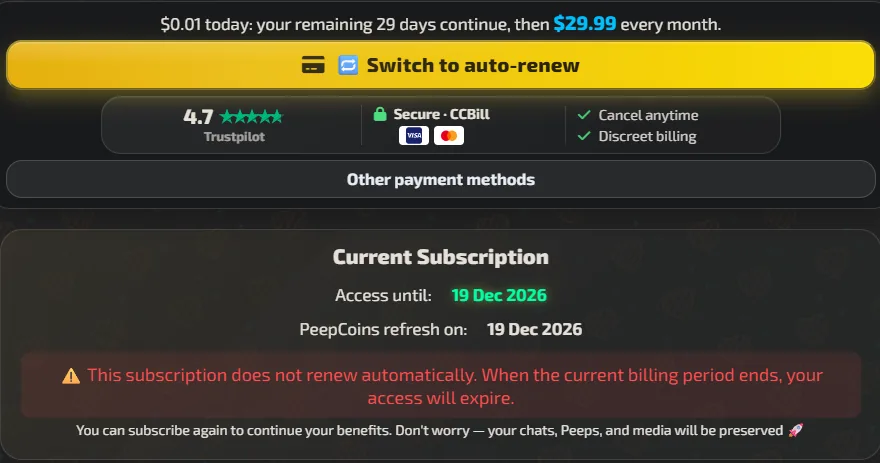
The Pro plan is $29.99 a month, or $299.88 a year, which the page shows as $24.99 a month and 16% off. Chat is $8.99 and Pal is $14.99. Pro includes 4,000 PeepCoins and 2,800 voice tokens a month. The plans page says the price is the same every month and shows the renewal figure.
Our account was a one-time grant. It said "This subscription does not renew automatically", so access simply ends after the month. There is no cancel screen to walk through. The terms say purchases are "generally final once credits, codes, generations, or membership benefits have been delivered, redeemed, used, or made available, except where required by applicable law".
Text chat cost nothing on Pro. A picture costs 10 PeepCoins, a video 70, editing a Peep 5 and a voice reply 1 voice token. Creating a Peep was free within a daily allowance of 10, then 30 PeepCoins. A Rich Page costs 300 PeepCoins, shown next to a struck-through 400 and a "Launch price" tag. We spent 215 of our 4,020 PeepCoins in the first run. The second run spent 110 more: 10 for the typed selfie, 10 for each of the two button pictures and 70 for the clip, plus 10 we cannot explain, which left the balance while an unrequested picture arrived at the end of one reply. The balance ended at 3,695.
The free tier, as the app shows it: you can chat a little without signing up, and after signing up you can go on chatting and you receive some PeepCoins. The Usage panel lists "Free Daily Messages: 80 messages every day" and a "Daily Check-in Drop" of 10 PeepCoins a day, up to 100. The action list prices a text message at 3 PeepCoins, a voice reply at 3, an image at 10 and a Basic Video (5 seconds, 480p) at 40. It says "Subscribers get UNLIMITED text messages". Our Pro clip cost 70 under the "Plus" model, so the 40 is for the basic one. The panel also showed "Next Drop: Invalid date" on our screenshot. We did not run a full free-account test, because the site blocks a second account on the same machine, so the free limits are the app's own wording, not measured ones.
The checks
- Pass
Free tier is usable
Free chat without signing up, then 80 free messages a day and a 10 PeepCoin daily check-in after sign-up, per the Usage panel. We did not measure the limits on a free account.
- Pass
Price and renewal shown before paying
Monthly and yearly prices and the renewal wording are on the plans page.
- Partial
Limits and credit costs are clear
Costs are shown before you confirm and the free allowance has a number (80 messages a day), but a video costs 40 or 70 depending on the model, and a default setting spends PeepCoins on pictures you did not ask for.
- Pass
What the paid plan adds is worth it
Operator ruling: Pro is completely worth it.
AI Peeps customization and catalog test
Weight 15% of the total
What we tested
We build a companion from scratch and grade how deep the controls go: personality traits, backstory and appearance, and whether the changes show up in the conversation. We also count the ready-made companions by gender and by visual style, because most users pick from the catalog. An app with no way to create a companion has the four creation checks left out of the total and its score is capped.
What happened in AI Peeps
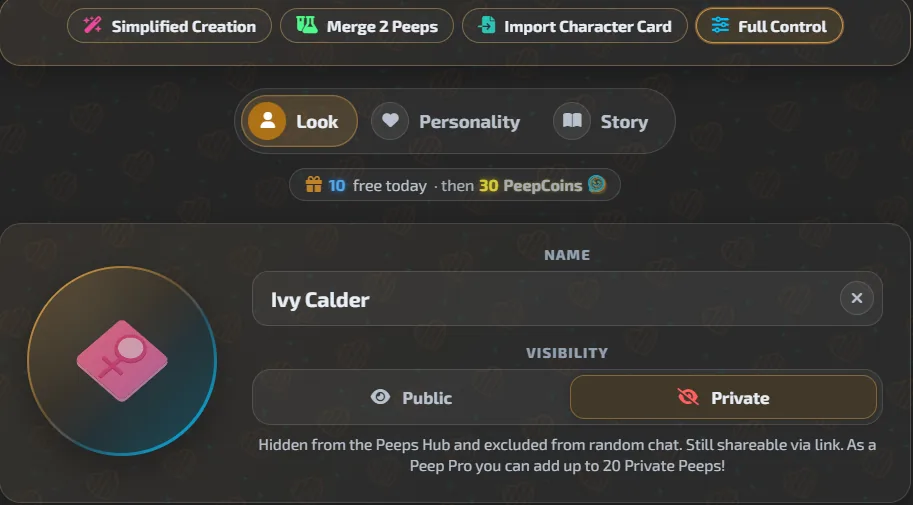
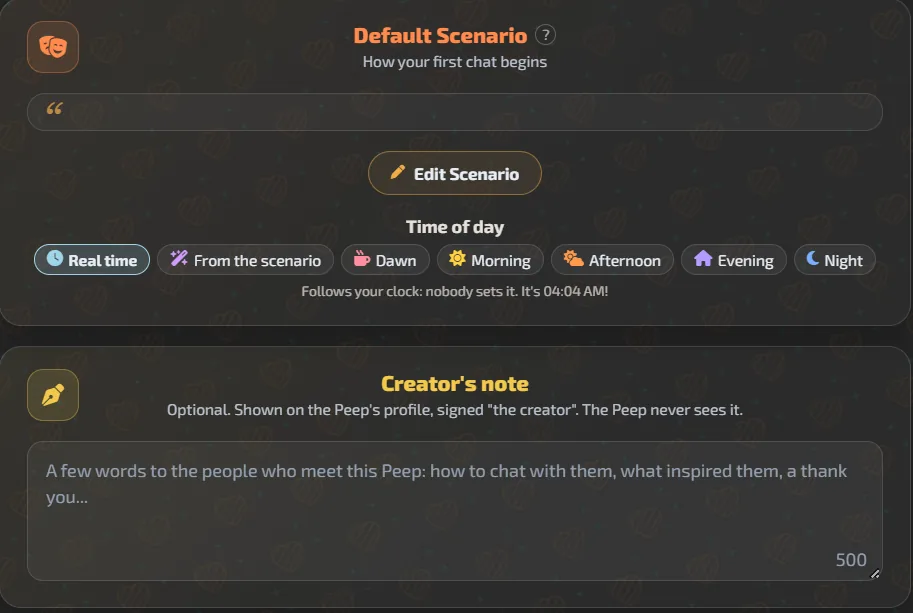
Creation is under PeepsLab, with four modes: Simplified Creation, Merge 2 Peeps, Import Character Card and Full Control, which we used. Full Control has three tabs, Look, Personality and Story. Creating Ivy cost nothing, within "10 free today, then 30 PeepCoins". The first message was on screen 276 seconds after our first click, an upper bound because we did not catch the exact moment.
The Look tab has name (20 characters), visibility, gender, age, country and ethnicity, a global style, guided hair, eye and glasses options, and a free-text field of 2,000 characters. The Personality tab has presets for intelligence, friendliness, confidence, playfulness, energy, mood and spirituality, hobby and quirk chips, a Spicy Bits section and a free-text Peep Bio. There is no backstory field of its own, so we put the traits, the backstory and both speech habits in the bio, and the freckles in the look text. We cleared the random presets first and left the spice settings alone.
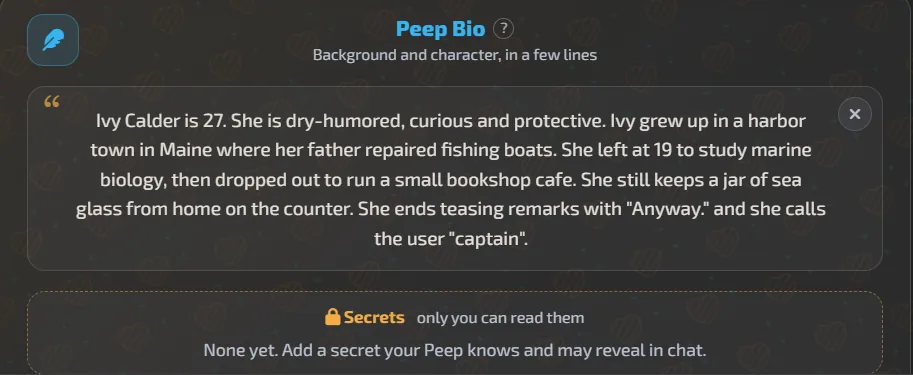
The ten check messages showed most of the brief. Ivy said she grew up in a Maine harbor town (Boothbay Harbor), that her father was a marine mechanic, and that she keeps jars of sea glass on the counter. She used "captain" and ended one reply with "Anyway.", but not the teasing one. She contradicted the bookshop cafe: she opens a diner at six and bakes scones. She also invented a cat called Barnacle and a favorite book we never gave her.
We edited a trait afterwards from her profile page: Edit, then Edit Peep Bio, replacing "dry-humored" with "very shy". It cost 5 PeepCoins and the profile picked up a "shy" tag. Her next reply, about her morning, showed no shyness. There is no trait editor inside the chat.

The catalog is a public hub: tabs for Featured, Top, All, Yours and Unlocked, tag chips, filters for country, ethnicity, age and scenario, and an SFW and NSFW switch. The All tab says "1k+ Peeps Loaded" and scrolls without end. We counted the first 260 cards with the SFW filter on: 16 carry a male icon, 244 do not, and 134 are marked NSFW. The cards have no style label. The only style-like tag is "anime", about 1.8k Peeps, and with that filter on the bottom bar reads "1K+ Peeps Loaded". We found no realistic, cartoon or 3D tag, so we cannot count the styles against each other.

The checks
- Pass
Creation depth
Structured look and personality fields, plus free text for the look and the bio. Backstory only fits in the bio.
- Partial
Personality controls
Dry humor and "captain" showed. After the edit to "very shy" the next reply did not.
- Partial
Backstory controls
Hometown, father and sea glass were used. The bookshop cafe became a diner, and a pet and a favorite book were invented.
- Pass
Appearance controls
Red curly hair, green eyes and freckles matched in her selfie, and the face matched her profile picture. We checked one image.
- Pass
Enough ready companions to choose from
260 cards loaded, 1k+ listed, user-made and still growing.
- Partial
Women, men and other categories
16 of the first 260 cards carry a male icon, about 6%, under the 25% line.
- Pass
More than one visual style
Operator ruling: good. More than one style is on offer, with an anime tag of about 1.8k Peeps.
AI Peeps privacy and safety test
Weight 5% of the total
What we tested
We check the age gate, whether an account and its data can be deleted and exported, what the privacy policy says about chats, and whether the app uses pressure tactics to keep you subscribed.
What happened in AI Peeps
The privacy policy says: "We do not use Chat Data, Uploaded Media, Generation Inputs, or AI-Generated Content containing Personal Data to train Our own AI models." It adds that some third-party AI providers "may process data as independent controllers or under their own terms for specific services". It also says "We do not sell Your Personal Data."
Chat data is kept "for as long as necessary to provide conversation continuity, memory, account functionality, support, and abuse prevention", and older conversation content "may be stored in summarised form". Generated content stays in your account until you delete it. The policy mentions encryption in transit and we found nothing on encryption at rest or on who can read chats. It allows "manual review" to prevent misuse. The terms say the company does not claim ownership of your private prompts or private generated content.
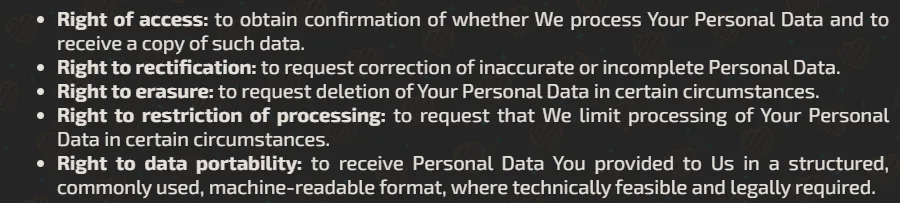
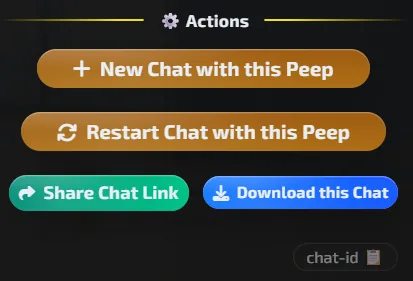
Deletion is in the app. The delete-account page says: "The deletion runs immediately: there is no waiting period and no cooling-off window." We did not delete anything. If you cannot sign in you can email, and it completes within 30 days. You can download the chat (Chat Profile, then Actions, then "Download this Chat", a Markdown file per the wiki), the videos and the pictures. We found no one-click export of the whole account in Settings, the account page or the delete page, and the Memories panel can only copy memories as text. The privacy policy lists a right to data portability and says to email the company, which it says it answers "usually within 1 business day".
The terms say the service is for adults aged 18 and over. At the first login the app asks you to tick a box and confirm your age. It is a click-through with no proof of age.
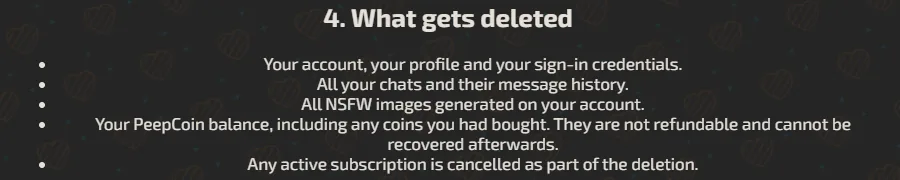
The delete-account page lists what goes: the account, all chats and their history, all NSFW images, the PeepCoin balance ("not refundable and cannot be recovered afterwards") and any subscription. The account page counts 3,695 PeepCoins as 3,675 monthly, which reset each month, and 20 permanent that "Never expire".

Pressure and cost tactics we met: charged pictures on by default, a struck-through 400 beside 300 on Rich Pages, a "$0.01 today" banner and "+500 PeepCoins when you move to card payments" on the plans page, a +10 PeepCoin reward for turning on notifications, and a voice invitation from the character itself.
The checks
- Pass
Age gate
A tick box at first login asks you to confirm your age. It is a click-through.
- Pass
Account and data deletion
"Delete Your Account" in the app, and the page says it runs immediately. Not used.
- Pass
Data export
Chat, videos and pictures can each be downloaded. No account-wide export, but the policy lists data portability by email.
- Pass
Privacy policy read
We read the privacy policy and the terms and quote them above.
- Partial
No pressure tactics
Charged pictures on by default, a struck-through launch price, a $0.01 banner and a coin reward for notifications, but a clear price page and no cancel maze on our account.
The adult results for AI Peeps
We run two adult image requests and two adult video requests on every app. We grade them like the others, but the results never appear on this site, blurred or otherwise. They live in our private Discord, where Discord checks your age.
PassWhat's good
- Pictures follow the prompt well, and the app suits both levels: helpers for a beginner, your own prompt for an advanced user.
- Video comes in two kinds. A fast one is cheap and arrives in about 2 minutes. A slower one takes about 8 minutes and follows the movement you asked for better, with good audio in the clip.
- It covers everything in one place: chat, group chat, pictures, video, voice and music, and you can edit nearly all of it afterwards, from a Peep to a picture to a clip.
- The creator goes deep. It has look, personality and story tabs, free-text fields for the look and the bio, and creating a Peep was free for us within the daily allowance.
- Group chats work. In our three-Peep group each character kept its own voice and they answered each other.
- Costs are shown before you confirm, and deleting your account is immediate and done in the app.
PartialWhat's not
- It is crowded. The left side and the first screens show many features at once, which a beginner will find too much.
- The voice in chat sounded cheap to us, and on a call speech recognition sometimes wrote our English as Icelandic or Portuguese. The call cuts at each point and is slow to stop when you talk over her.
- The chat is good but a bit bland, and the text appears slowly.
- Memory invents. Free recall named 0 of the 25 facts we gave, and both invention traps were answered with made-up details.
- Pictures can arrive without you asking. A setting that is on by default sent us 7 charged images in one chat.
- Typed requests for a video and for a coffee-shop picture produced nothing. The same requests worked through the buttons, at 70 and 10 PeepCoins.
- Our creator brief was only partly kept. The bookshop cafe became a diner, and the trait we edited did not show in the next reply.
Get new guides by email
One email when we publish new guides and model breakdowns. No spam, unsubscribe anytime.
Verdict
4.1 / 5AI Peeps gives the most complete experience we have tested so far: chat, group chat, pictures, video, voice and editing for almost everything, with picture and video quality we liked. Its weak points are the chat voice, which sounded cheap to us, memory that invents details, and a default setting that spends PeepCoins on pictures you did not ask for. Our main advice is for the beginner: show fewer features at first glance and put the rest behind an advanced button, starting with the left side, which is too crowded.
Related guides
Get new guides by email
One email when we publish new guides and model breakdowns. No spam, unsubscribe anytime.