
How to write prompts for AI video generation
Written by Clement
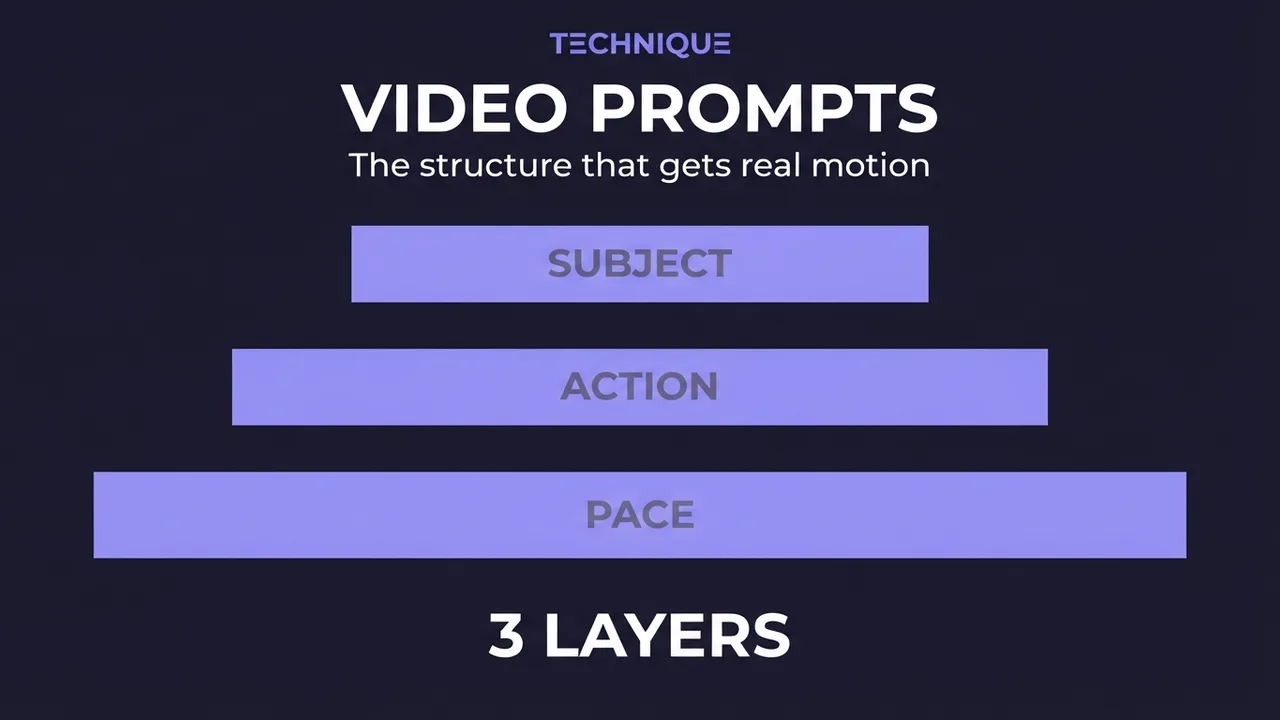
Writing a prompt for AI video is not the same skill as writing one for a still image, and treating it like one is why so many clips come out looking like a melting photograph. An image prompt describes a scene. A video prompt describes a change over time, and that difference decides everything.
This guide covers the prompt structure that holds up across current video models. It applies most directly to image-to-video, where the picture supplies the scene and your words supply the motion, but the same principles improve text-to-video prompts too.
Why video prompts are different
A still-image model has to be told what exists: the subject, the setting, the light, the style. A video model, in image-to-video, already has all of that from your source frame. What it does not have is time. It doesn't know what should happen across the seconds you're asking for.
So a good video prompt spends its words on motion, not description. Every word you spend re-describing the subject is a word not spent telling the model what to animate, and worse, it invites the model to redraw the subject and drift away from your image.
The present-progressive rule
Write motion in the present-progressive tense: the "-ing" form. "She is turning her head." "Steam is rising from the cup." "The camera is slowly pushing in." This tense describes continuous, ongoing action, which is exactly what a video is.
Compare that to a static phrase like "a woman with her head turned." That describes a state, not a motion, and the model reads it as a still pose. The verb form is doing real work: it is the difference between a frozen frame and a moving one.
We tested this distinction directly on the same source image: "a woman with her head turned" produced a static, barely-moving clip three times in a row. Switching the identical setup to "she is turning her head" got real motion on the first try. Same image, same settings, one verb form changed.
How to structure a motion prompt
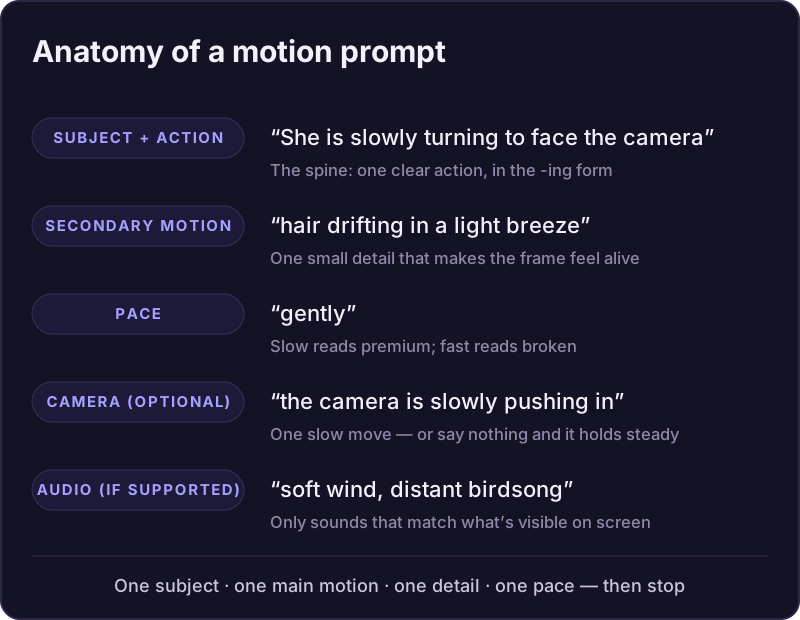
Build the prompt in layers. Each layer adds realism without fighting the image.
- 1
Start with the primary motion
One clear action, in present-progressive form, for your main subject: "he is walking toward the camera," "she is laughing and looking away." This is the spine of the prompt.
- 2
Add one layer of secondary motion
Small environmental movement makes a clip read as alive: "hair moving in the wind," "leaves drifting past," "light flickering." One or two of these is plenty; more competes with the main motion.
- 3
Set the pace if it matters
Words like "slowly," "gently," or "gradually" pull motion back toward believable; "quickly" or "suddenly" push it toward chaos. When in doubt, slow it down. Small motion looks premium, big motion looks broken.
- 4
Add a camera move only if you want one
If you want the camera itself to move, name it plainly: "the camera is slowly panning right." If you don't mention the camera, leave it out. Inventing a camera move you didn't ask for is a common way models add distortion.
- 5
Stop
Resist the urge to keep adding. A short, focused motion prompt beats a long one almost every time. If the result is wrong, fix it by changing a word, not by piling on more.
Get new prompt files and guides first
One email when a new tested prompt file or model guide goes live. Prompts that survived production, not theory. No spam, unsubscribe anytime.
What to leave out
Scene description. The image already has it. Re-describing the room, the outfit, or the face invites the model to redraw them and lose consistency.
Impossible physics. Anything that can't plausibly happen in a few seconds (a full sprint across a field, a dramatic transformation) will distort. Scale the motion to the runtime.
Stacked contradictory instructions. "Slowly running," "still but moving": the model tries to satisfy both and satisfies neither. Keep each instruction internally consistent.
Describing camera movement: do's and don'ts
Camera moves are their own layer, separate from subject motion. Keep them simple and deliberate, or leave them out.
- Do name the move plainly
- "the camera is slowly pushing in", "panning left", "tilting up", "pulling back". Present-progressive, one clear move.
- Do keep it slow and singular
- One gentle camera move per clip. A subtle push-in or pan reads as cinematic; more competes with the subject.
- Don't stack conflicting moves
- "zooming while orbiting and tilting" is contradictory and warps. Choose one move.
- Don't confuse camera and subject motion
- Want the subject to move? Describe the subject. Adding a camera move you don't need is a common source of distortion.
- Don't ask for fast or complex moves
- Whip pans and dramatic sweeps in a few seconds distort. Silence on the camera means the model holds it steady, often the right call.
Prompting audio (on models that support it)
Some newer video models generate sound in the same pass as the picture. On those, treat audio as a described layer just like motion: name the ambient sound that belongs to the scene: "waves rolling onto the shore," "quiet room tone with distant traffic," "wind in the trees." Sound that matches the visible action sells the clip; sound that doesn't is worse than silence.
For voice, describe the manner rather than a full script: "she is speaking softly," "a calm, warm voice." Keep it simple and let the model fit the delivery to the subject. Cramming a long spoken line into a few seconds distorts, the same way over-ambitious motion does.
Keep audio synced to what's on screen: a voice when the mouth moves, a sound when the wave breaks. Fewer sounds that match the picture beat a busy soundscape that drifts from it. If you're going to replace the audio with music in post anyway, skip it and use a silent model.
Scripting longer clips with a timeline
One sentence of motion is enough for a short clip. Past roughly five seconds, a single instruction runs dry and the back half of the clip drifts or repeats. The fix is to script the action as a timeline, describing what happens second by second.
Write it as timestamps, one beat per second or every couple of seconds: "At 00:00, she is standing at the window looking out. At 00:03, she turns slowly toward the camera. At 00:06, she smiles and steps forward." Each beat hands off to the next, so the model always knows what comes next and the clip reads as one continuous action.
Keep the beats small and physically continuous: a person can turn, step, and smile across ten seconds, but not cross a room and change clothes. The timeline controls pacing and order; it isn't a licence to pack in more than the runtime can hold.
Debugging a prompt by symptom
Barely moves: your verb is too weak or too abstract. Swap it for a concrete physical action in present-progressive form.
Moves too much and warps: you asked for too much, too fast. Cut a motion, add a pace word like "slowly," or lower the model's guidance.
Subject changes appearance: your prompt is re-describing the subject. Strip it back to motion only.
Feels lifeless despite correct motion: add one small secondary motion (wind, steam, a shift of light) to give the frame a pulse.
Camera behaves oddly: you likely stacked moves or asked for a fast one. Reduce to a single slow move, or remove the camera instruction entirely.
Audio drifts from the picture: name only sounds that belong to the visible action, and keep them few.
Keep reading
How to write a script for an AI-generated video
A script format built for AI video generation, not film: every scene planned with its start frame, end frame, duration, dialogue, camera move, and sound, so each clip can be generated on its own and still cut together as one continuous video.
How to turn an image into a video with AI
A model-agnostic guide to generating an AI video from an image: what image-to-video does, how to pick a source image that moves well, and how and what to prompt to get good motion.
How to fix flickering AI video: 4 causes and fixes
AI video that flickers, shimmers, or morphs between frames has 4 usual causes. Here's how to diagnose and fix each one: source-image noise, too-few steps, over-long clips, and unstable prompts. Step by step.
How to make longer AI videos: 4 methods that work
AI video models cap out at a few seconds. Here are the 4 methods that extend them: chaining clips, last-frame continuation, and keeping motion consistent across every join. Step by step, free.
How to generate videos with Wan 2.2 (free, step-by-step)
A tested, step-by-step walkthrough for turning a single image into smooth AI video with Wan 2.2: the exact settings that matter, the prompt structure that works, and the mistakes that waste renders. Free.
How to use HappyHorse text-to-video (AI video from a prompt)
A practical guide to HappyHorse text-to-video: how to write a prompt that produces physically realistic, motion-smooth video with no source image, the resolution and duration settings that matter, and the mistakes that waste a render.
Get new prompt files and guides first
One email when a new tested prompt file or model guide goes live. Prompts that survived production, not theory. No spam, unsubscribe anytime.