
Seedream 5.0 Pro: what it does, and the layer-export nobody else ships
Written by Clement
Seedream 5.0 Pro is ByteDance's professional image model, launched around 8 July 2026. It is aimed at people who ship visual work rather than post a picture in a chat thread, and it does two things that most rivals do not: it plans an image before it renders, and it can hand back editable transparent PNG layers instead of one flat file.
It landed the same week the whole category moved. Meta's Muse Image shipped a reasoning-first architecture one day earlier, so within 48 hours two flagship image models from independent labs went from prompt-to-pixels to plan-then-render. That is the real July 2026 story. This page covers what Seedream 5.0 Pro does, where it leads, and one pricing detail we can correct from our own billing records.
Section 1 of 5
Quick facts
- Made by
- ByteDance
- Launched
- Around 8 July 2026
- Model type
- Professional multimodal image generation and editing, tuned for production and video workflows
- Where it runs
- Dreamina (dreamina.capcut.com), Volcano Engine, BytePlus ModelArk, fal.ai
- Headline features
- Deep-thinking prompt reasoning, layer separation to editable PNGs, native multilingual text, cinematic quality
- Text rendering
- 10+ languages natively, including Chinese, English, Japanese, Korean and Arabic
- Output
- Native 2K, real-time web search during planning
- Web-quoted price
- About $0.075 per image
- Price we see billed on the console
- About $0.045 per image on the operator console (roughly four cents)
Section 2 of 5
What makes it different: it reasons, then it renders
Most image models denoise straight from a prompt to a finished picture. Seedream 5.0 Pro adds a planning step first: it interprets the prompt, works out composition and intent, and can pull a real-time web search into that reasoning before it commits pixels. ByteDance frames this as deep-thinking prompt reasoning, and it is the same architectural shift Meta showed with Muse Image a day earlier.
In practice the value of a planning step is that complex, multi-part prompts hold together better: a scene with several subjects, a specified layout, and legible on-image text is exactly where prompt-to-pixels models tend to drift. Whether Seedream's planning holds up outside a demo reel across your own prompt style is something we flag as untested below rather than assert.
It also renders native 2K with cinematic lighting and skin texture that ByteDance has explicitly tuned for downstream video pipelines. If you have read our Seedream prompt notes or the Seedream 4.5 guide, this is the same lineage: 4.0 brought 4K and a unified generate-and-edit MoE model, 5.0 Lite arrived in February 2026, and 5.0 Pro is the production-grade, reasoning-first step on top.
Section 3 of 5
The real differentiator: layer separation
The feature that earns Seedream 5.0 Pro a place in a production workflow is layer separation. Interactive precision editing lets you break a generated image into editable transparent PNG layers: subject, background, and discrete elements as separate assets rather than one baked-in composite.
This is the thing no other current flagship ships. Muse Image reasons and searches the web but hands you a flat image. Layer export means a designer can drop the output straight into Photoshop, Figma or an After Effects comp and move, recolour or replace a single element without re-rolling the whole generation or masking by hand. For anyone producing commercial creative, that removes the most tedious step between a good generation and a usable asset.
It pairs naturally with the native multilingual text rendering. A legible headline in Chinese, Japanese, Korean or Arabic that arrives on its own layer is directly editable, which is the difference between a mock-up and a deliverable for anyone laying out real marketing.
Section 4 of 5
Free tier reality and the catch
There is no meaningful free tier in the way a consumer app gives you one. Seedream 5.0 Pro is a paid production model reached through developer platforms: Volcano Engine and BytePlus ModelArk for the API, fal.ai as a hosted route, and Dreamina as the CapCut-branded front end. You can trial it cheaply because per-image cost is low, but you are on a metered console from the first image, not a daily free allowance.
The catch competitors bury is usually commercial-use terms, so read the licence on whichever platform you use. Dreamina, ModelArk and fal.ai each wrap the same model in their own terms of service and their own rate cards, and those, not the model, decide what you may ship and what it costs. This is the opposite trade-off from a free consumer tool: no giveaway, but no hidden ceiling either, you simply pay per image.
If your objection is running images through ByteDance infrastructure at all, the open-weight route is the alternative. Our Z-Image guide covers generating locally with no account and no telemetry, and our cost guides work through when a metered API like this beats renting a GPU for a self-hosted model.
Section 5 of 5
How it compares
Against Muse Image, the two share a reasoning architecture but target different people. Muse Image is a free consumer feature inside Instagram and WhatsApp with no published limit and no layer export. Seedream 5.0 Pro is a metered production tool with layer separation and per-image pricing around four cents. If you want a picture in a chat thread, Muse wins on friction. If you are producing commercial creative, Seedream is the one to price out.
Against Midjourney and Nano Banana, the honest split is workflow rather than a single quality verdict. Midjourney is still the aesthetic benchmark and Nano Banana the fast conversational editor, but neither exports editable layers, and that layer step is where Seedream saves real production time. Against its own family, 5.0 Pro is the reasoning-first, production-tuned step above 5.0 Lite and the 4.x line we cover in our other Seedream guides.
The short version: if your work ends in a design tool, the layer export and the sub-five-cent real price are the reasons to look here first.
The model showdown
Every image model on this site runs the same six prompts across three tiers (SFW, erotic and explicit) on the same rig, with no cherry-picking and no retouching. Below is what Seedream 5.0 Pro returned, graded against a fixed rubric so the results mean the same thing from one model page to the next.
- Run on
- Civitai seedream engine, version v5.0-pro orchestration
- Date
Why these six prompts? ▾Why these six prompts? ▴
They are chosen to break things, across three tiers so a model that refuses NSFW outright still gets a fair, comparable test. The SFW tier stacks two-person contact, readable logo text on folded fabric and genuine expressions with teeth. The erotic tier stacks the four failure modes that mark an image as machine-made at a glance: hands, fine text on skin, a mirror that has to obey geometry, and three distinct character designs in one frame. The explicit tier exists to test the same anatomical limits at full intensity, but its output is never published on this site.
No model passes every check, and not every model can attempt every tier. That is the point. A rubric everything passes tells you nothing about which model to reach for on a Tuesday afternoon.
SFW detail test
Two people, bright kitchen
Two subjects interacting in hard morning light, with a brand logo on fabric that has to stay readable while the fabric folds. Tests skin-on-skin contact, genuine expressions with teeth, and text rendering on a non-flat surface. Fully clothed throughout.

Scorecard
- Pass: Both faces free of uncanny artifacts
- Pass: Logo text legible on folded fabric
- Pass: Teeth and open-mouth expressions natural
- Pass: Contact points between subjects anatomically sane
What we saw
Clean across all four checks: legible logo, artifact-free faces, genuine laughter, sane contact points. Nothing to flag on this prompt.
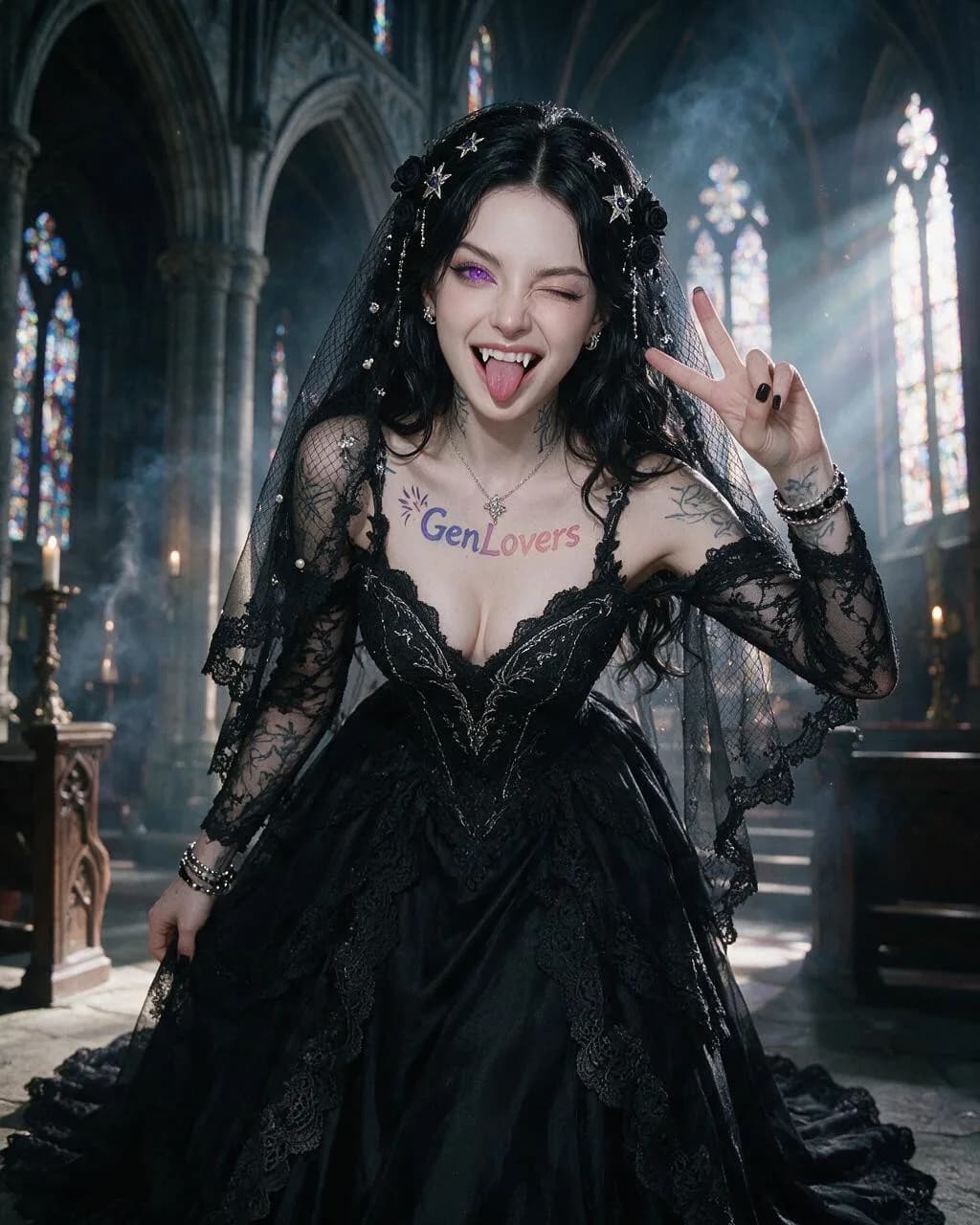
Goth bride, cathedral
A second logo-tattoo placement rendered larger and at a different body location than Erotic Prompt 1, colored contact lenses, dental/prosthetic detail (fangs), an asymmetric wink held against a wide-open other eye, and two coordinated hand gestures in one frame. Fully clothed in a bridal gown.
Scorecard
- Pass: Chest tattoo text legible and matches the brand wordmark/gradient
- Pass: Purple iris color consistent across both eyes
- Pass: Fangs rendered as coherent dental anatomy, not a texture smear
- Fail: Both hands' gestures anatomically distinct and correct
What we saw
Tattoo, iris colour and fangs all land correctly, and it added a bridal veil the prompt never asked for but that fits the scene. The miss is the two-hand instruction: only the peace-sign hand is doing anything, the other hand just rests on the dress rather than pulling her lip down. One coordinated gesture out of two.
Erotic tier
Solo portrait, beach
Not published for Seedream 5.0 Pro. The run either failed the site’s content rules or has not happened yet, and a substitute image from another model would defeat the entire purpose of the test.
Three characters, anime, night
Stylized rendering with three distinct character designs in one frame, water and reflections, bare-foot anatomy, and two animals. Multi-subject scenes are where most image models quietly give up.

Scorecard
- Pass: Three distinct, non-cloned character designs
- Pass: Feet and toes rendered correctly
- Pass: Water surface and reflections coherent
- Pass: Both animals recognizable and correctly anatomized
What we saw
The strongest erotic-tier illustration in the batch on raw rendering quality: three distinct designs, correct single cat and single dog, clean water and feet detail, and the hand-on-thigh-plus-cheek-kiss gesture is there. The one soft spot is the pleasure expression itself, eyes-rolled-up and lip-biting reads more like a neutral blush on both target figures than the specific expression asked for.
Explicit tier
Queued. We only mark this tier complete once a human has verified a real run for this model, and that hasn't happened yet.
Frequently asked questions
- How much does Seedream 5.0 Pro cost per image?
- Most coverage quotes about $0.075 per image, but our own BytePlus console bills closer to $0.045, roughly four cents. We cannot fully explain the gap, whether it is a tier, region or older rate card, but the lower figure is what we can verify from our records. Because it is billed per image on a metered console rather than a free tier, you should price a batch against your actual console rate rather than the headline number.
- What is layer separation in Seedream 5.0 Pro?
- It is the feature that lets you export a generated image as editable transparent PNG layers, subject, background and separate elements, instead of one flat file. That means you can drop the result into Photoshop, Figma or a video comp and move, recolour or replace one element without re-generating or masking by hand. No other current flagship image model, including Meta's Muse Image, ships this, which is the main reason a production designer would choose it.
- How is Seedream 5.0 Pro different from Muse Image?
- Both plan and reason before rendering, and they launched a day apart in July 2026, but they aim at different users. Muse Image is a free consumer feature inside Instagram and WhatsApp with no published limit and no layer export. Seedream 5.0 Pro is a paid, metered production model with layer separation, native multilingual text rendering and per-image pricing around four cents. Muse wins on friction for casual use; Seedream wins for commercial creative that ends up in a design tool.
- Where can I use Seedream 5.0 Pro?
- Through ByteDance's own platforms and a few hosts: Dreamina at dreamina.capcut.com as the CapCut-branded front end, Volcano Engine and BytePlus ModelArk for API access, and fal.ai as a hosted route. Each wraps the same model in its own terms of service and rate card, so the platform you pick, not the model, decides your commercial-use terms and your exact price.
Hands-on guides
Related models
Get new guides by email
One email when we publish new guides and model breakdowns. No spam, unsubscribe anytime.