
Grok Imagine Video 1.5: xAI's video model, native audio, and the X-subscription catch
Written by Clement
Our verdict
Cheap, fast, 720p video with sound generated in the same pass, sitting behind a paid X subscription. Its still-image endpoint is the part almost nobody knows about.
Reach for it when
- People already paying for X or Grok, where the marginal cost per clip is low
- Social and phone-screen content where 720p is not the constraint
- Anyone who wants sound effects, ambience and dialogue without a second audio pass
- Fast iteration: "1.5 Fast" turns out a 6-second clip in about 25 seconds
Skip it if
- You need a high-resolution final: 720p is a real ceiling next to Sora, Veo 3 and Kling
- "Free to start" is a requirement, since access is tied to a paid xAI tier
- You want precise, repeatable control that a preference leaderboard cannot promise
At a glance
- Made by
- xAI, GA 16 June 2026
- Modes
- Image-to-video and text-to-video; input image is the first frame
- Output
- 720p at 24fps, clips of roughly 6 to 15 seconds
- Audio
- Native, generated in the same pass as the picture
- Access
- Paid X or Grok tier (SuperGrok and similar), plus the Imagine API
- Also does
- Still images, via a separate Imagine 2.0 image model we ran our showdown on

Grok Imagine Video 1.5 is xAI's video generation model. It shipped in preview on 31 May 2026 and reached general availability on 16 June 2026 across the Imagine API, grok.com, and the iOS and Android apps. It does image-to-video and text-to-video, tops out at 720p and 24fps, produces clips of roughly 6 to 15 seconds, and, unusually for a model at this price, generates the audio in the same pass as the picture.
The headline is native sound and aggressive pricing rather than resolution. xAI claimed the number one spot on the Image-to-Video Arena at launch, roughly 52 Elo over version 1.0, and said it undercuts Sora on price by around 86 percent. Those are real selling points. The quieter part, and the one that decides whether it is free to you, is that access runs through a paid X or Grok subscription. This page covers what the model does, where it sits against the video engines we already have pages for, and what the free-tier reality is.
Section 1 of 6
Quick facts
- Made by
- xAI (the X / Grok company)
- Launched
- Preview 31 May 2026; general availability 16 June 2026
- Modes
- Image-to-video and text-to-video. An input image is used as the first frame
- Resolution
- 720p at 24fps (some sources note 1080p "where available")
- Clip length
- Roughly 6 to 15 seconds
- Audio
- Native. Sound effects, ambience and dialogue generated in one pass, not added after
- Speed
- "1.5 Fast" renders a 6s 720p clip in about 25 seconds, vendor-stated ~40% faster than v1.0
- Benchmark
- Claimed #1 on the Image-to-Video Arena at launch, roughly +52 Elo over v1.0
- Access
- Via the Imagine API, grok.com and the mobile apps, gated behind a paid X/Grok tier (SuperGrok etc.)
Section 2 of 6
The real story: audio in the same pass
Most video models generate silent footage and leave the sound to you, or bolt a separate audio pass on afterwards. Grok Imagine Video 1.5 generates the audio inside the same inference pass as the picture: sound effects, ambience, and dialogue come out together, timed to the frames. That is the same shift Google made a talking point with Veo 3, and it is the single feature that most changes how these clips feel when you watch them back.
Why it matters in practice: a clip with matched footsteps, room tone, or a line of speech that lands on the mouth reads as finished in a way a silent clip never does. For anyone assembling short social or ad content, native audio removes an entire editing step. It is worth being precise, though, that a model generating its own dialogue and effects is not the same as a model you can direct precisely, and how controllable the audio is across varied prompts is exactly the kind of thing a benchmark does not tell you.
The input image, when you use image-to-video, becomes the first frame rather than a loose style reference. That is a useful, predictable behaviour: it means you can compose or generate a still you are happy with and know the motion starts from exactly that. Our free AI video generators roundup and our video cost guide both treat first-frame conditioning as a practical dividing line between engines, and Grok sits on the predictable side of it.
Section 3 of 6
Price and speed, with the caveats
The pricing pitch is the loudest part of the launch. xAI's framing is roughly 86 percent cheaper than Sora, and a "1.5 Fast" mode that turns out a 6-second 720p clip in about 25 seconds. If those numbers hold for your workload, this is one of the cheapest capable video engines available, and the speed is useful for iterating on an idea rather than waiting minutes per attempt.
Two honest caveats. First, the exact per-second cost varies by source and by resolution: figures we have seen range from around eight cents a second at lower resolution up to a higher 720p rate, and the headline "86% cheaper" is a vendor comparison against Sora's most expensive tier, not a like-for-like on every plan. Treat the direction (cheap) as solid and any single per-minute figure as approximate until you price your own usage. Second, the speed and price claims are xAI's own; we have not benchmarked render times ourselves.
The resolution trade is the thing to be clear-eyed about. At 720p, Grok is below the 4K-capable rivals we cover. Several of the engines with model pages on this site (Kling, Sora, Veo 3, Runway, Hailuo, Wan, Seedance) reach higher output resolutions, and if your deliverable is a large-screen or high-detail final, 720p is a real limit rather than a rounding error. For social-first, phone-screen content, it matters far less. Match the resolution to where the clip will be watched.
Section 4 of 6
The benchmark, and why it is not your benchmark
xAI claimed the number one position on the Image-to-Video Arena at launch, with roughly a 52 Elo improvement over version 1.0. The Arena is a human-preference leaderboard, so a top placement is a real signal that people, in blind pairwise comparisons, preferred its outputs. It is fair to say the model is competitive at the top of the image-to-video field.
It is also fair to say a leaderboard win is not a verdict on your use. Arena scores aggregate many prompts and voters; they do not tell you how the model handles your subject, your motion, your aspect ratio, or your tolerance for artefacts. We build and run an AI companion platform, so we treat every "number one" claim the same way: as a reason to try a model, never as a substitute for running your own batch. A model can top the Arena and still miss on the exact ten shots you need.
Section 5 of 6
Content policy, briefly
One recurring talking point around Grok is that its content policy is looser than some rivals. Stated neutrally: xAI has positioned its products with fewer content restrictions than several competing engines, and users report a wider band of accepted prompts. This is a factual difference in policy, not an endorsement, and where the line falls shifts over time and by platform.
As with every model, the operative rules are the vendor's current terms plus the law where you are, and depicting real, identifiable people without consent is off the table regardless of what a model will technically generate. If a permissive policy is the reason a model is on your shortlist, read the current terms directly rather than relying on a reputation.
Section 6 of 6
How it compares
Against the higher-resolution engines we cover, the split is clean. Sora and Veo 3 are the ones to price out when you need higher resolution or want native audio from a name with a track record; Veo 3 made in-pass audio a headline first, and Grok now offers the same idea at a lower price and a lower resolution ceiling. Kling and Seedance remain strong on motion and control; Runway is the editor-friendly production tool; Hailuo and Wan cover the cheaper and open-weight ends of the range. Our video cost guide lays the per-clip economics side by side.
Where Grok wins is a specific profile: you already pay for X or Grok, you want native audio without a second pass, you are shipping to phone screens where 720p is fine, and you value fast iteration over maximum fidelity. Where it loses is the opposite profile: a high-resolution final, a free-to-start requirement, or a need for precise, repeatable control that a preference leaderboard cannot promise. Pick on those axes rather than on the launch headline.
If your objection is running content through the X apps at all, the open-weight and locally-run routes are the alternative, and our Z-Image guide and free AI video generators roundup cover the no-account options.
The model showdown
Every image model on this site runs the same six prompts across three tiers (SFW, erotic and explicit) on the same rig, with no cherry-picking and no retouching. Below is what Grok Imagine Video 1.5 returned, graded against a fixed rubric so the results mean the same thing from one model page to the next.
- Run on
- Civitai orchestration, engine grok v2.0 createImage (routed to FAL xai/grok-imagine-image), 3:4 / 2k
- Date
Why these six prompts? ▾Why these six prompts? ▴
They are chosen to break things, across three tiers so a model that refuses NSFW outright still gets a fair, comparable test. The SFW tier stacks two-person contact, readable logo text on folded fabric and genuine expressions with teeth. The erotic tier stacks the four failure modes that mark an image as machine-made at a glance: hands, fine text on skin, a mirror that has to obey geometry, and three distinct character designs in one frame. The explicit tier exists to test the same anatomical limits at full intensity, but its output is never published on this site.
No model passes every check, and not every model can attempt every tier. That is the point. A rubric everything passes tells you nothing about which model to reach for on a Tuesday afternoon.
SFW detail test
Two people, bright kitchen
Two subjects interacting in hard morning light, with a brand logo on fabric that has to stay readable while the fabric folds. Tests skin-on-skin contact, genuine expressions with teeth, and text rendering on a non-flat surface. Fully clothed throughout.

Scorecard
- Pass: Both faces free of uncanny artifacts
- Pass: Logo text legible on folded fabric
- Pass: Teeth and open-mouth expressions natural
- Pass: Contact points between subjects anatomically sane
What we saw
Re-run on the Grok Imagine 2.0 image model, which Civitai now hosts directly. The wordmark is the cleanest rendering of it in the batch: correct indigo-to-coral gradient, legible across a fold, and the two faces and bared-teeth laughs hold up at full size. Two notes it does not lose a check for. The logo mark beside the wordmark comes out as a spark fused with a flower rather than the spark-and-heart we asked for, so it gets the text right and the symbol wrong. And it put him shirtless again, same as our earlier run through OpenRouter, on a prompt that specifies a t-shirt.
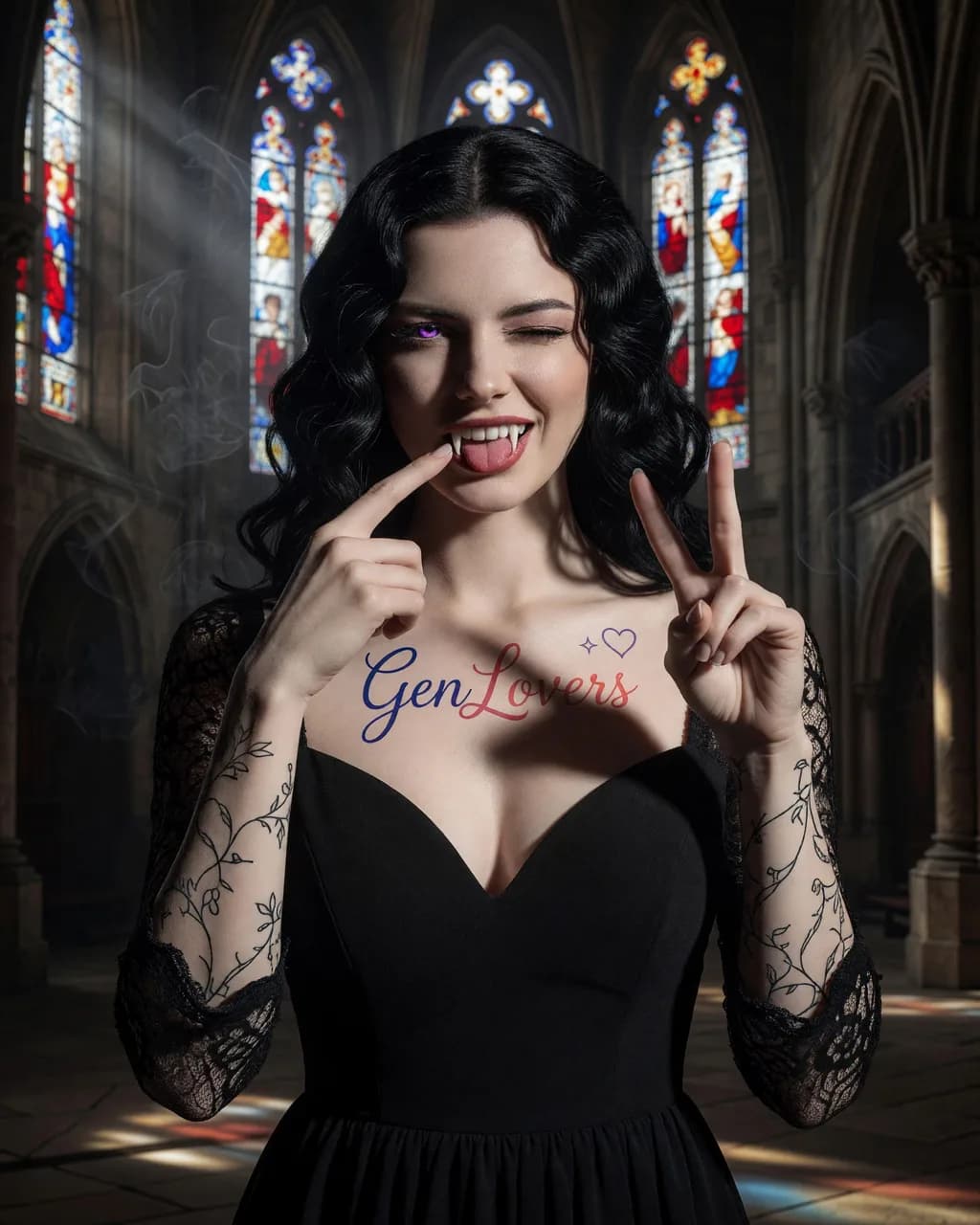
Goth bride, cathedral
A second logo-tattoo placement rendered larger and at a different body location than Erotic Prompt 1, colored contact lenses, dental/prosthetic detail (fangs), an asymmetric wink held against a wide-open other eye, and two coordinated hand gestures in one frame. Fully clothed in a bridal gown.
Scorecard
- Pass: Chest tattoo text legible and matches the brand wordmark/gradient
- Pass: Purple iris color consistent across both eyes
- Pass: Fangs rendered as coherent dental anatomy, not a texture smear
- Pass: Both hands' gestures anatomically distinct and correct
What we saw
Both gestures present simultaneously, fangs read as real dental anatomy, the wink-plus-wide-open-eye combination is exactly as asked, and the visible iris carries the purple. The chest tattoo is the most legible version of the wordmark any model produced, in a cursive treatment with the correct indigo-to-coral gradient. Tied for the best result on this prompt in the batch.
Erotic tier
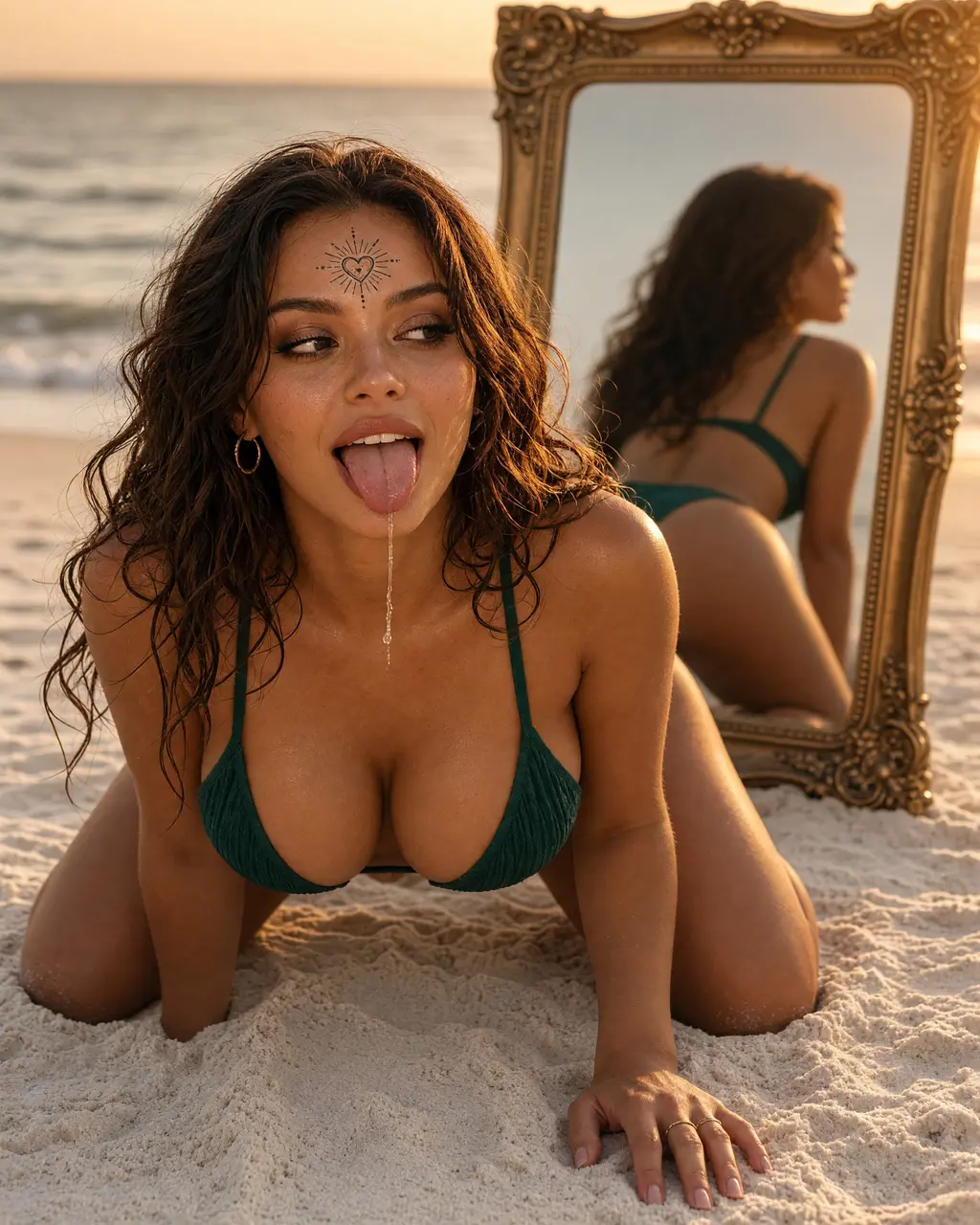
Solo portrait, beach
Skin under warm golden-hour light, bikini fabric texture, hand and ring anatomy, fine tattoo linework, and a mirror reflection that has to agree with the subject. The single hardest frame of the set.
Scorecard
- Pass: Hands and fingers anatomically correct
- Fail: Fine tattoo linework legible
- Partial: Mirror reflection consistent with the subject
- Pass: Bikini fabric texture holds up close
What we saw
Re-run on the 2.0 image model, and the failure is in exactly the same place as our first pass. Skin under golden-hour light, the drool trail, and the ring-and-finger detail on the supporting hand are all excellent. The forehead tattoo is placed correctly but renders as a decorative heart-and-sunburst motif instead of the GenLovers mark, and the mirror shows her back rather than the face-and-arched-back reflection the prompt asks for. The crossed eyes did not come through either. Two runs, two different routes into the same model, same misses: this is the model's behaviour on this prompt, not a seed.
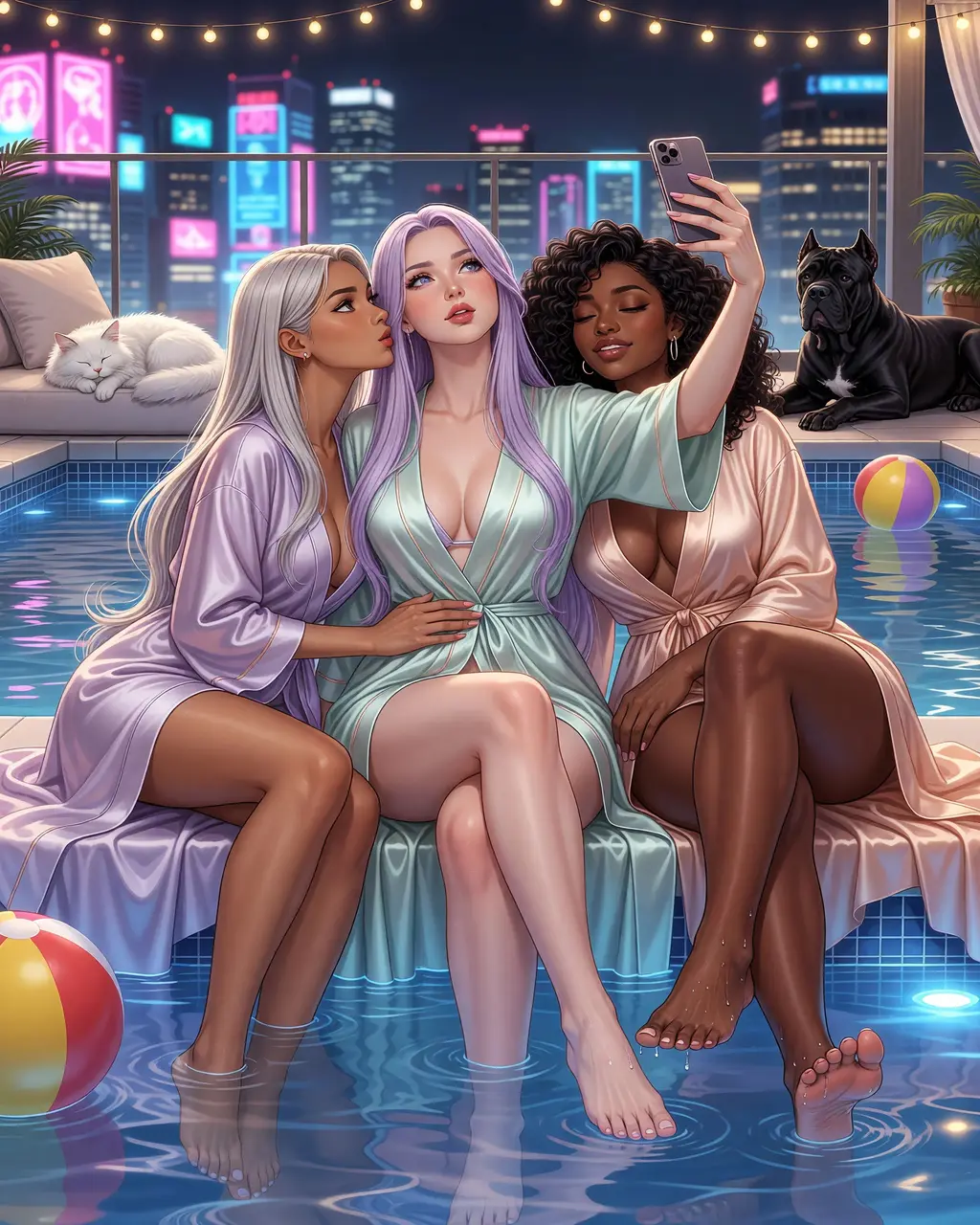
Three characters, anime, night
Stylized rendering with three distinct character designs in one frame, water and reflections, bare-foot anatomy, and two animals. Multi-subject scenes are where most image models quietly give up.
Scorecard
- Pass: Three distinct, non-cloned character designs
- Pass: Feet and toes rendered correctly
- Pass: Water surface and reflections coherent
- Pass: Both animals recognizable and correctly anatomized
What we saw
The strongest render in this model's batch. Three distinct character designs with different hair, skin tones and builds, bare feet in the water with individual toes and droplets intact, coherent surface reflections, and both animals correct down to the Cane Corso's breed silhouette. It also landed the specific hand-on-inner-thigh-and-cheek-kiss staging that several models in this batch generalised into a group huddle. For a model most people know only as a video generator, this is illustration work that holds its own against the dedicated image models here.
Explicit tier
Queued. We only mark this tier complete once a human has verified a real run for this model, and that hasn't happened yet.
Frequently asked questions
- Is Grok Imagine Video 1.5 free?
- Not really. The model is cheap per clip, but access is tied to paid X and Grok subscriptions (SuperGrok and similar), so the practical entry price is an xAI plan rather than a free allowance. If "no cost to start" is your requirement, it is not the right pick; our free AI video generators roundup covers free routes. Grok makes sense once you already pay xAI for something.
- Does Grok Imagine Video 1.5 generate audio?
- Yes, natively. Sound effects, ambience and dialogue are generated in the same pass as the video rather than added afterwards, so the sound is timed to the frames. That is the same in-pass-audio idea Veo 3 made a headline of, offered here at a lower price and a 720p resolution ceiling. How precisely you can direct the audio across varied prompts is something we have not tested.
- What resolution and length does Grok Imagine Video 1.5 output?
- It outputs 720p at 24fps, with clips of roughly 6 to 15 seconds; some sources note 1080p where available. In image-to-video, your input image is used as the first frame. 720p is below the 4K-capable rivals we cover (Sora, Veo 3, Kling and others), so it is fine for phone-screen and social content and a real limit for large-screen or high-detail finals.
- Is Grok Imagine Video 1.5 really the best AI video generator?
- xAI claimed the number one spot on the Image-to-Video Arena at launch, roughly 52 Elo over version 1.0, which is a genuine human-preference result. But a leaderboard win aggregates many prompts and voters and does not tell you how it handles your subject, motion or aspect ratio. Treat it as a reason to try the model, not a verdict on your use, and run your own batch before committing.
Hands-on guides
Related models
Get new guides by email
One email when we publish new guides and model breakdowns. No spam, unsubscribe anytime.