
MiniMax H3: the open-weight video model with native audio
Written by Clement
Our verdict
The strongest open-weight video model available right now, if you're not in the US, EU, UK, or South Korea, and you don't mind that a local run tops out at 768p.
Reach for it when
- Anyone outside the excluded territories who wants a competitive open video model to run on their own hardware
- Multi-reference work: locking a character, style, camera move, or voice across up to 9 images, 3 videos, and 3 audio clips in one generation
- Native audio in the same pass, no separate text-to-speech or sound-design step afterward
Skip it if
- You're in the US, EU, UK, or South Korea and want to run the open weights locally; the license doesn't cover that without separate authorization from MiniMax
- You need 2K resolution; that's H3-Regenerate-2K, a hosted-only pass, not part of the open release
- Your product already clears $20M/year in revenue from something that uses H3; you need MiniMax's written sign-off first
At a glance
- Made by
- MiniMax, open-sourced August 3, 2026
- Size
- 33.1B-parameter dense omni transformer, Qwen3-VL-32B text encoder
- Output
- Up to 15s, 24fps, native 32kHz stereo audio. 768p locally; 2K is hosted-only
- Runs on
- ComfyUI (native day-zero support); pruned FP8/INT8 builds fit consumer GPUs
- License
- Community license; excludes local use in the US, EU, UK, South Korea
- Hosted API
- $0.08/s at 768p, $0.13/s at 2K, available worldwide regardless of the local restriction

MiniMax H3 is the open-weights release of MiniMax's third-generation video model, the lineage behind its Hailuo product. MiniMax open-sourced it on August 3, 2026, and ComfyUI shipped native support the same day. What makes it worth a page rather than a footnote: it's omni-modal (text, images, video, and audio all go in as context, video and audio come out together), it runs on your own GPU once you download it, and MiniMax structured the license in a way that most coverage undersells: the open weights are not licensed for local use in the US, EU, UK, or South Korea at all.
This page covers what H3 does, where it benchmarks against the field, the license restriction in full, and the honest trade-off between running it yourself and just paying MiniMax's API per second. If you've already decided to run it locally, the setup walkthrough below has the exact files and ComfyUI workflows.
Free: our MiniMax H3 prompt-enhancer kit
The exact system file we use to turn a rough idea into a full H3 prompt: it classifies Ref2VA vs. Base MultiShot mode, enriches the brief across camera, lighting, pacing, and sound, then outputs the exact field format H3 expects. Comes with its 3 companion reference files. Subscribe and download instantly.
Quick facts
- Made by
- MiniMax (Shanghai AI company), also behind Hailuo
- What it is
- Open-weight omni-modal video model: text, image, video, and audio in; video with native audio out
- Multi-reference limit
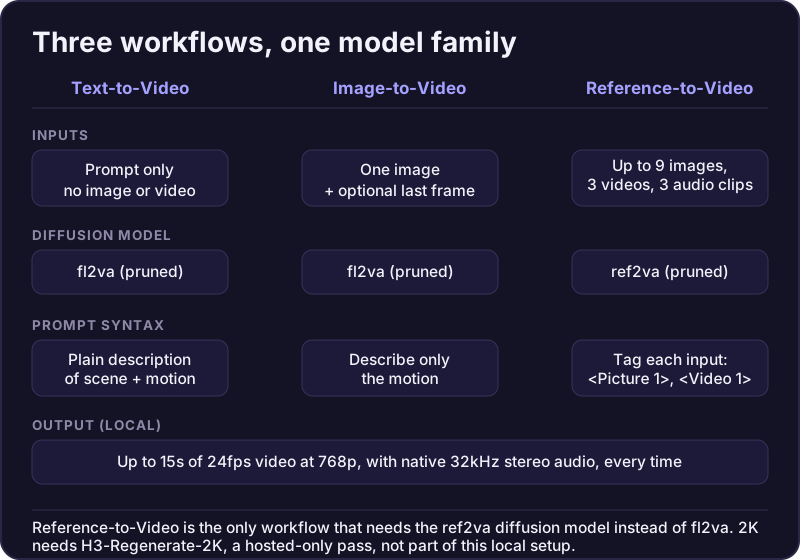
- Up to 9 reference images, 3 reference videos, 3 standalone audio clips per generation
- Resolution
- 768p natively and locally; 2K only through MiniMax's hosted Regenerate-2K pass
- Duration
- Up to 15 seconds at 24fps in a single pass
- License
- Free under $20M/yr revenue from products using it; local deployment excludes the US, EU, UK, and South Korea
- Best for
- Anyone eligible under the license who wants a top-tier open video model on their own hardware
What makes H3 different
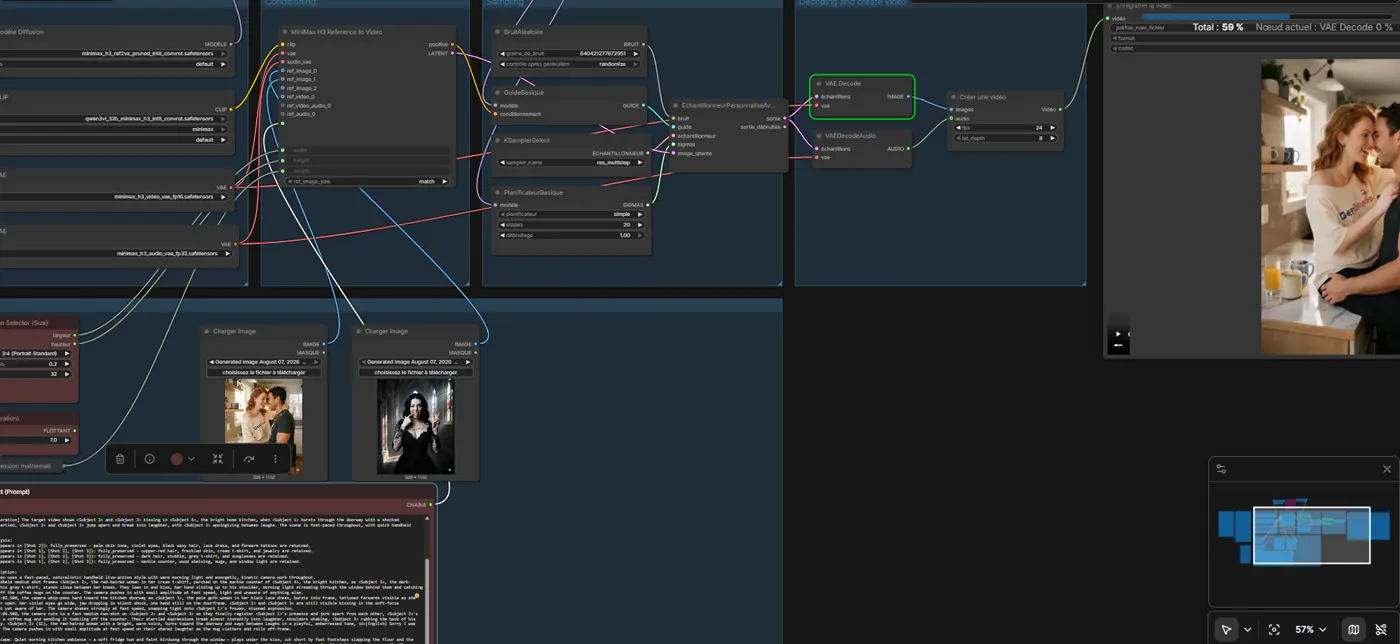
Most video models take one kind of input: a prompt, or a prompt plus one image. H3's Reference-to-Video workflow takes up to 9 images, 3 videos, and 3 audio clips at once, tagged directly in the prompt (<Picture 1>, <Video 1>, <Audio 1>), and reads identity, performance, camera movement, and soundscape from whatever you give it. That's a materially larger context window for creative control than most rivals offer.
Native audio is the other real differentiator. H3 generates its 32kHz stereo soundtrack in the same pass as the video, not as a separate text-to-speech or sound-design step glued on afterward. On Artificial Analysis's audio-judged arena, that's also where it ranks best (see below).
768p locally, 2K only through the hosted pass
The "up to 2K" in MiniMax's marketing is not what you can download. The open-weights release ships H3-Base and H3-Context-IR, both capped at 768p (short edge, up to 768x1344). 2K comes from a separate module, H3-Regenerate-2K, that re-renders a finished 768p clip using the original context. It stayed proprietary: hosted-only on MiniMax's API, billed at $0.05/second on top of the base generation cost.
Practically, that means a fully local ComfyUI setup caps at 768p. Getting to 2K means sending your 768p output back to MiniMax's API for the regeneration step, even if you generated the original clip on your own hardware.
How it benchmarks
On the Artificial Analysis video arena, H3 ranks #2 in text-to-video when judged with audio (Elo 1239.36) and #1 in video editing when judged with audio (Elo 1130.25). Its closest competition in both categories, Gemini Omni Flash and Seedance 2.0, sits close enough that Artificial Analysis itself notes the top three are statistically difficult to separate. Treat the ranking as " near the front of the field," not " the best," and weight that against the fact that the other two are hosted-only: H3 is the only one of the three you can run yourself.
Should you run it yourself, or just use the API
If you're inside the excluded territories, this isn't a choice: the API is your only licensed option for now. Outside them, it's a real trade-off. MiniMax's own API prices H3 at $0.08/second at 768p and $0.13/second at 2K (roughly $1.20 and $1.95 for a 15-second clip), no GPU or setup required. Running it locally only pays off once your volume is high enough that a GPU's amortized cost and electricity undercut per-second billing, or you specifically need the license's local-use terms rather than the API's.
The pruned FP8/INT8 builds bring the model down from 123.6GB in full precision to roughly 42.5GB, which is what makes a consumer GPU (MiniMax cites something in the RTX 3060 class, with dynamic VRAM offloading on) workable at all. That's still a meaningfully bigger download and setup step than clicking through to a hosted API.
Frequently asked questions
- What is MiniMax H3?
- An open-weight, omni-modal video model from MiniMax, open-sourced August 3, 2026. It takes text, images, video, and audio as context and generates up to 15 seconds of video with native 32kHz stereo audio in one pass. It's the third generation in the lineage behind MiniMax's Hailuo product.
- Is MiniMax H3 free?
- The open weights are free to download and run, subject to the license. Commercial use is free up to $20M/year in revenue from products using H3; past that you need MiniMax's prior written authorization, and any commercial product must display "MiniMax H3" on its interface either way.
- Can I use MiniMax H3 in the US or EU?
- MiniMax's own hosted API, yes, it's available globally. Running the open weights locally, no: the license's "Applicable Territory" explicitly excludes the US, EU, UK, and South Korea from local deployment. MiniMax invites people in those regions to contact them about a separate agreement.
- How does MiniMax H3 compare to other video models?
- On Artificial Analysis's audio-judged arena it ranks #2 in text-to-video and #1 in video editing, close enough to Gemini Omni Flash and Seedance 2.0 that the top three are statistically hard to separate. Its real edge over both of those is that you can run it yourself; they're hosted-only. Against Wan, the other major open-weight local video model, H3 adds native audio and a much larger multi-reference input; Wan is lighter-weight and has no territory restriction.
Hands-on guides
Related models
Get new guides by email
One email when we publish new guides and model breakdowns. No spam, unsubscribe anytime.