
Z-Image Turbo: the 6B open model that renders text
Written by Clement
Our verdict
The best open-weight model available for images that contain text, and the one most likely to hand your subject a broken finger.
Reach for it when
- Posters, packaging, signage and anything where words have to be spelled correctly
- People on a 16GB consumer card who do not want to quantise
- Bilingual work: it handles Chinese and English typography in the same frame
- Commercial projects that need a permissive licence (Apache 2.0)
Skip it if
- Your work is close-up hands, jewellery or anything where finger anatomy is the subject
- You need a single character to stay identical across a set without training a LoRA
- You want built-in editing or inpainting: this is text-to-image only
At a glance
- Made by
- Alibaba Tongyi Lab, released 27 Nov 2025
- Size
- 6B parameters, S3-DiT architecture
- Speed
- 8 sampling steps, sub-second on data-centre GPUs
- Runs on
- 16GB VRAM consumer cards, ComfyUI
- Licence
- Apache 2.0, commercial use permitted
- Ranking
- #1 open-weights on the Artificial Analysis Image Arena
Alibaba's Tongyi Lab put Z-Image Turbo out on 27 November 2025 under Apache 2.0, and the number that got attention was 6 billion parameters. That is small. Flux 2 dev is several times the size. Small usually means worse, and here it did not: Artificial Analysis put Z-Image Turbo at the top of its open-weights image ranking, above Flux 2 dev, HunyuanImage 3.0 and Qwen-Image.
It gets there through distillation rather than scale. The base model is compressed into Turbo using Decoupled-DMD, which collapses generation down to eight sampling steps, then aligned to human aesthetic preference with DPO and GRPO. Eight steps on a 16GB card is the practical headline. You do not need a quantised build and you do not need to wait.
We ran it through the same three prompts we run every image model through. It did one thing no other model in the set managed, and one thing badly enough that it changes what you should use it for.
Section 1 of 3
The text rendering is the reason to install it
Most open image models treat text as texture. Ask for a word and you get letter-shaped marks that dissolve under inspection. Z-Image Turbo spells.
Our first showdown prompt asks for a small tattoo in fine linework on a subject's forehead, reading "GenLovers". Krea 2, which beats Z-Image on almost every anatomy check, simply declined to render it. Z-Image Turbo produced it legibly, in the right place, following the curve of the brow. That is a hard ask: small text, on skin, on a curved surface, at an angle.
The published capability matches what we saw. Tongyi built it to handle Chinese typography in signage, posters and packaging alongside English in the same image, which is a harder problem than either alone and something most Western models still fumble. If your output has words in it, this is the open model to reach for.
Section 2 of 3
Full specification
- Architecture
- Scalable Single-Stream DiT (S3-DiT): text, visual semantic tokens and image VAE tokens concatenated into one input stream
- Distillation
- Decoupled-DMD, collapsing inference to eight function evaluations
- Preference alignment
- DPO and GRPO against human aesthetic preference
- Parameters
- 6B
- Minimum VRAM
- 16GB for the full-precision build
- Sampling steps
- 8
- Licence
- Apache 2.0
- Editing / inpainting
- Not included. Text-to-image only out of the box
- Text rendering
- Chinese and English, including mixed-script layouts
Section 3 of 3
How it compares to Krea 2
These two models came out of our showdown as a clean pair of opposites, which is more useful than a ranking.
Krea 2 is the better photographer. Hands, skin, fabric and light are stronger, and it produced the single best frame in our whole set. It also ignored two explicit instructions to get there: no tattoo, and a composition adjacent to the one we asked for.
Z-Image Turbo is the better listener. It rendered the text, kept two mirror reflections tracking the subject, and produced three distinct character designs where Krea 2 cloned faces. Then it broke a hand.
So the choice is not which model is better. It is whether your image lives or dies on anatomy or on instruction-following. Portrait and product work: Krea 2. Posters, signage, multi-character scenes and anything with words: Z-Image Turbo.
The model showdown
Every image model on this site runs the same six prompts across three tiers (SFW, erotic and explicit) on the same rig, with no cherry-picking and no retouching. Below is what Z-Image Turbo returned, graded against a fixed rubric so the results mean the same thing from one model page to the next.
- Run on
- Z-Image Turbo, FP8, ComfyUI on a single RTX 4090, 8 steps (Erotic Prompt 2 above); Civitai native sdcpp/zImage/turbo orchestration (all other results below, 2026-08-07)
- Date
Why these six prompts? ▾Why these six prompts? ▴
They are chosen to break things, across three tiers so a model that refuses NSFW outright still gets a fair, comparable test. The SFW tier stacks two-person contact, readable logo text on folded fabric and genuine expressions with teeth. The erotic tier stacks the four failure modes that mark an image as machine-made at a glance: hands, fine text on skin, a mirror that has to obey geometry, and three distinct character designs in one frame. The explicit tier exists to test the same anatomical limits at full intensity, but its output is never published on this site.
No model passes every check, and not every model can attempt every tier. That is the point. A rubric everything passes tells you nothing about which model to reach for on a Tuesday afternoon.
SFW detail test
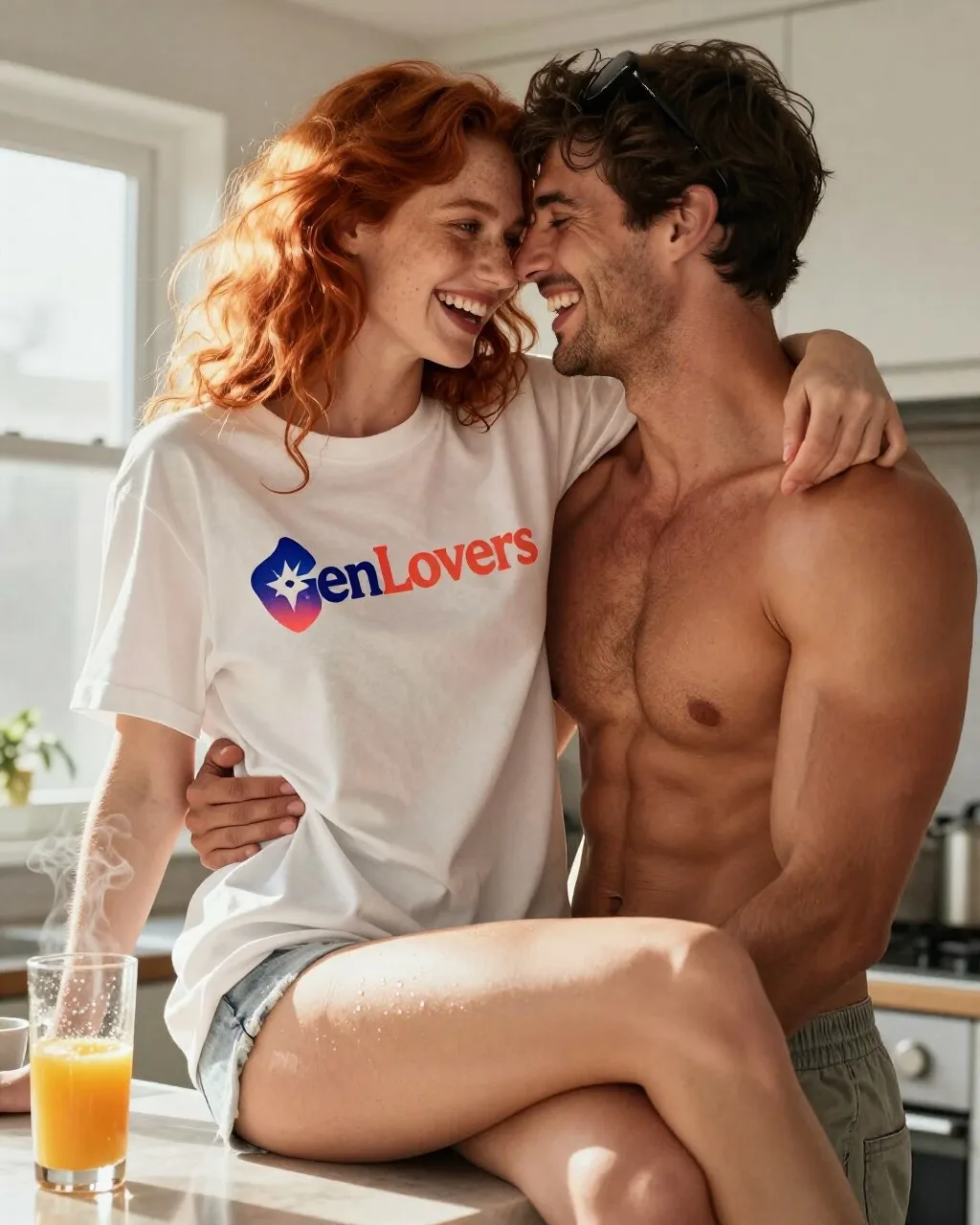
Two people, bright kitchen
Two subjects interacting in hard morning light, with a brand logo on fabric that has to stay readable while the fabric folds. Tests skin-on-skin contact, genuine expressions with teeth, and text rendering on a non-flat surface. Fully clothed throughout.
Scorecard
- Pass: Both faces free of uncanny artifacts
- Pass: Logo text legible on folded fabric
- Pass: Teeth and open-mouth expressions natural
- Pass: Contact points between subjects anatomically sane
What we saw
This is the re-run of the pass that originally got withheld for showing more skin than this site publishes. The logo is clean and correctly gradiented, both faces are artifact-free, and the laugh reads as genuine rather than posed. No compositional misses this time either, unlike Krea 2 on the same prompt.
Goth bride, cathedral
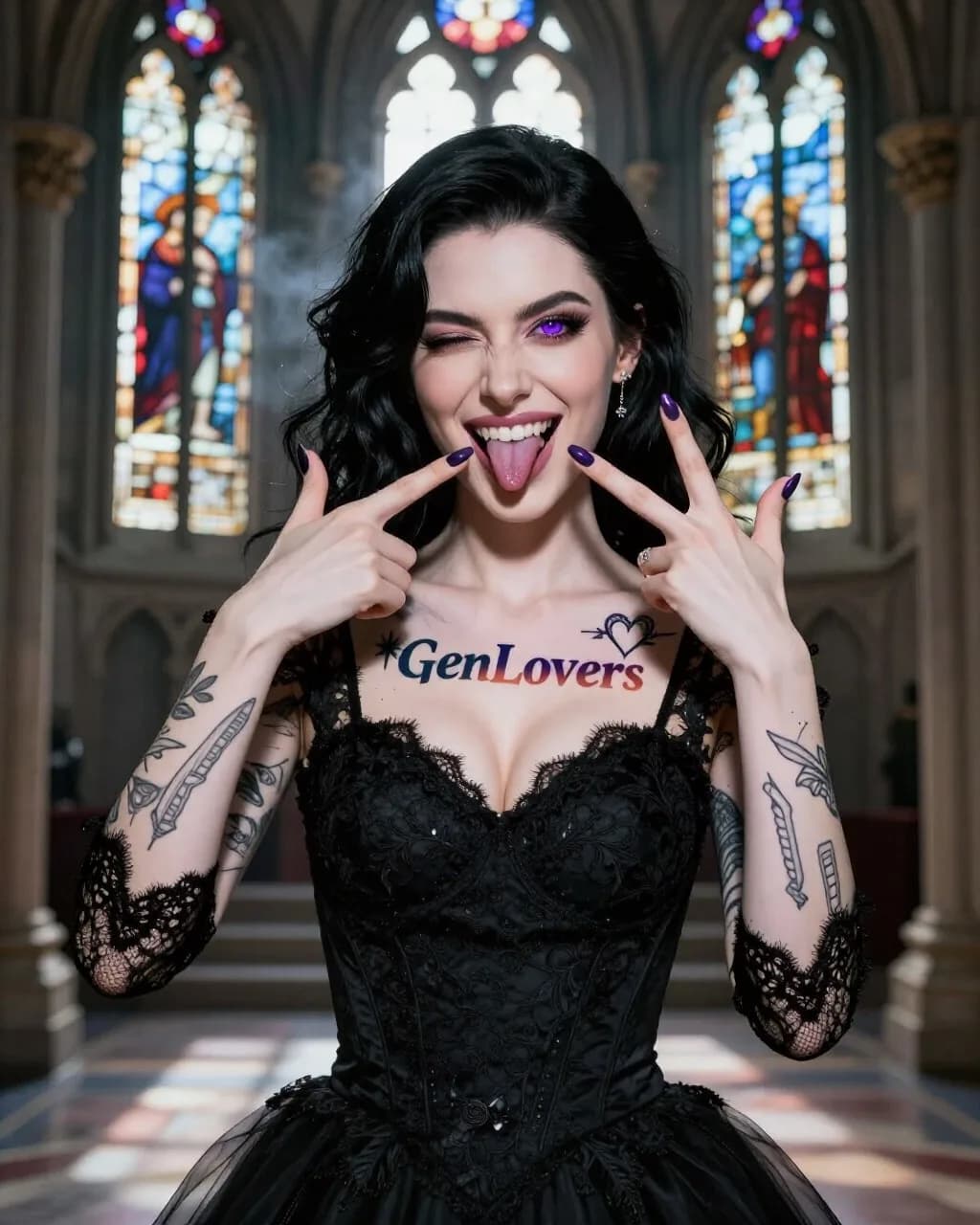
A second logo-tattoo placement rendered larger and at a different body location than Erotic Prompt 1, colored contact lenses, dental/prosthetic detail (fangs), an asymmetric wink held against a wide-open other eye, and two coordinated hand gestures in one frame. Fully clothed in a bridal gown.
Scorecard
- Partial: Chest tattoo text legible and matches the brand wordmark/gradient
- Pass: Purple iris color consistent across both eyes
- Pass: Fangs rendered as coherent dental anatomy, not a texture smear
- Pass: Both hands' gestures anatomically distinct and correct
What we saw
The strongest render of this prompt across every model we ran it against. Both hand gestures are there and anatomically distinct, the fangs read as real dental anatomy rather than a texture smear, and the wink-plus-open-eye combination is correct. The only soft spot is the tattoo's gradient, which leans flatter than the indigo-to-coral the brand mark calls for, even though the text itself is spelled right and legible.
Erotic tier
Solo portrait, beach
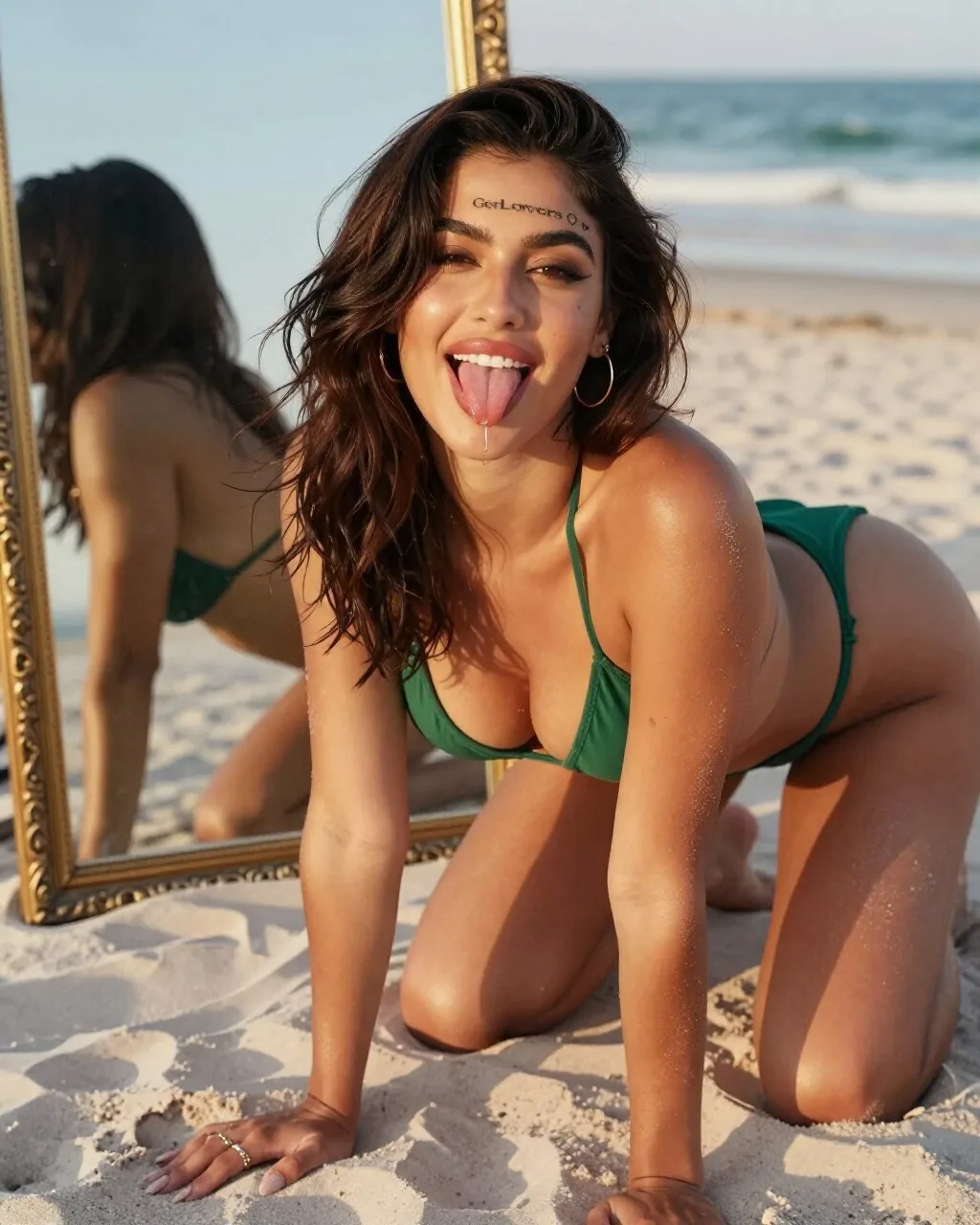
Skin under warm golden-hour light, bikini fabric texture, hand and ring anatomy, fine tattoo linework, and a mirror reflection that has to agree with the subject. The single hardest frame of the set.
Scorecard
- Pass: Hands and fingers anatomically correct
- Partial: Fine tattoo linework legible
- Partial: Mirror reflection consistent with the subject
- Pass: Bikini fabric texture holds up close
What we saw
The tongue-out, drooling expression is right there, exactly as prompted, which most models in this batch skipped entirely. The forehead tattoo made it into frame too, but the text renders garbled, readable as roughly "GetLovers" rather than the brand's actual wordmark, a classic diffusion text failure. The mirror shows her from behind rather than reflecting her face, so the "doubling" effect the prompt wanted only half lands.
Three characters, anime, night
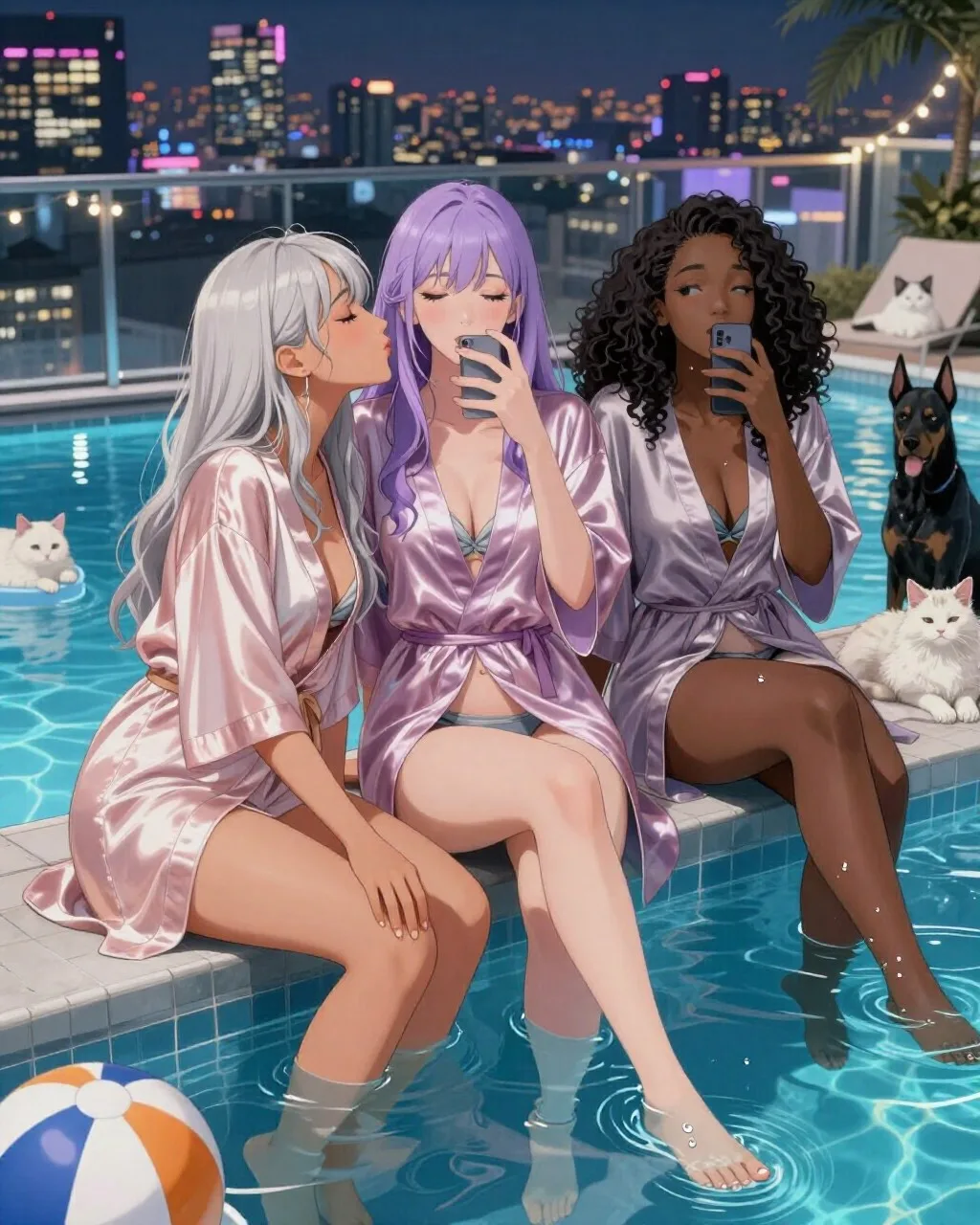
Stylized rendering with three distinct character designs in one frame, water and reflections, bare-foot anatomy, and two animals. Multi-subject scenes are where most image models quietly give up.
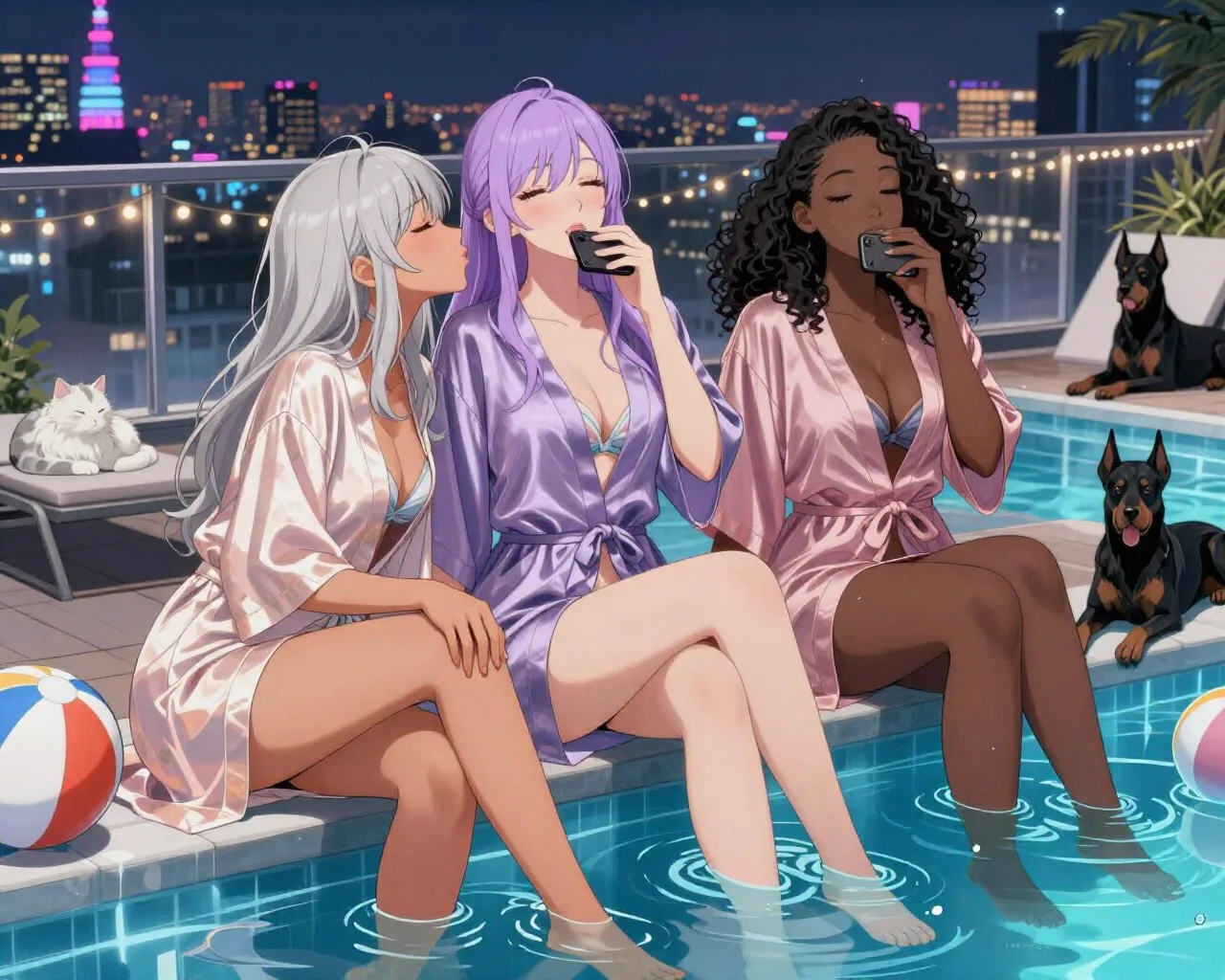
Scorecard
- Pass: Three distinct, non-cloned character designs
- Pass: Feet and toes rendered correctly
- Pass: Water surface and reflections coherent
- Partial: Both animals recognizable and correctly anatomized
What we saw
Re-run in portrait to fix the 1280x1024 aspect problem in the original pass. Three distinct designs again, no face-cloning, and feet/water hold up well this time. The animal count flipped rather than fixed itself: the dog count is now correct at one, but there are two cats in frame instead of one. Counting remains this model's soft spot regardless of which animal it over-renders.
Explicit tier
Frequently asked questions
- Is Z-Image Turbo free?
- Yes,. The weights are published under Apache 2.0, which permits commercial use, and you run them on your own hardware, so there is no per-image cost and nothing you generate touches anyone else's servers. Your costs are the GPU and the electricity. That is a meaningfully different deal from "free tier" models that meter you.
- What GPU do you need to run Z-Image Turbo?
- 16GB of VRAM runs the full-precision build comfortably, which puts it in reach of a 4060 Ti 16GB, a 4080 or a 3090. That is the design goal: Tongyi built a 6B model specifically so it would fit consumer cards without quantisation. On data-centre hardware the eight-step generation is sub-second.
- Is Z-Image Turbo better than Flux 2?
- On the Artificial Analysis Image Arena it ranks above Flux 2 dev among open-weights models, and it is roughly a quarter of the size. In our own testing the honest answer is narrower: it is better at text and at following an unusual instruction, and it is not better at hands. Benchmarks aggregate across prompt types, so treat the ranking as a reason to try it rather than a verdict on your particular work.
- Can Z-Image Turbo edit an existing image?
- Not out of the box. It ships as text-to-image only, with no inpainting or instruction-based editing, which is the same gap Krea 2 launched with. If you need to change one element of an image you already have, you will be pairing it with a separate editing model or doing the pass in ComfyUI yourself.
- Why does Z-Image Turbo only need 8 steps?
- Because Turbo is a distilled model, not the base one. Tongyi compressed the base Z-Image using Decoupled-DMD, which trains the small model to reproduce in eight function evaluations what the base model does across many more. You are trading a little diversity for a large speed gain, which is the same bargain Krea 2's Turbo variant makes.
Hands-on guides
Related models
Get new guides by email
One email when we publish new guides and model breakdowns. No spam, unsubscribe anytime.