
Qwen-Image-2.1: Alibaba's open-weight image model, tested
Written by Clement
Our verdict
A capable open-weight image model with strong text/logo rendering, held back for commercial use by a research-only license and a step behind on skin-level fine detail.
Reach for it when
- Local or rented-GPU generation where you want text and branding to render legibly
- Research, evaluation, or personal projects where the Qwen Research License's non-commercial terms are acceptable
- Multi-reference image editing: up to 16 input images in one call, more than most local alternatives
- Native transparent-background (RGBA) output without a separate matting model
Skip it if
- You need a commercial license: the weights are non-commercial only, with no carve-out for generated outputs, unlike the older Apache 2.0 Qwen-Image models
- Your work depends on fine skin-level detail like small tattoos or jewelry text - our test found this the model's weakest area
- You want a hosted, no-setup option: this runs through ComfyUI on your own or a rented GPU, not an API
At a glance
- Made by
- Alibaba Qwen team, repackaged for ComfyUI by Comfy-Org
- License
- Qwen Research License: non-commercial only, no outputs carve-out
- Runs on
- ComfyUI, local GPU or rented cloud GPU (12GB+ VRAM for the int8 default)
- Our install time
- ~4 minutes for the int8 default (~13.6GB) on a rented RunPod GPU
- Our generation speed
- ~45-50s per image at 1024x1280, 25 steps
- NSFW
- Not filtered - runs on your own hardware, no hosted content policy
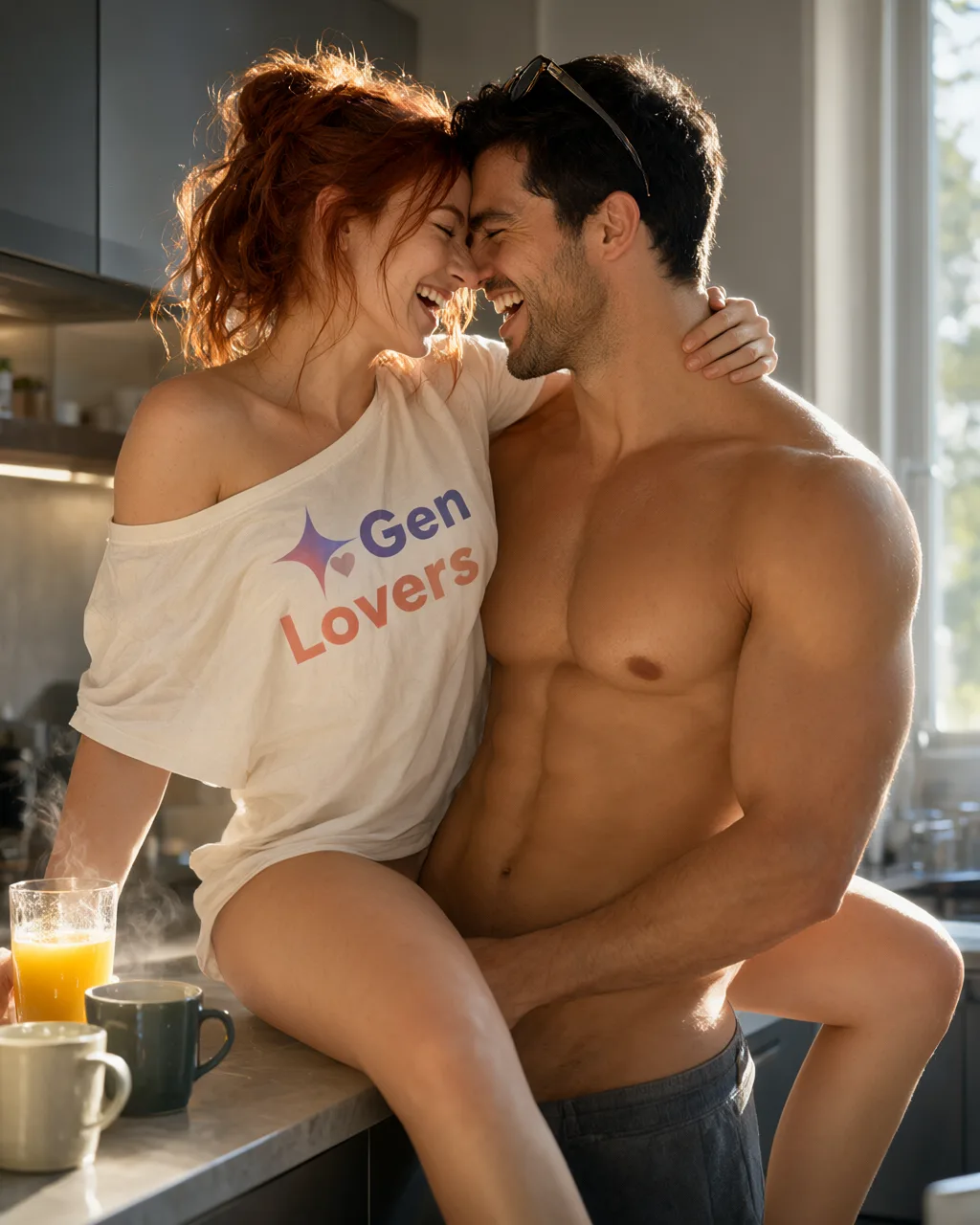
Qwen-Image-2.1 is Alibaba's follow-up to Qwen-Image, packaged by Comfy-Org into ready-to-run ComfyUI files: three official workflow templates (text-to-image, image editing, background removal), int8/bf16/GGUF weight tiers for different VRAM budgets, and a text encoder built on Qwen3-VL that also handles multi-reference image editing, up to 16 input images in a single call.
We installed it on a rented RunPod GPU using our own auto-setup script and ran it through the same standardized 6-prompt showdown we run every image model through: two SFW prompts, two erotic, and two explicit (the first model on this site where both explicit-tier prompts exist, since the second is authored per model rather than shared). What follows is what we measured and saw, not the vendor's own claims.
Setup: faster than we expected
We ran the full install on a RunPod RTX PRO 4000 Blackwell pod: 24GB usable VRAM, EU-RO-1 region, secure cloud tier at $0.57/hr. Cloning ComfyUI, installing its Python dependencies, and downloading the int8 diffusion model, text encoder, and VAE (about 13.6GB combined) took roughly 4 minutes over aria2c's multi-connection downloads. We'd budgeted 8-12 minutes going in.
ComfyUI started cleanly on the first real attempt, correctly detecting the GPU and the int8/w4a8 mixed-precision quantization the weight files use. Generation itself was quick too: about 50 seconds for the first image, most of it a one-time ~49s CUDA warm-up on the first sampling step, then around 45 seconds for each one after, at roughly 1.8s per step. VRAM stayed comfortably inside the 24GB card across all 6 generations, no out-of-memory errors.
The only snag we hit during testing came from switching pods mid-session, from a CPU pod used to pre-stage the download to a separate GPU pod. Python dependencies live on the pod's local disk, not the network volume, so they didn't carry over automatically. That only matters if you deliberately split install and serve across two different pods. Running both steps on the same GPU pod, the normal path, doesn't hit it.
Showdown results: strong on text, uneven on fine detail
The clearest win across our 6 prompts was text and logo rendering. Our first SFW prompt asks for a branded t-shirt logo with a specific two-color gradient across two words, a hard ask for most image models. Qwen-Image-2.1 rendered it fully legible, correctly colored, and following the fabric's fold on the first attempt.
Fine skin-level detail was the weaker side. A small forehead tattoo in our first erotic prompt, meant to be a detailed logo-and-text combination, came back as a plain outline shape instead. A chest tattoo in our second SFW prompt did include the right text, but it read as slightly rough rather than crisp at full zoom. Multi-character scenes held up well: our three-character anime prompt produced three distinct designs rather than the same face repeated, with both named animals correctly rendered.
Where the model didn't fully follow instructions: a requested mirror reflection in the beach prompt showed a plausible but not geometrically consistent second angle of the subject, and a two-part gesture (hand placement plus a cheek kiss) in the poolside prompt didn't come through in the final frame. These are the kind of instruction-following gaps that showed up consistently enough across the 6 prompts to be worth flagging rather than one-off seed variance.
Full specification
| Architecture | Diffusion transformer, Qwen3-VL-based text encoder |
|---|---|
| Weight tiers | int8 (~13.6GB combined, 12GB+ VRAM), bf16 (~31.7GB combined, 24GB+ VRAM), GGUF Q4_K_M (~10.5GB combined, 8-10GB VRAM) |
| Multi-reference editing | Up to 16 input images in a single call (TextEncodeQwenImage21 node's own limit) |
| Transparency | Native RGBA output via the same weights, not a separate matting model |
| License | Qwen Research License Agreement - non-commercial, no outputs carve-out |
| Official workflows | Text to Image, Image Edit, Remove Background (Comfy-Org templates) |
The model showdown
Every image model on this site runs the same six prompts across three tiers (SFW, erotic and explicit) on the same rig, with no cherry-picking and no retouching. Below is what Qwen-Image-2.1 returned, graded against a fixed rubric so the results mean the same thing from one model page to the next.
- Run on
- int8 weight tier, official Text to Image template, ComfyUI on a rented RunPod RTX PRO 4000 Blackwell (24GB VRAM), 1024x1280, 25 steps, euler/simple, cfg 1
- Date
Why these six prompts? ▾Why these six prompts? ▴
They are chosen to break things, across three tiers so a model that refuses NSFW outright still gets a fair, comparable test. The SFW tier stacks two-person contact, readable logo text on folded fabric and genuine expressions with teeth. The erotic tier stacks the four failure modes that mark an image as machine-made at a glance: hands, fine text on skin, a mirror that has to obey geometry, and three distinct character designs in one frame. The explicit tier exists to test the same anatomical limits at full intensity, but its output is never published on this site.
No model passes every check, and not every model can attempt every tier. That is the point. A rubric everything passes tells you nothing about which model to reach for on a Tuesday afternoon.
SFW detail test
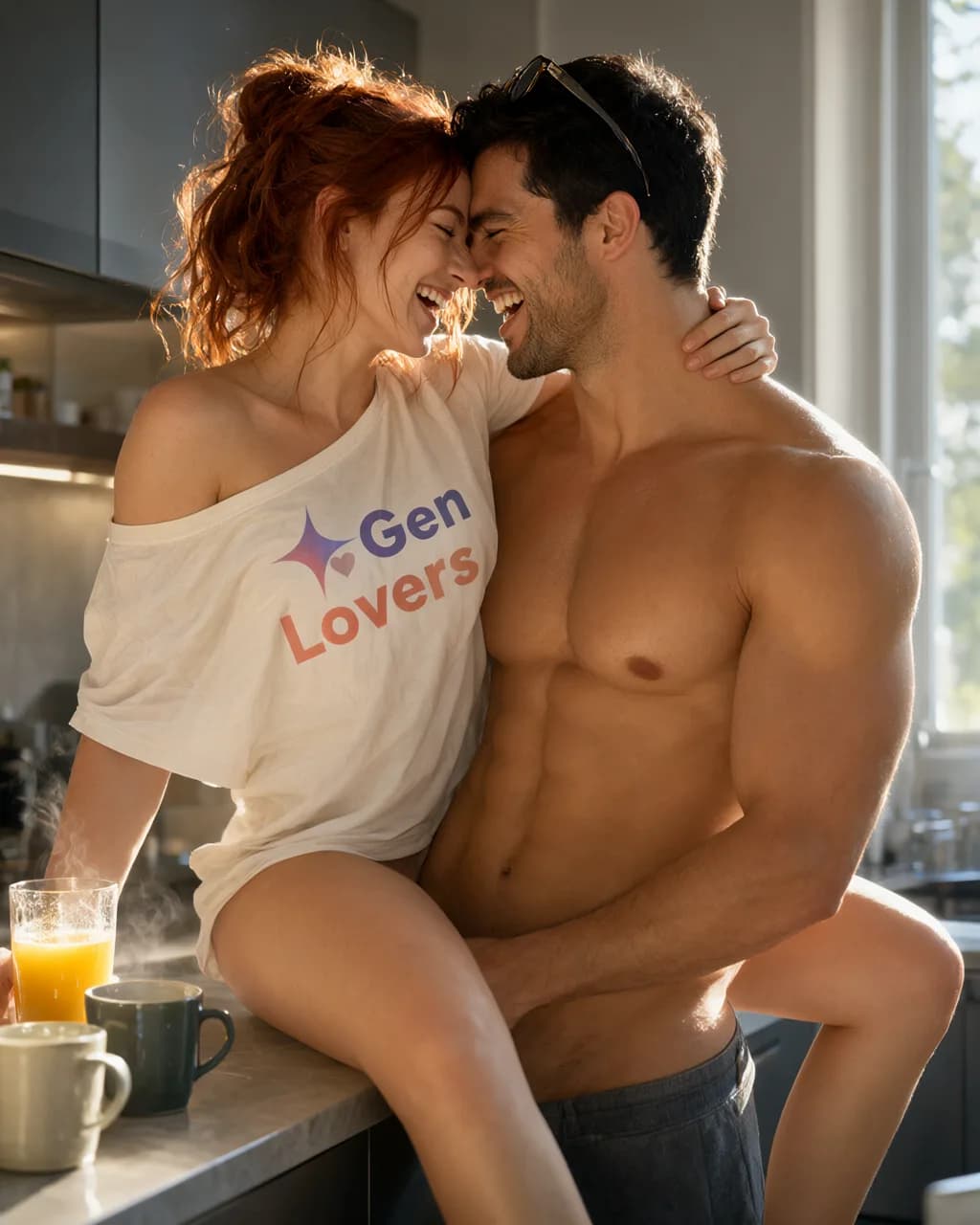
Two people, bright kitchen
Two subjects interacting in hard morning light, with a brand logo on fabric that has to stay readable while the fabric folds. Tests skin-on-skin contact, genuine expressions with teeth, and text rendering on a non-flat surface. Fully clothed throughout.
Scorecard
- Pass: Both faces free of uncanny artifacts
- Pass: Logo text legible on folded fabric
- Pass: Teeth and open-mouth expressions natural
- Pass: Contact points between subjects anatomically sane
What we saw
The strongest result in the whole set. The GenLovers wordmark is fully legible, the gradient runs the correct direction on both words, and it follows the fabric's fold at the shoulder rather than sitting flat on top like a sticker. Both faces are clean, the laugh reads as genuine with teeth visible on both, and the pose matches the prompt: she's lifted onto the counter, he's standing between her knees. First attempt, no reroll needed.
Goth bride, cathedral
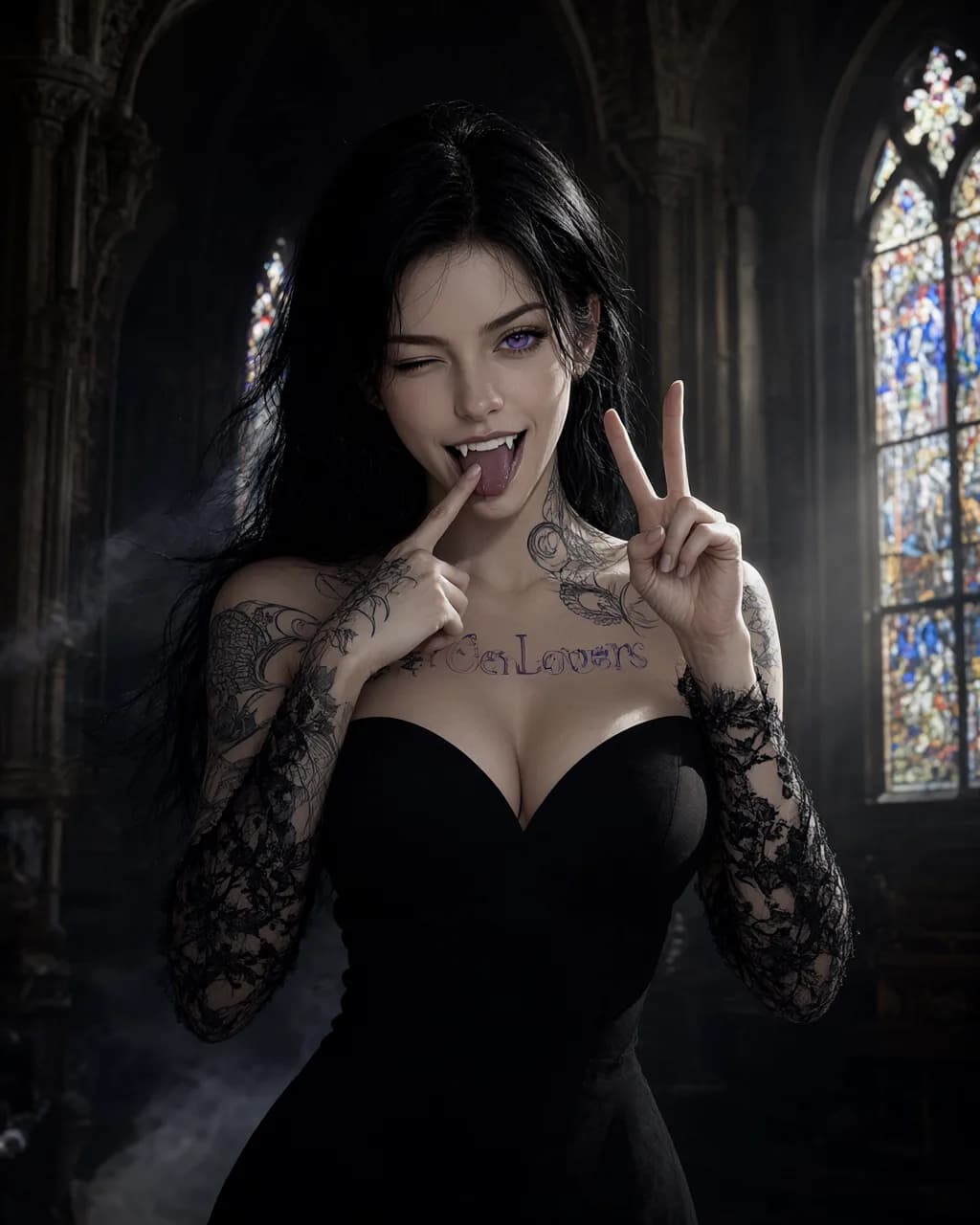
A second logo-tattoo placement rendered larger and at a different body location than Erotic Prompt 1, colored contact lenses, dental/prosthetic detail (fangs), an asymmetric wink held against a wide-open other eye, and two coordinated hand gestures in one frame. Fully clothed in a bridal gown.
Scorecard
- Partial: Chest tattoo text legible and matches the brand wordmark/gradient
- Pass: Purple iris color consistent across both eyes
- Pass: Fangs rendered as coherent dental anatomy, not a texture smear
- Pass: Both hands' gestures anatomically distinct and correct
What we saw
Both hand gestures came through correctly in one frame, the fangs are visible and anatomically coherent behind the lip-pull, and the wink reads as a genuine asymmetric eye state rather than both eyes doing the same thing. The chest tattoo does contain the right text, but at full zoom the lettering is slightly rough, not the clean linework the kitchen shot's shirt logo managed. Purple iris only visible on the open eye, which the prompt itself calls for given the wink.
Erotic tier
Solo portrait, beach
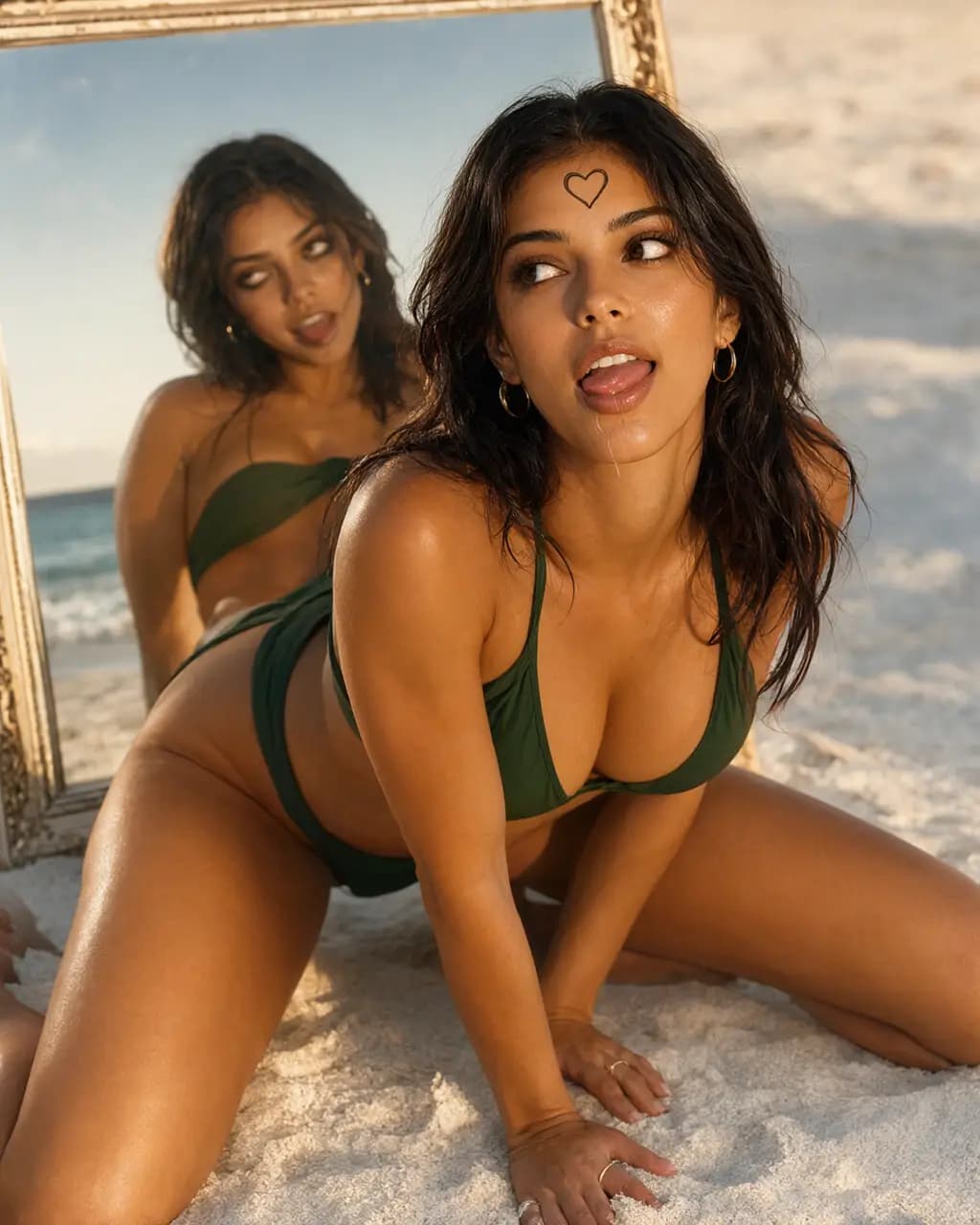
Skin under warm golden-hour light, bikini fabric texture, hand and ring anatomy, fine tattoo linework, and a mirror reflection that has to agree with the subject. The single hardest frame of the set.
Scorecard
- Pass: Hands and fingers anatomically correct
- Fail: Fine tattoo linework legible
- Partial: Mirror reflection consistent with the subject
- Pass: Bikini fabric texture holds up close
What we saw
Hand and finger anatomy near her hip is clean, ring included, and the bikini fabric holds its texture under the golden-hour light. Two misses: the forehead mark is a plain heart outline, not the detailed logo-and-wordmark combination the prompt asked for, so the brand tattoo check fails outright here despite passing cleanly in both SFW prompts. The mirror is present and reflects a plausible second angle of her, but it isn't geometrically consistent with her actual pose, more a second interpretation than a true reflection.
Three characters, anime, night
Stylized rendering with three distinct character designs in one frame, water and reflections, bare-foot anatomy, and two animals. Multi-subject scenes are where most image models quietly give up.
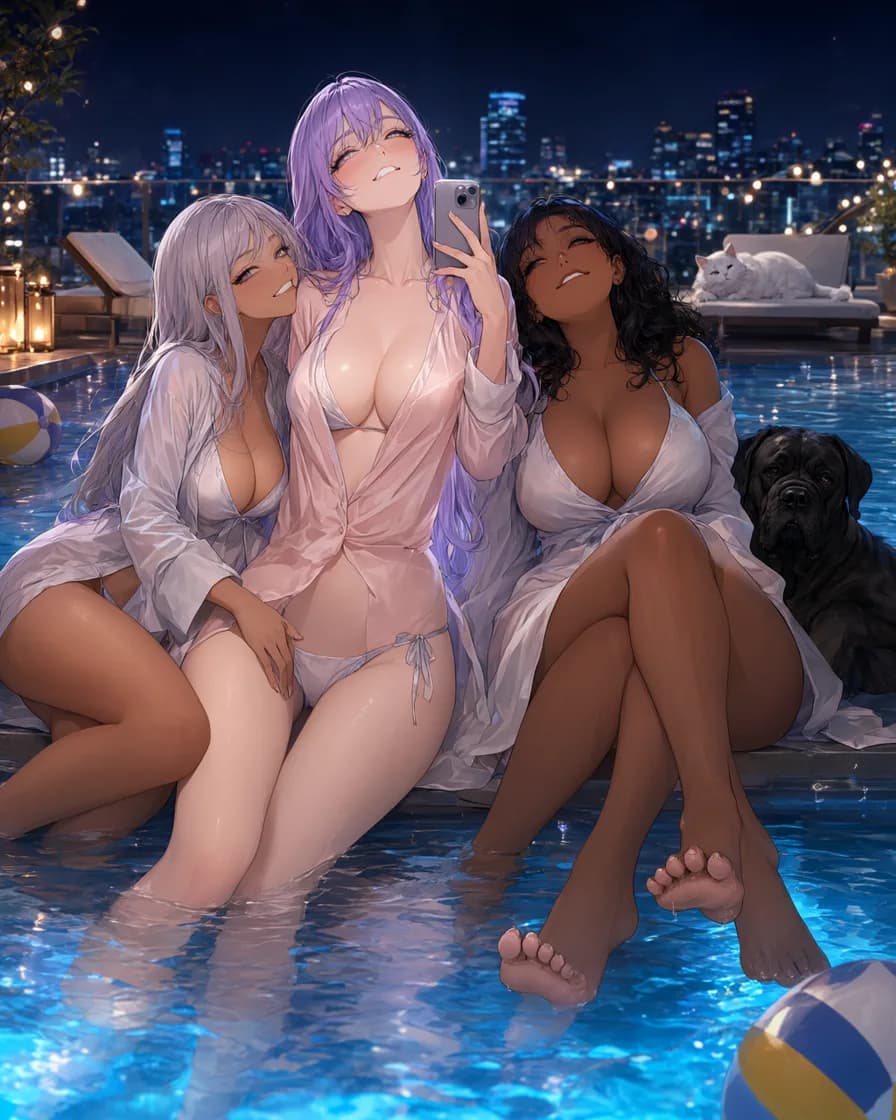
Scorecard
- Pass: Three distinct, non-cloned character designs
- Pass: Feet and toes rendered correctly
- Pass: Water surface and reflections coherent
- Pass: Both animals recognizable and correctly anatomized
What we saw
Three distinct character designs, no cloned faces, which is the check most models in this niche fail outright on a multi-subject scene. Both animals are present, recognizable, and correctly anatomized. Feet and toes in the water are clean at full zoom. The one place this doesn't fully deliver on the prompt: the specific "eyes rolled up, lip-biting" pleasure expression and the hand-on-thigh-plus-cheek-kiss gesture between two of the figures don't read in the final frame, the poses are affectionate and the mood lands, but those exact beats are soft rather than sharp.
Explicit tier
Generated (both the shared Explicit Prompt 1 and a Qwen-Image-2.1-specific Explicit Prompt 2), but not yet posted to the private Discord channel and confirmed by a human. We only mark this tier complete once that out-of-band step has happened.
Frequently asked questions
- Is Qwen-Image-2.1 free?
- The weights are free to download and run on your own hardware, but the license is non-commercial only (Qwen Research License Agreement), so "free" here means free for research and personal use, not free-to-use-commercially. Your costs are the GPU and electricity, or a rented cloud GPU by the hour.
- How long does Qwen-Image-2.1 take to generate an image?
- In our test on a RunPod RTX PRO 4000 (24GB VRAM), a repeat generation at 1024x1280 with 25 steps took about 45 seconds. The first generation in a session takes about 50 seconds due to a one-time CUDA warm-up.
- Can I use Qwen-Image-2.1 for NSFW content?
- Technically yes - since it runs on your own or a rented GPU rather than through a hosted API, there's no content-policy filter blocking the request. We ran it through our full erotic and explicit test tiers without refusal. This is separate from the license question: the non-commercial terms still apply to whatever you generate.
- Is Qwen-Image-2.1 good at rendering text and logos?
- Yes, this was the strongest result in our test. A branded t-shirt logo with a two-color gradient across two words came out fully legible and correctly colored on the first attempt. Fine skin-level text, like a small tattoo, was less reliable.
- How much VRAM does Qwen-Image-2.1 need?
- 12GB+ for the int8 default we tested, 24GB+ for the full bf16 weights, or 8-10GB with the GGUF Q4_K_M quantization. See our setup guide for the exact file sizes per tier.
- Can I use Qwen-Image-2.1 commercially?
- Not under the standard license. It ships under the Qwen Research License Agreement, non-commercial use only, with no separate carve-out for generated outputs. This differs from the earlier Qwen-Image and Qwen-Image-Edit models, which are Apache 2.0. Commercial use needs a separate license directly from Qwen.
Hands-on guides
Related models
Get new guides by email
One email when we publish new guides and model breakdowns. No spam, unsubscribe anytime.